
This section shows the manager a table with the different users registered for the management of the selected company.
The user table displays fields such as the contact name, position, e-Mail, platform access user, the assigned profile type, the User Role, or the option to reset the password.
All these fields can be modified by clicking on the name of the contact you wish to modify, which is located in the first column of the table. The data modification form is the same as the one that opens when going to My Profile, except that it allows assigning a specific one to the user. This is defined in the following section.
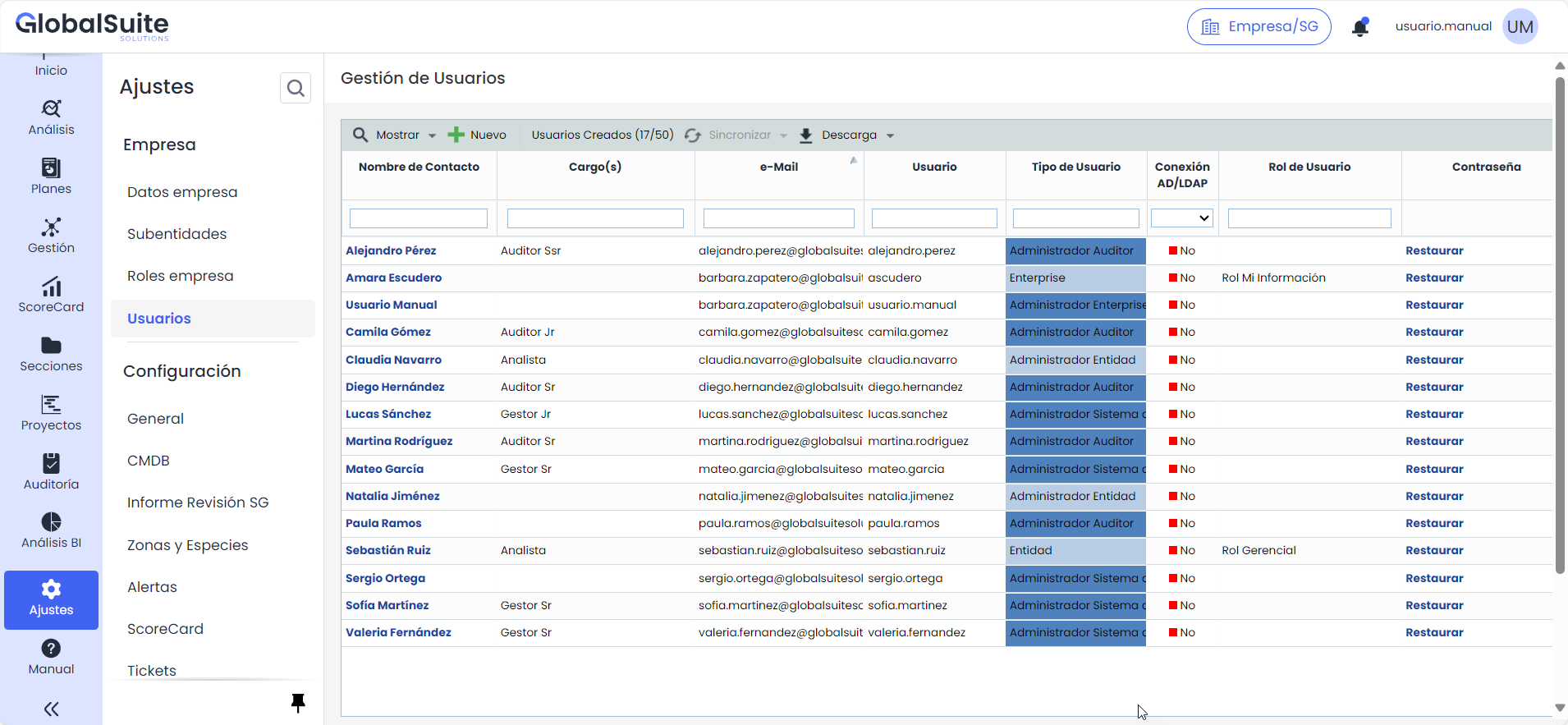
When accessing the option, a table is displayed where the following options can be performed:
-
Show: This option is a quick filter to view users in the table based on their connection type.
-
AD All: Displays all users connected through Active Directory.
-
AD Related: Displays users connected with Active Directory that are related to one.
-
Local: Displays users with a local connection.
-
-
New: Allows creating new users, directing to the form where the necessary data for registration is completed.
-
User Counter: Displays a text with the number of users created and the maximum allowed user limit.
-
Synchronize The synchronize button allows establishing a connection with the organization's Active Directory.
-
Download: Allows downloading the users displayed in the table.