
This section allows defining different alerts for the configured Ticket categories.

In this table, alerts of different types will be configured for each ticket category (Service Requests, Incidents and Problems, Changes and Deliveries, Claims, Non-Conformities, Corrective and Preventive Actions, Loss Events).
The 'Name' column allows assigning a descriptive name. The 'Alert Type' column indicates which action or event will be notified in the alert. The alert type is selected when creating it.
The columns 'Periodicity', 'Previous Days Interval', and 'Subsequent Days Interval' are used to indicate how often periodic alerts will be sent, as well as the range of days before or after the alert is sent that will be used to select the Tickets included in the message. If no date is specified in the "Date Field" column, the initial date will be taken. Otherwise, one of the dates of that ticket type can be selected, which will be considered for triggering alerts.
The 'Ticket Type' field is used to select which ticket category the alert affects, which can be one of the types configured in GlobalSUITE, and is selected by clicking on the table cell. Finally, the 'Recipient' field allows indicating which section of the ticket will be used to identify the recipients of the alert.
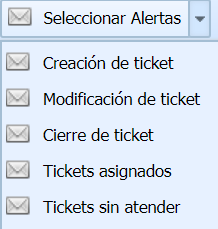
There are five types of alerts to configure for each ticket category:
-
Ticket Creation: Recipients defined in the alert will be notified when a new ticket of that type is created. This alert is immediate, so it is not necessary to define "Periodicity" or "Interval Days".
-
Ticket Modification: Recipients associated with the alert will receive an email notification when a ticket they are associated with is modified (such as Employees, Owners, or Managers). If there is a status change in a Workflow, it notifies the responsible parties for the next status (this alert is additional to the Notify check that can be marked on the ticket itself). This alert is immediate, so it is not necessary to define "Periodicity" or "Interval Days".
-
Ticket Closure: Allows selecting the recipients who will receive an alert if a ticket of the defined type is closed and the recipient is associated as an Employee or Owner of the ticket. If it is a Workflow, an alert will be sent to the responsible parties and/or recipients when a ticket is moved to a final state of the Workflow. This alert is immediate, so it is not necessary to define "Periodicity" or "Interval Days".
-
Assigned Tickets: Configurable periodic alert. Through this alert, a notification will be sent to the responsible parties defined in it, who are assigned as Employees, Owners, or Workflow Managers of the tickets.
-
Unattended Tickets: Configurable periodic alert. Recipients or responsible parties associated with the alert will be notified that there are unattended tickets (in the initial state).
The alert types "Assigned Tickets" and "Unattended Tickets" are sent periodically, for which it is necessary to define in the Periodicity column (Daily, Weekly, or Monthly) the frequency with which recipients will be notified. It is also necessary to indicate, numerically in the "Interval Days" column, the interval of previous days that will be taken as a basis to collect the assigned tickets, based on their "Registration Date". For example, if an interval of 7 days is indicated, the responsible party will receive in the alert the list of tickets assigned with a Registration Date from the 7 days prior to the notification being sent.
NOTE: If a user is not configured in the alert, they will not receive it even if they are assigned to the ticket.
The actions that can be performed in the table are as follows:
-
New: Enables the creation of a new alert, based on the alert type selected in the 'Select Alerts' dropdown.
-
Delete: Offers the possibility to delete an already created alert. To do this, the desired alert must be selected, and the 'Delete' button must be pressed.
-
Associate: Allows defining the users who will be alerted. To do this, the button must be pressed, and the roles/employees who will receive the notification must be selected.