
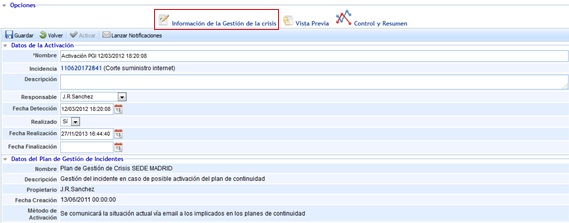
Activation Data

In these fields, it is possible to establish all the data that will determine the origin, detection date, cause, and those responsible for the activation of the Crisis Management Plan.
-
Name: Allows assigning a specific name to the Crisis that has been defined.
-
Related Incidents: Allows determining if the Crisis Management originates from one or several specific incidents. If it originates from an incident, it will automatically appear associated with the Crisis Management in this table.
-
Description: Allows determining what has occurred to proceed with calling the Crisis Management Plan for a possible activation.
-
Coordinator: Person responsible for coordinating and supervising the Crisis Management.
-
Detection Date: Allows establishing the date on which the event occurred.
-
Status: Allows indicating the status of the Crisis Management (Notified, In Progress, or Completed).
Levels
-
Crisis Level: Indicates the current level of the crisis, derived from the level of the activated crisis management plan. This level cannot be modified; instead, the crisis would be escalated to another crisis management plan if a level change is desired.
-
Impacts: Allows indicating the status under which each type of impact is at that moment in the crisis management, as well as the individual level of each type of impact. The "View General Impacts" button provides access to the company's general information regarding impacts and levels, helping the user decide whether to change the level of each impact.
-
Reference Scenarios: This table shows the crisis scenarios that have led to the activation of the crisis management plan. Using the "View Actions" button, actions to be considered when addressing a scenario in crisis management can be viewed.
-
Services: This table associates the services and processes affected by the crisis management.
-
Infrastructures: This table associates the critical infrastructures affected by the crisis management.
Crisis Management Data
This section displays the members of the committee associated with the declared crisis management. The committee associated with the crisis corresponds to the committee linked to the activated Crisis Management Plan.
-
Decision Committee: Indicates the name of the decision committee associated with the crisis management.
-
Committee Member Attendance Confirmation: This table automatically displays the members belonging to the committee. In this section, it is possible to indicate whether a member has attended the decision-making or, on the contrary, could not attend. If a member cannot attend and has defined substitutes, the functionality allows notifying the first associated substitute. To do this, select that a member could not attend through the checkbox in the last column of the table, and the tool will automatically notify the first associated substitute (if one exists).
-
External Members and Support to the Management System Committee: This table displays the external members of the crisis management committee, who may have relevance in the plan but do not belong to the management system.
-
Disruptive Events: This table allows managing the events occurring during a crisis management that require subsequent treatment.
-
New: Allows creating a new event.
-
Delete: Allows deleting an event by selecting it in the table.
-
Associate Impacts: Allows associating different types of impacts affected by the event.
-
Associate Actions: Allows associating actions from the "Resolutive Actions" table that aim to resolve the disruptive event.
-
Associate Stakeholders: Allows associating clients/stakeholders defined in the "Clients/Business Relationships" table, affected by the event.
-
Associate Suppliers: Allows associating suppliers defined in the "Suppliers" table, affected by the event.
-
-
Resolutive Actions: This table allows managing the resolutive actions carried out during crisis management to address the disruptive events.
-
New: Allows creating a new action.
-
Delete: Allows deleting an action by selecting it in the table.
-
Associate Scenarios: Allows associating scenarios defined in the "Reference Scenarios" table, affected by the event.
-
Assign Responsible: Allows assigning a responsible person to the action from the organization's employee list.
-
Associate Events: Allows associating events from the table that the action is supporting to resolve.
-
Information Systems Supporting Crisis Management
-
Objectives: This table indicates the objectives to be achieved in crisis management.
Relationships and Communication
-
Clients (Business Relationships): This table associates the clients (business relationships) affected by the crisis management.
-
Suppliers: This table associates the suppliers affected by the crisis management. These suppliers are configured in the "Suppliers" option of the Home menu.
Escalation
-
Escalation: This table allows indicating to which other crisis management plans of my entity or other entities the current crisis management can be escalated. The "Escalate" button will send a notification to the responsible parties of the crisis management plan selected in the table, so they can consider whether to activate the selected crisis management plan.
-
Active Crises: This table allows identifying which crises are active, whether from the entity itself or its subsidiaries, which can be escalated to the Crisis Management Plan that activated the specific crisis management.
Attachments
The user is offered the possibility to attach any additional documents that help complete the Crisis Management by clicking the 'Attach' button. Once uploaded, the documents can be downloaded by clicking the 'Download' button.