
This option allows establishing the Continuity Plan within the solution.
On the main screen, all defined continuity plans can be identified.
.jpg?cb=17a3a3e197318f1b3eb988d46c06c8e4)
-
New: Allows creating a new Continuity Plan.
-
Delete: Allows deleting one of the defined Continuity Plans.
-
Download: Allows obtaining a list of all defined continuity plans.
General Data
This part of the Continuity Plan allows establishing all the general data necessary for its proper definition.
The options provided by GlobalSuite are shown below:
.jpg?cb=ce894f732efc999971b5ea332978446f)
-
Date: Sets the date on which the Continuity Plan is defined.
-
Name: Allows defining the specific name of the Continuity Plan.
-
Description: Allows determining what the defined Plan consists of in this option.
-
Emergency Contacts: Establishes all those contacts that may be necessary in case of an emergency.
-
Emergency Planning Team: Allows determining which individuals will be responsible for managing emergencies.
.jpg?cb=982228932c48075b225323390b3225ea)
-
Coordination with other businesses: Allows establishing the employee responsible for coordinating actions with other businesses.
-
Services involved in the plan: Establishes the services covered by the defined Continuity Plan.
-
Review frequency: Establishes how often the defined Continuity Plan will be reviewed.
Alternative Center Data
Through this option, GlobalSuite allows establishing the necessary data to properly define the alternative center available in case of a serious incident.
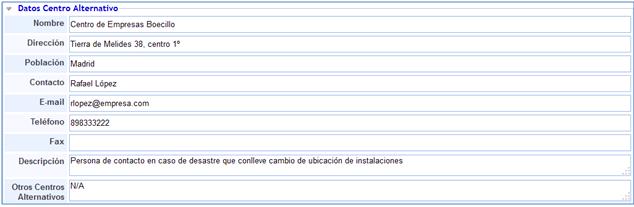
The solution provides the following fields to define the alternative center data:
-
Name: Allows establishing the name of the alternative center.
-
Address: Allows determining the location of the alternative center.
-
City: Allows establishing the city where the alternative center is located.
-
Contact: Allows defining the contact person for managing any action regarding the alternative center.
-
E-mail: Allows registering the e-mail of the contact person.
-
Phone: Allows establishing the phone number for managing any action regarding the alternative center.
-
Fax: Allows determining the fax number for managing any action regarding the alternative center.
-
Description: Allows establishing any other information that may be relevant regarding the alternative center.
-
Other Alternative Centers: Allows determining other possible alternative centers apart from the one defined in this option.
Crisis Manager
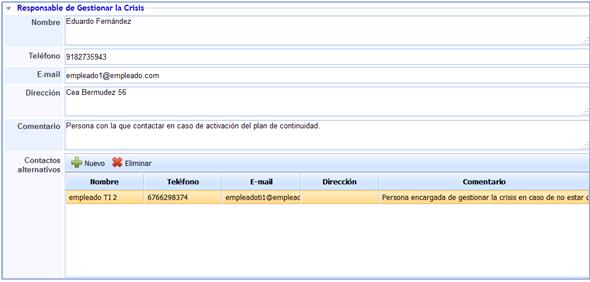
In this option, GlobalSuite will allow you to define the necessary data to determine all the contact information of the person responsible for managing the crisis.
-
Name: Allows determining the name of the person responsible for managing the crisis.
-
Phone: Allows defining the contact phone number in case of a crisis.
-
E-mail: Allows defining the contact e-mail in case of a crisis.
-
Address: Allows determining the address where the person responsible for managing the crisis can be found.
-
Comment: Allows establishing any type of information or comment necessary to contact the person responsible for crisis management.
-
Alternative Contacts: Allows defining all available and alternative contacts to the person responsible.
Facility Evacuation Plan in Case of Emergency
The options presented by the Facility Evacuation Plan in Case of Emergency allow establishing all the necessary information that determines the characteristics of the plan's components.
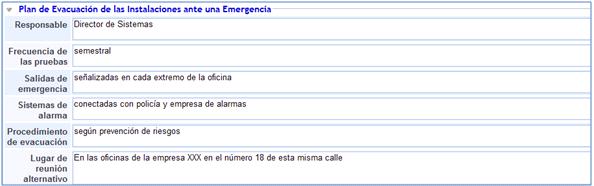
GlobalSuite provides the following options to determine the Evacuation Plan:
-
Responsible: The person in charge of managing the evacuation plan.
-
Test frequency: Allows establishing how often evacuation drills will be conducted.
-
Emergency exits: Allows establishing where the emergency exits are located or their conditions.
-
Alarm systems: Allows establishing which alarm systems are available and their conditions.
-
Evacuation procedure: Refers to the procedure for evacuation or defines how to act in such cases.
-
Alternative meeting place: Defines the location for staff meetings in case of evacuation.
Business Processes to Recover
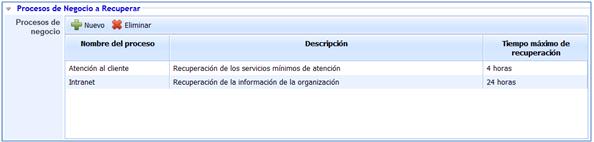
This option allows defining the necessary processes to recover as well as the maximum recovery time.
-
New: Allows creating all those processes that need to be recovered.
-
Delete: Allows deleting the created processes.
Once the processes to recover are created, the solution allows defining the following fields:
-
Process Name: Allows determining the process to recover.
-
Description: Allows detailing any information considered necessary for a proper definition of the process.
-
Maximum recovery time: Establishes the maximum time available to recover the specific process.
Suppliers

The suppliers option directly launches a message that redirects you to the suppliers option in the solution.
Backups
The Backups option refers to all the necessary information for proper management of any backup when it is needed in case of an emergency.
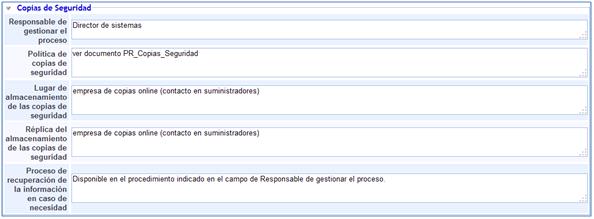
The following fields are provided by GlobalSuite to register all the necessary information to manage backups in case of disaster:
-
Person responsible for managing the process: Allows establishing who is responsible for managing the backup process.
-
Backup Policy: Allows determining or referring to the policy to follow for backups.
-
Backup storage location: Allows establishing the location of the backups.
-
Backup storage replication: Allows determining the location of the replicas of the backup information.
-
Information recovery process in case of need: Allows establishing or referring to the procedure for information recovery.
Incident Action Plan Models
Allows establishing various action plans where the steps to follow in case of a disaster are defined.
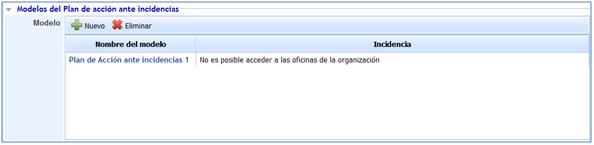
The solution allows:
-
New: Create all those action models necessary to act in the face of incidents or emergencies.
-
Delete: Allows deleting previously created action plans.
To access each of the defined Action Plans, it is necessary to click on the model name. Once accessed, GlobalSUITE presents the following options that allow defining each of the Action Plans.
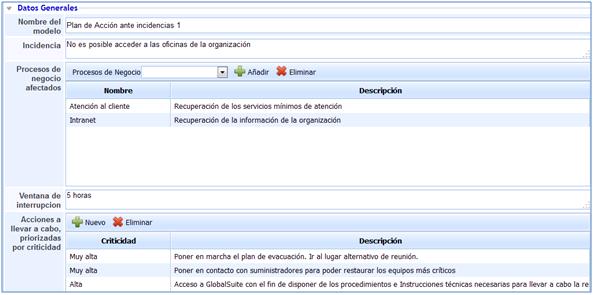
-
Model Name: Allows detailing the name of the set of tasks defined for restoration.
-
Incident: Allows establishing the causes that triggered the restoration actions.
-
Affected business processes: Allows establishing all those business processes that can be recovered in case of model activation.
-
Interruption window: Establishes the maximum recovery time.
-
Actions to be carried out, prioritized by criticality: Allows establishing all those tasks necessary to carry out restoration in an emergency situation.
NOTE 1: To add any type of business process that will allow restoration through the model, these must be previously defined in the Business Processes option.
NOTE 2: The Continuity option presented throughout this section corresponds to the GlobalSGSI, Global20000, and GlobalSGPIC licenses. For other licenses, this option will not be available.