
The GlobalSuite® platform allows clients to organize themselves into different management systems, facilitating the selection and administration of the company's management system they wish to work on. Through the Company/MS option, located at the top right of the screen, users can access a directory of companies they have access permissions for. This directory displays the available companies, organized according to the user's access profile, and allows managing the view and access to the corresponding management system of each company.
After accessing the platform, you can select the management system you wish to work on. To do this, use the Company/MS option, located at the top right of the screen.
To access the desired company, it is necessary to select it and click “Accept”.
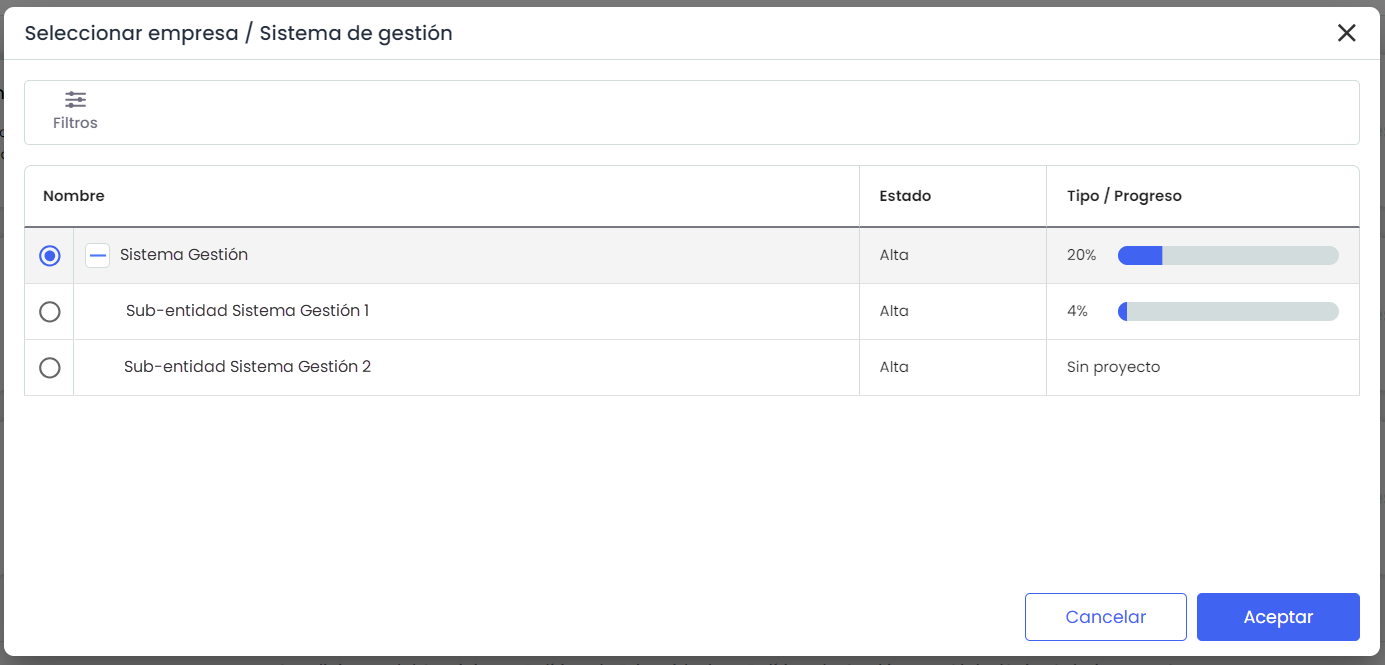
The table displays all the companies the logged-in user can access. Depending on the user's profile, different views of the system will be accessible.
-
Enterprise: only accesses the company to which the user belongs.
-
Consulting: accesses the companies where the user is assigned as a consultant/coordinator in the work team.
NOTE: If you do not see the desired company when accessing this screen, go to the Settings option to check that the company has been correctly created and that you are included as a consultant.
The company directory displays the following information:
-
Company: list of companies that can be viewed by the logged-in user. If multiple companies are displayed, they will appear in a tree format, each depending on its directly superior consulting/coordinating/distributing company. Initially, it is shown collapsed, and you must click the + icon to the left of the tool's name to view the lower-level companies.
-
Status: Indicates whether the company is active or inactive.
-
Consulting/Distributor: Matches the company it depends on in the company tree.
-
Progress: Indicates the percentage of project progress for the companies. This percentage only appears if the company has an associated project in project management.
The option provided by the tool for the table is to 'Show' the list of all companies or filter by those that are active or inactive.
NOTE: Although the company may have multiple contracted services, the management system is unique. The tool will load the options for each company's management system, thus achieving complete alignment of standards and much more agile management and implementation of them.