
In this section, you can configure which standards, frameworks, or regulations will be managed in the system.
-
Manual configuration of standards: This field allows, when activated, the configuration of standards to be done from the table below. If deactivated, they cannot be configured.
-
Reference standards: This is the list of standards that can be configured for use in other sections of the tool, such as Scope or Audits.
-
New: Allows you to add a new record to the table
-
Delete: Allows you to delete the selected standards
-
Change URL: Allows you to modify the URL field, which must follow a specific web address structure.
-
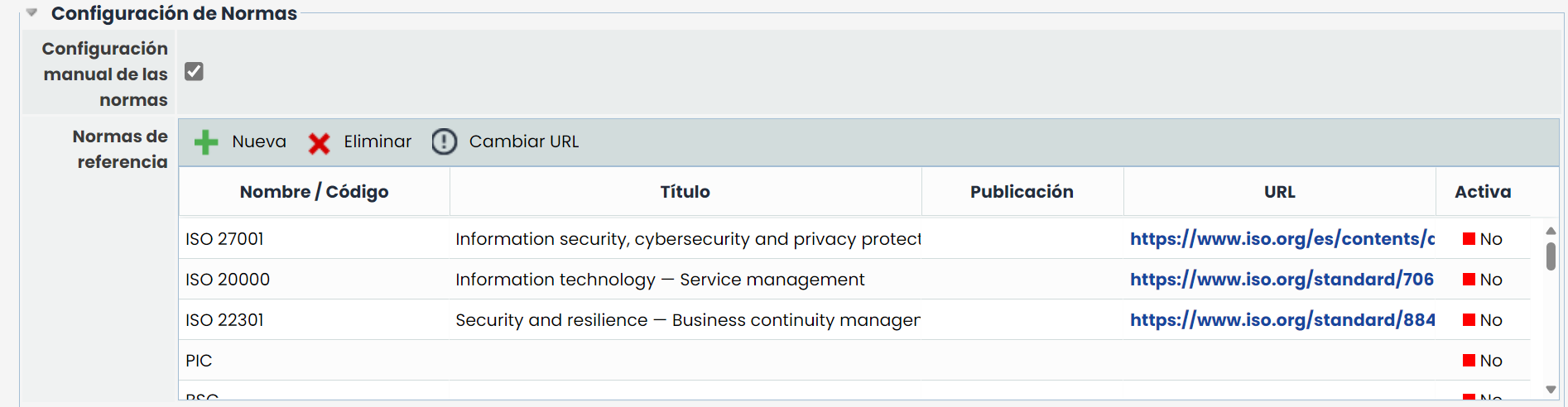
The fields in this table are:
-
Name / Code: This is the main field of the standard.
-
Title: Allows you to provide a more detailed description or extended name of the standard
-
Publication: Used to indicate the period when the standard was published
-
URL: Allows you to specify an address or link to the standard
-
Active: Used to indicate which standards are active or not.