
This option allows the consolidation of alerts from the parent company to its dependent sub-entities. This ensures that alerts assigned to sub-entities are also escalated to the responsible parties of the parent company.
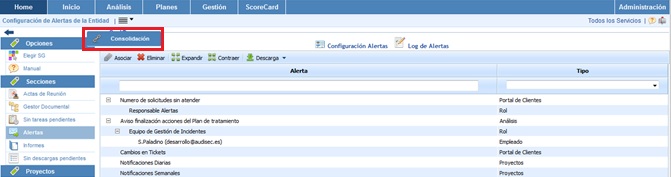
Once the option is accessed, the following is displayed:
-
Alert Table: Displays the list of alerts that have been defined in the parent company. The table allows the following options:
-
Associate: Allows the following actions:
-
Assign Roles: Once the desired alert is selected, it allows assigning the desired roles to the alert. This option is necessary to consolidate the alerts later.
-
Associate Alerts: Once the Roles are established, it allows associating the alerts to the selected sub-entities.
-
-
Delete Provides the option to delete the roles associated with an alert.
-
Expand Allows expanding the list of alerts.
-
Collapse Allows collapsing the list of alerts.
-
-
Sub-entities Table: Displays the list of sub-entities to which the parent company's alerts can be associated. The table allows the options to expand or collapse the list of sub-entities.
-
Alerts Table: Once the sub-entity is selected in the upper table, it displays the list of alerts that have been associated with it. The tool provides the option to delete associated alerts; to do so, the desired row must be selected, and the 'Delete' button must be clicked.