
The multiple risks option offers the possibility of generating a specific threat that encompasses several threats defined in the 'Risk Analysis' section.
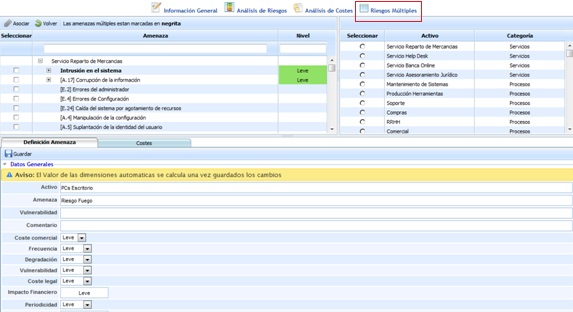
Upon accessing the section, the following tables are displayed, on which the following actions can be performed:
-
Left table: Displays the tree of all defined assets and the threats associated with them, along with the assessments generated in the 'Risk Analysis' section.
-
Right table: Displays the list of all assets defined in the 'Asset Inventory' section.
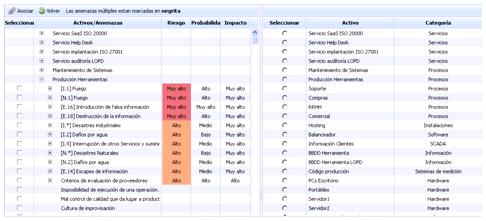
To generate a global threat, you must select the checkbox of the desired threat(s) in the left table, select the asset that will be affected in the table on the right, and click the 'Associate' button.
This action generates the following section, on which the following actions can be performed:
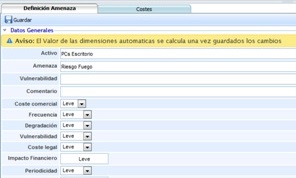
Threat Definition
-
Asset: Identifies the name of the asset affected by the threat.
-
Threat: Allows defining the name of the threat.
-
Vulnerability: Enables indicating the vulnerability associated with the generated threat.
-
Comment: Allows inserting any additional notes about the asset.
-
Dimensions: Displays the list of dimensions defined in the Analysis Methodology to be assessed.
NOTE: Depending on the methodology defined in the 'Settings/Analysis Methodology' section, the assessments can be qualitative or quantitative.
-
Threats: Identifies, through a list, the individual threats that make up the global threat.
Costs
Allows associating different costs to the generated global threat. The actions that can be performed are:

-
Costs: Allows displaying the list of costs generated in the 'Settings' section.
-
Add: Once the cost is selected in the dropdown, it can be associated by clicking the 'Add' button.
-
Delete: Allows deleting different costs defined in the table. To do this, you must select the desired row or rows and click the 'Delete' button.