
The option provided by the platform allows the user to store histories of the risk analyses defined in the section ‘Analysis/Risk Analysis’.
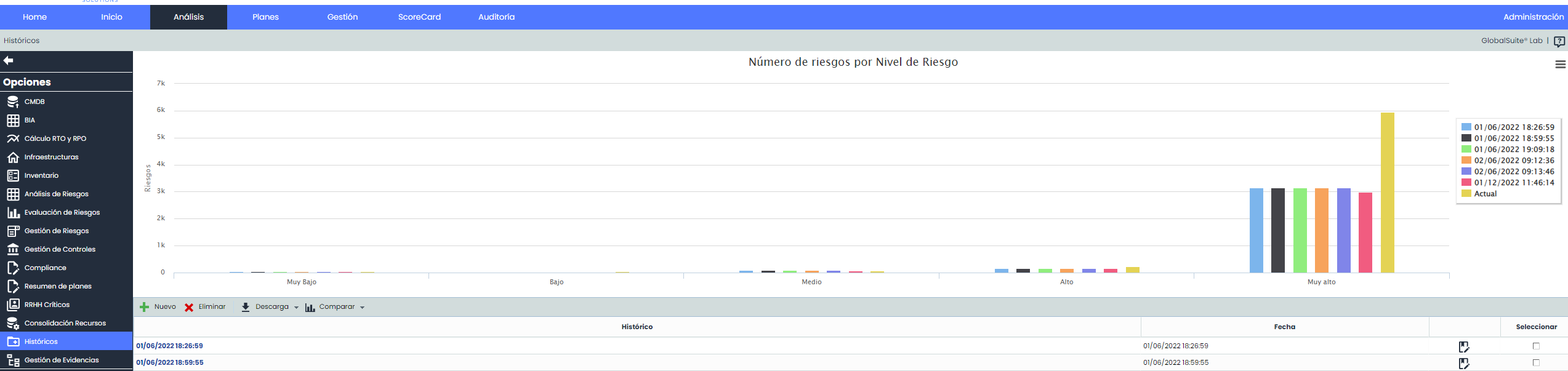
Upon accessing, the first thing visible is a bar chart that shows, separated by histories, the number of threats for each of the defined risk levels (Very High, High, Medium, Low, Very Low). This allows the organization to see the evolution of the various analyses conducted and graphically verify the trend intended to be achieved through their execution.
The table located at the bottom allows the following actions:
-
New: Allows creating a new history of the risk analysis. To do this, click on the ‘New’ button, which generates a new entry in the table.
-
Delete: Enables the deletion of an established history. To do this, select the desired row or rows and click the ‘Delete’ button.
-
Download: Offers the possibility to download the list of histories in an editable format (.xlsx) or in .PDF format.
By clicking on the link in the lower table, the specific information of the risk analysis at the time of the history's creation is displayed.

NOTE: The information displayed in the history option (General Information, Asset Inventory, Risk Analysis, Cost Analysis, etc.) has been developed in its corresponding section of this Manual.