
The 'Plan Summary' option provides a list of all the plans defined by the organization, showing a list of the controls defined in the 'Home/Adaptation Plan' and 'Analysis/Risk Management' options.
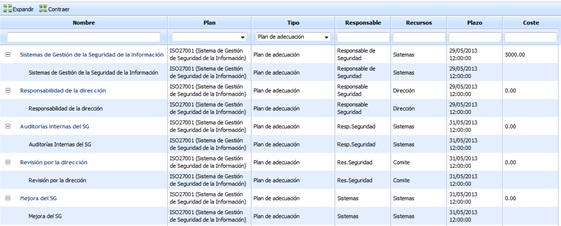
The actions that can be performed on the controls table are as follows:
-
Expand: Expands the list of all controls.
-
Collapse: Collapses the list of all controls.
The information displayed in the different columns of the organization is as follows:
-
Name: Identifies the name of the control.
-
Plan: Displays the name of the catalog associated with the control.
-
Type: Identifies whether the control is derived from an adaptation plan or a treatment plan.
-
Responsible: Displays the information of the person responsible for the control.
-
Resources: Displays the list of resources assigned to the control.
-
Deadline: Identifies the final implementation deadline of the control.
-
Cost: Provides information about the implementation cost of the control.
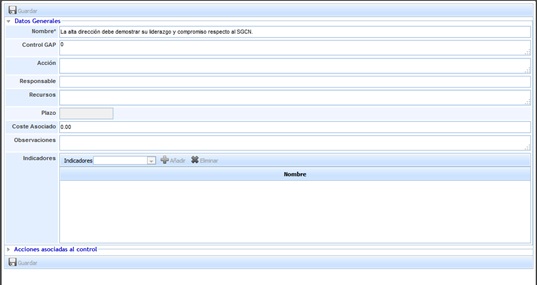
If we click on the link of a control, a form is displayed where we can define the following concepts:
-
Name: Identifies the name of the control that will be displayed in the table below.
-
GAP Control: Identifies the control to which it is associated.
-
Action: Provides the possibility to describe in more detail what the control consists of.
-
Responsible: Identifies the person within the organization responsible for verifying the implementation of the control within the defined deadlines.
-
Resources: Identifies the resources or departments within the organization that will be involved in the implementation of the control.
-
Deadline: Identifies the deadline by which the control must be implemented in the organization.
-
Associated Cost: Allows defining the cost for the organization of implementing the control.
-
Observations: Allows indicating any additional notes associated with the control.
-
Indicators: Allows associating one or more indicators defined in the 'ScoreCard/Indicators' section.
Actions associated with the control
.jpg?cb=c9f87938da12b2ebfbca7d88c901ed15)
Allows defining the necessary actions for the implementation of the control by clicking on the 'New' button. This generates a new entry in the table that allows defining the following parameters:
-
Name: Allows identifying the name of the actions by double-clicking on the cell.
-
Responsible: Identifies the person or department within the organization responsible for verifying the completion of the action within the defined deadline.
-
Resources: Identifies the resource(s) or departments involved in carrying out the action.
-
Deadline: Identifies the deadline by which the action must be completed. This deadline must not exceed the final implementation deadline of the control.
If you want to delete an action, you must select the desired row or rows and click the 'Delete' button.