
This option allows you to view a summary of the different risk analyses associated with the entity and sub-entities.

Below is the functionality provided by each of the available tables.
-
Services Table: Allows the user to filter the analyses associated with the selected Services.
.jpg?cb=57612fb94f9c179aa3dbbcd3ca29e303)
-
Sub-entities Table: Provides the ability to filter the analyses defined in the selected sub-entities.
.jpg?cb=c059dbe77c277e1dd4f2bbff5027fb9a)
-
Label/Value Table: Allows you to view the analyses associated with a specific label.
.jpg?cb=ba30930d030225474c4a662bed08a785)
-
Specific Filters: Provides the ability to view risk analyses by filtering based on the desired analysis methodology, specific asset, and the category it belongs to.

Once the necessary filters have been established, the query must be generated. To do this, the following options are available:
-
Consolidate: Once the button is clicked and based on the established filters, it allows you to view a summarized version of the assets in the table below.
-
Back: Provides the ability to return to the initial asset list.
The results are displayed in the lower table 'Consolidation Results'
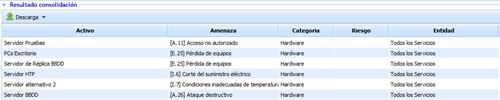
The information provided by the table is as follows:
-
Asset: Allows you to view the name of the asset.
-
Threat: Allows you to view the threat that has been assessed in the risk analysis.
-
Category: Provides the ability to view the category to which the asset has been associated.
-
Risk: Allows you to view the risk level obtained for the asset.
-
Entity: Provides the ability to view the entity or sub-entity associated with the asset.