
This option allows the user to view the tickets assigned to them, centralized in a single table.
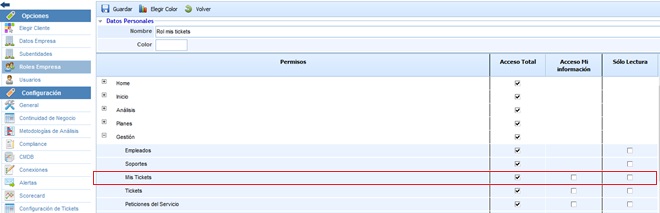
The following option is displayed if the user has been assigned a role with specific access to the My Tickets section, in Settings > Company Roles, as shown in the following image:
The actions allowed on the table are as follows:
-
New: Allows generating new entries in the table.
-
Delete: Allows deleting an entry from the table. To do this, select the desired row and click on the 'Delete' button.
-
Show: This option allows displaying only open tickets or all tickets through the dropdown menu available in this option.
-
Download: Allows you to download the list of My Tickets represented in Excel or CSV format. This report will be available in Pending Downloads.
Once you access the ticket, the manageable fields are described in each of the specific options.