
The projection and simulation option allows the user to initially check how the implementation of the controls defined in the system would affect (Projection) or to verify in real terms how they have affected once implemented (Simulation).
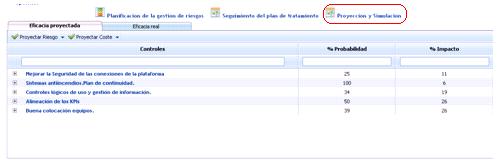
The option is divided into two tabs, on which a series of actions can be performed as detailed below.
Projected Effectiveness
The projected effectiveness tab initially displays the list of controls defined in the 'Risk Management Planning' section. For these controls, it is possible to establish how their implementation would affect the organization based on the dimensions defined in the risk and control methodologies. To do this, double-click on the cell and indicate the desired value as a percentage of reduction.
Depending on how the type of effectiveness is configured, the entered value can be a numerical value (Quantitative):

or an effectiveness level (Qualitative):

For the case of control dimensions, it is possible to configure this option to define the effectiveness of the controls according to the methodology (Controls):

Once the values are defined, the tool allows the following actions:
-
Project Risk: Allows displaying through a value table how the implementation of the controls would affect based on the Risk Analysis performed. For this, the tool allows the calculation according to the following options:
-
Maximum: Performs the calculation based on the maximum percentage value of the defined dimensions.
-
Minimum: Performs the calculation based on the minimum percentage value of the defined dimensions.
-
Average: Selects the average of the percentage values of the defined dimensions.
-
Accumulated: Selects the sum of the percentage values of the defined dimensions.
-
Depending on the selected calculation mode, the tool displays in a value table the resulting risk levels after the implementation of the controls.
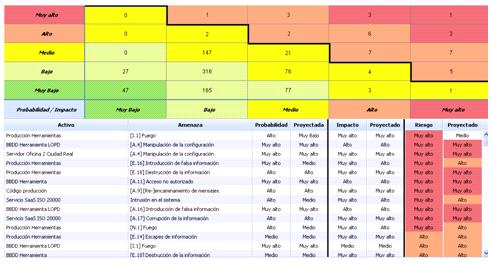
Additionally, the lower table details the values shown in the upper table, simultaneously indicating the values obtained in the performed risk analysis and the resulting values after the implementation of the controls.
-
Project Cost: Allows checking the economic benefit that the implementation of the controls defined in the risk treatment plan would have for the organization. For this, the tool allows the calculation according to the following options:
-
Maximum: Performs the calculation based on the maximum percentage value of the defined dimensions.
-
Minimum: Performs the calculation based on the minimum percentage value of the defined dimensions.
-
Average: Selects the average of the percentage values of the defined dimensions.
-
Accumulated: Selects the sum of the percentage values of the defined dimensions.
-
Depending on the selected calculation mode, the tool displays the following information:
Table of control benefits and associated threats
.jpg?cb=342dba36b5cbe5bc60fd01c1ebc0e24f)
-
Controls/Threats: Hierarchically displays the list of controls and those associated threats above the NRA that would be mitigated if implemented.
-
Projected Value: Displays, based on the selected calculation mode, the cost savings in case a threat materializes.
NOTE: The implementation cost of the controls will always be a fixed value.
-
Benefit: Indicates the total benefit that the implementation of the defined controls brings to the organization.
-
Initial Value: Displays two types of values:
-
Value associated with the control: Indicates the economic cost to the company of implementing the control. This value is defined in the 'Risk Management Planning' section.
-
.jpg?cb=c9e91090bd655565b3dcb57fdad93176)
-
Value associated with the threat: Indicates the cost to the company of the materialization of said threat. These values are defined in the 'Cost Analysis' section.
.jpg?cb=95ecd43755adcf7bbe58f94d8e9344e5)
Table of control and threat costs
.jpg?cb=195c943856cc836db104d94d71e642e9)
Displays the cost of implementing the controls on one hand and the economic cost in case of threat materialization (Initial Value) and its estimated cost in case of control implementation (Projected Value).
General Data
%20(1).jpg?cb=7dabd0647e5b56f16c7a5cd1b9858f66)
Globally displays the following data:
-
Cost of applied controls: Total economic cost of implementing the controls.
-
Initial cost of threats: Total cost in case of materialization of those threats that exceed the NRA.
-
Projected cost of threats: Total cost in case of materialization of those threats that exceed the NRA once the controls are implemented.
-
Benefit: Displays the economic savings that the implementation of the controls would bring to the organization.
Real Effectiveness
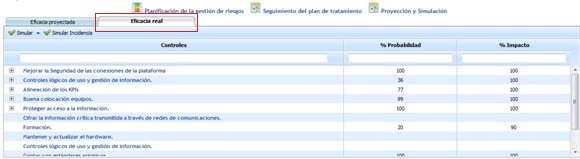
When clicking on the Real Effectiveness tab, the tool asks the user if they want to copy the reduction estimates defined in the Projected Effectiveness tab.
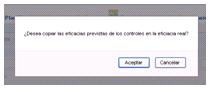
If the estimates (percentages of the defined dimensions) have been real after the implementation of the controls, the user must 'Accept' and the tool will automatically copy the evaluations to the Real Effectiveness tab. Otherwise, if the estimated values are not as expected after the controls are implemented, the user must 'Cancel' the value copy.
Once the request to copy estimated values is answered, the following screen is accessed. If the value copy is accepted, the table will display the same values defined in the Projected Effectiveness tab.
In case of cancellation, the table will appear without values, and it will be the user's task to define the real improvement percentages of probability and impact after the implementation of the controls.
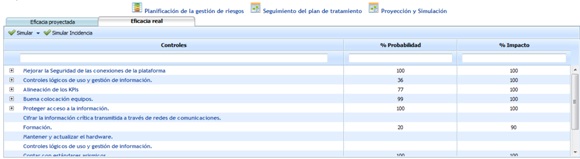
Once the improvement percentages are defined, the tool allows the following action:
-
Simulate: Allows displaying, through a value table, how the risk levels have been reduced after the implementation of the controls. For this, the tool allows the calculation according to the following options:
-
Maximum: Performs the calculation based on the maximum percentage value of the defined dimensions.
-
Minimum: Performs the calculation based on the minimum percentage value of the defined dimensions.
-
Average: Selects the average of the percentage values of the defined dimensions.
-
Accumulated: Selects the sum of the percentage values of the defined dimensions.
-
Depending on the selected calculation mode, the tool displays in a value table the resulting risk levels after the implementation of the controls.
Additionally, the lower table details the definitive values after the implementation of controls.
By clicking on the 'Apply' button, the tool generates a history in the 'Analysis/Histories' section of the performed Risk Analysis and copies the values obtained in the simulation to the 'Analysis/Risk Analysis' section.
-
Simulate Incident: Based on the modifications made in the 'Management' section under the 'Risks' option, the tool allows simulating how the event would affect the organization.