User Types
This guide explains the different types of users in GlobalSuite®, organized into two main categories: Administrators (with configuration and management privileges) and Company Users (with access to management system information). Additionally, it details the profiles available in each category, the configuration of sub-roles to customize access, and the main functions and limitations associated with each profile.
User Categories
GlobalSuite® has several predefined access profiles, which are divided into two main categories: Administrator and Company User. The main difference between the two categories is that administrator users have privileges to configure the environment, while company users only have access to management system information.
For the category Administrator, the 5 existing user types are as follows:
-
Platform Administrator: This is the profile with the highest privileges. The user can access the assigned environment, manage all options in the Settings section, and manage other Administrator users.
-
Enterprise Administrator: The user can access the assigned environment and manage all options in the Settings section. This user has similar privileges to the Platform Administrator, except that they cannot create more Enterprise Administrator, Platform Administrator, Access Administrator, or Configuration Administrator users; therefore, they can only create and view users with the Entity Administrator role and the Company category role.
-
Access Administrator: The user can only access the Settings section, limited to the options "Company Roles," "Users," "Access Logs," and "Action Logs." They do not have access to management system information.
-
Configuration Administrator: The user can manage the options in the Settings section of the assigned environment, except for "Company Roles," "Users," "Access Logs," and "Action Logs." They do not have access to management system information.
-
Entity Administrator: The user can access the information of the assigned environment and manage the options for entities, profiles, and users. This type of user is only relevant in companies with entities.
Regarding users of the Company category, the following user types allow access to entity information:
-
Enterprise: The user can access all the information of the assigned entity (in the dropdown “Company/SG,” the entity is selected) and does not have administrative permissions over it.
-
Entity: The user can access all the information of the assigned entity (in the dropdown “Company/SG,” the entity is selected) and consolidate information from entities dependent on the entity (if any exist). The user does not have permissions for the Settings section. This type of user is intended for individuals in the Corporate license who have privileges to view information from all entities but do not have privileges to parameterize methodologies.
Sub-Role Configuration
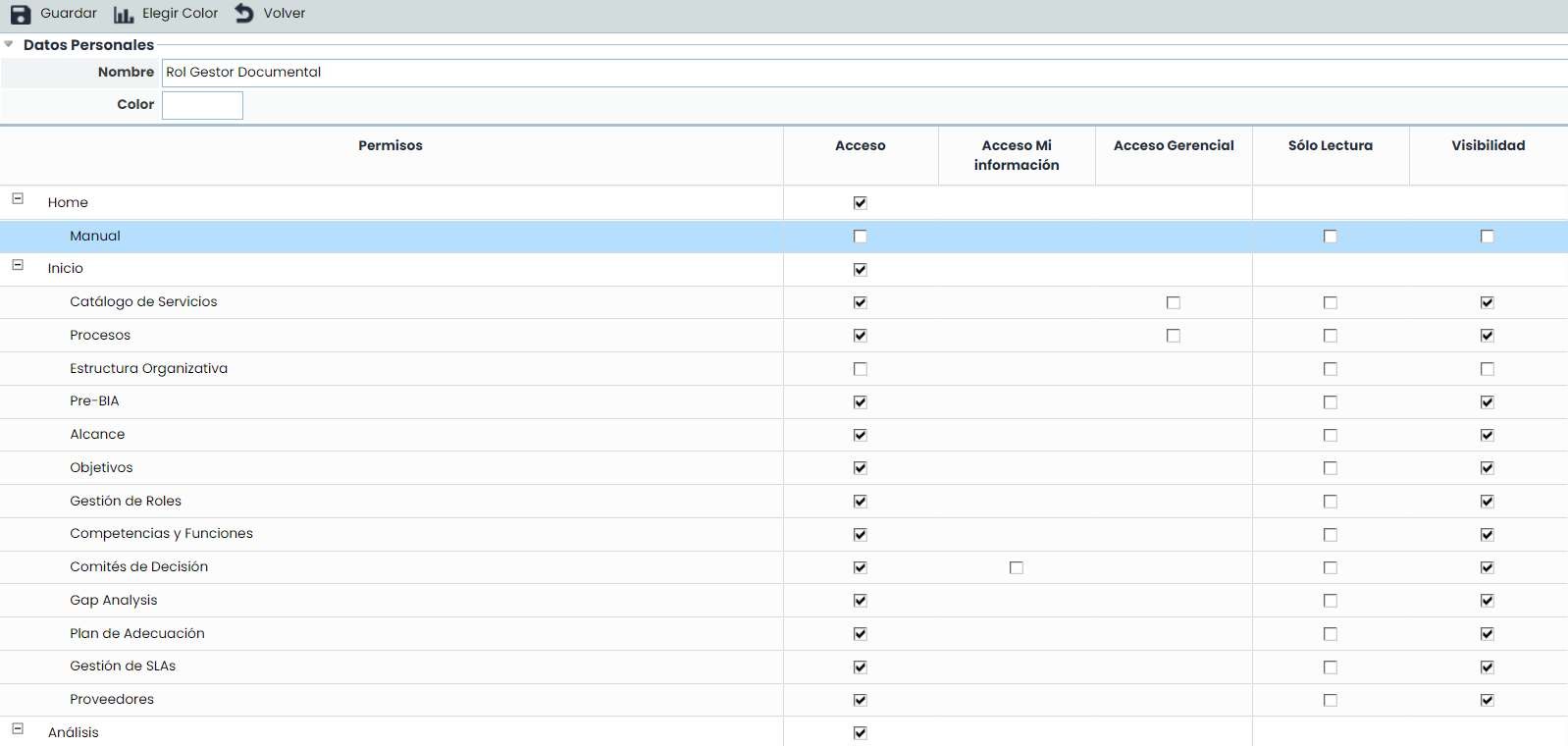
The configuration would be done through the following path: Settings > Company Roles
For both types of Company Users (Enterprise and Entity), a sub-role can be assigned to configure specific access to each option (by default, if no sub-role is assigned, the user has access to all options in the management system). For each option in the left menu of GlobalSuite®, visibility and permissions within the option can be configured:
It can be specified whether changes are allowed in the option Read-Only or if it allows using information from the marked option, even when management access to it is not available by marking the Visibility option. Example: from the "Inventory" option, an "Employee" can be assigned as responsible for an Element, but it is not desired for that user to have access to the "Employees" option. In that case, the "Employees" option will have the Access checkbox marked, but not the Visibility checkbox.
Additionally, for some options in GlobalSuite®, special access to data for which the user is responsible can be configured (Access to My Information).
Finally, there is the option to parameterize the user so that they only see the data belonging to the Service (Home – Services option) where the user assigned this role is responsible (Managerial Access). This configuration option is available for some options in GlobalSuite®.
Main functions of Administrator users
The main functions available to a Platform Administrator user in GlobalSuite® are as follows:
-
Management of access users.
-
Creation of access profiles.
-
Consultation of access and action logs.
-
Modification of Risk methodology.
-
Modification of Control methodology.
-
Modification of risk-control catalogs.
-
Modification of compliance catalogs. 8. Modification of CMDB configuration.
-
Modification of Business Continuity methodology.
-
Modification of configuration for various aspects of tickets and loss events.
-
Modification of ScoreCard configuration.
-
Modification of survey models (BIA, Assets, Risks, Controls, Compliance).
-
Assignment of methodologies, risk catalogs, compliance catalogs, and survey models to entities.
-
Access to information from any of the entities.
The above functions can be delegated to an Enterprise Administrator user. The only actions that a Platform Administrator can perform, which an Enterprise Administrator user cannot, are as follows:
Creation of Enterprise Administrator users
Configuration of the document manager (activation/deactivation of the workflow)
Configuration of technical aspects of the platform (SMTP configuration for email sending, logo setup, and activation/deactivation of the action log)
On the other hand, there are other Administrator-type profiles that can perform some of the functions described above. Below are the functions that each profile can perform:
Access Administrator: Can perform functions 1 - 3.
Configuration Administrator: Can perform functions 4 – 13.
Entity Administrator: Can perform function 1 (only creation of users with access to a specific entity), function 13, and function 14.
Finally, it should be noted that Company User-type users, with the 2 types Enterprise and Entity (non-administrators), cannot perform any of the above functions, except for function 13, which they can perform as it corresponds to access to their own entity's information.