
The projects option allows defining the types of time and expenses that will be applied to project management.
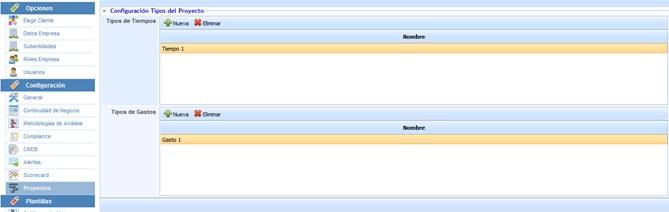
The time type and expense type tables allow the following options:
-
New: Allows inserting a new entry into the table by clicking the button.
-
Delete: Offers the possibility to delete an entry from the tables. To do this, select the desired row and click the 'Delete' button.
On the other hand, the following additional options are available:
-
Priority Visibility: Allows enabling the priority field for each of the tasks in the "Project Management" section. Once enabled, the following table is displayed, allowing the following actions:

-
New: Allows inserting a new entry into the table.
-
Delete: Offers the possibility to delete an entry from the table. To do this, select the desired line and click the button.
-
Change color: Allows the user to highlight the priority in the dropdown that will be displayed using a color. To do this, select the desired line and choose the most representative color.
-
Increase Priority: Allows raising the position of the priority in the dropdown.
-
Decrease Priority: Allows positioning the priority in lower positions in the dropdown.
-
State Visibility: Allows enabling the state field for each of the tasks in the "Project Management" section. Once enabled, the following table is displayed, allowing the following actions:

-
New: Allows inserting a new entry into the table.
-
Delete: Offers the possibility to delete an entry from the table. To do this, select the desired line and click the button.
-
Change color: Allows the user to highlight the state in the dropdown that will be displayed using a color. To do this, select the desired line and choose the most representative color.
-
Progress Visibility: Allows enabling the progress field for each of the tasks in the "Project Management" section. Once enabled, the following table is displayed, allowing the following actions:

-
New: Allows inserting a new entry into the table.
-
Delete: Offers the possibility to delete an entry from the table. To do this, select the desired line and click the button.
NOTE: The progress percentage defined in the table will be taken into account for the calculation of the project's total progress.