
This option allows indicating the number of people required for each of the processes in case of a contingency.
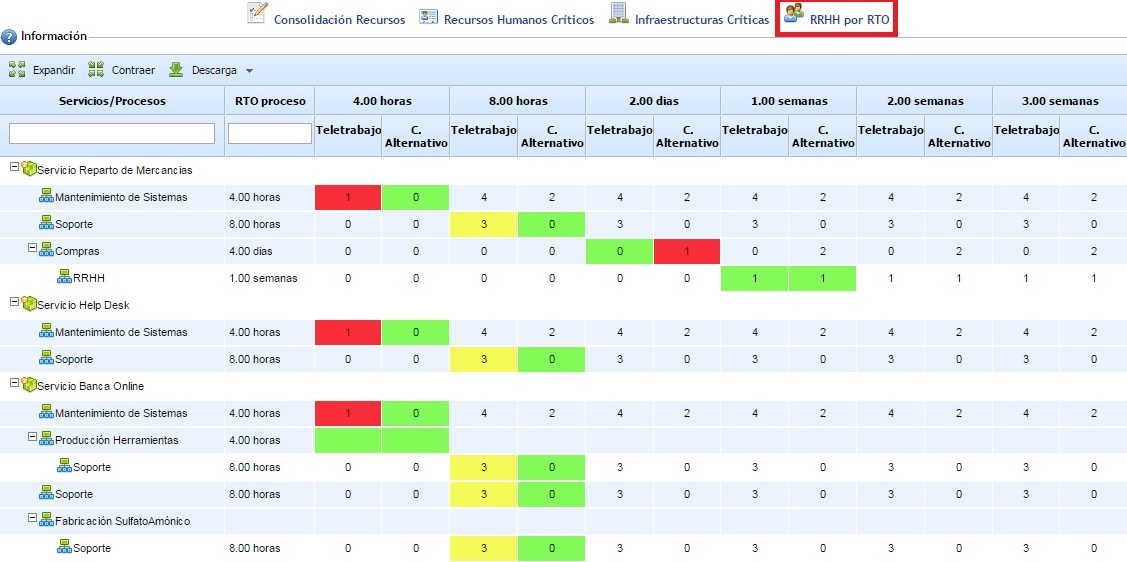
When accessing the option, the entity's service and process tree is displayed, along with the RTO value identified in the BIA and the time scales used. For each of the time scales, the number of people required to perform telework and the number of people required to be located at the alternate site can be defined.
For each process, a time scale is marked in color. This corresponds to the time scale equal to or less than the RTO of the process's BIA. If there is no time scale less than the process's RTO, no time scale is marked in color. Each color has the following meaning:
-
Red: Cells in red indicate that the number of people recorded is less than the minimum number of people identified in the "Critical Human Resources" option.
-
Green: Cells in green indicate that the number of people recorded is equal to the minimum number of people identified in the "Critical Human Resources" option.
-
Yellow: Cells in yellow indicate that the number of people recorded is greater than the minimum number of people identified in the "Critical Human Resources" option.
Finally, note that this option includes the 'Expand' and 'Collapse' buttons to manage the complete structure (by default, it is displayed expanded), as well as allowing the result to be downloaded in an editable document format (.xlsx) and .pdf format.