
When accessing the consolidation option, the tool displays a table with the list of actions or resources defined by the user. The platform allows the following actions on the table:
-
New: Allows inserting a new entry into the table.
-
Delete: Allows deleting a resource from the table. To do this, select the desired row or rows and click the ‘Delete’ button.
-
Download: Provides the option to download the list of resources in an editable format (.docx) or in .PDF format.
Once we have selected the desired resource or action, the tool displays a form that allows defining its necessary parameters.
Action Data
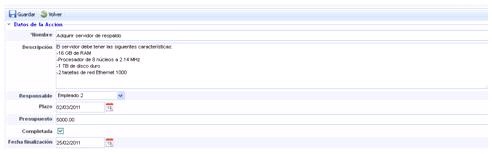
The points that can be defined are as follows:
-
Name: Identifies the name of the resources or actions. This name will appear in the initial resource consolidation list.
-
Description: Allows identifying the characteristics that the resources to be acquired must meet or additional information about the actions necessary to recover services within the MTPD.
-
Responsible: Enables identifying the person responsible for managing the resources or actions.
NOTE: The employee list is defined in the ‘Management/Employees’ section.
-
Deadline: Sets the deadline by which the defined resources or actions must be implemented in the organization.
-
Budget: Allows identifying the budget for acquiring the resources or implementing the necessary actions in the organization.
-
Completed: Provides the option to indicate whether the action has been completed or not.
-
Completion Date: Sets the final date for implementing the action or acquiring the defined resources in the organization.
Consolidated BIA Resources
This option displays all the resources identified in the Necessary Resources section of the Consolidated BIAs, required to recover services within the maximum tolerable downtime or MTPD.
.jpg?cb=cda76b937a7bfcd87bc3d10436f734e3)
Resulting Products from the Action
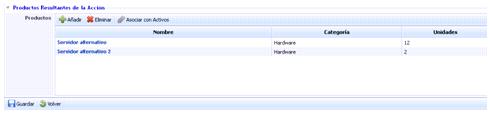
This option allows defining the resources or actions finally carried out for the proper recovery of services within the MTPD.
The tool allows the following actions:
-
Add: Allows adding a new entry to the table by clicking the button.
-
Delete: Allows deleting resources or actions defined in the table. To do this, select the desired row or rows and click the ‘Delete’ button.
-
Associate with Assets: Allows associating the different acquired resources with the assets identified in the ‘Analysis/Asset Inventory’ section.
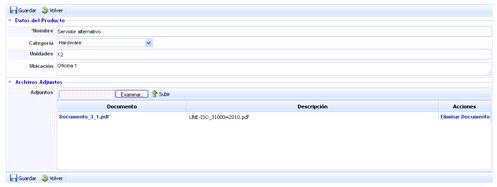
By clicking the link, the tool allows a more detailed definition of the acquired resource or the action carried out, offering the possibility to complete the following fields:
-
Name: Identifies the name of the resource or action carried out. This name will be displayed in the list of resulting products.
-
Category: In the case of resources, allows identifying the category to which the acquisition belongs.
-
Units: Enables indicating the number of resources acquired.
-
Location: Allows identifying where the resources are hosted within the organization.
-
Attachments: Provides the option to attach any file with additional information about the resource or action carried out.