
In this article, we will explore all the configuration possibilities for user permissions to access and modify ticketing options.
When GlobalSuite refers to Ticketing, it encompasses all the options that allow the company to manage internal requests, incidents, action plans, audit findings, etc. In short, any company process where multiple areas are involved in the resolution and it is necessary to manage it automatically through approval workflows.
When approval workflows are complex, it is very important to have a correct definition of permissions among all GlobalSuite users.
This article will apply to all GlobalSuite licenses as this ticketing part is a Core option of the system.
How to configure general permissions for these options?
Before going into specific details by option, the way to configure access profiles will be detailed. To do this, it should be done in Settings > Company Roles. You will access an access profile that represents groups of users with the same permissions.
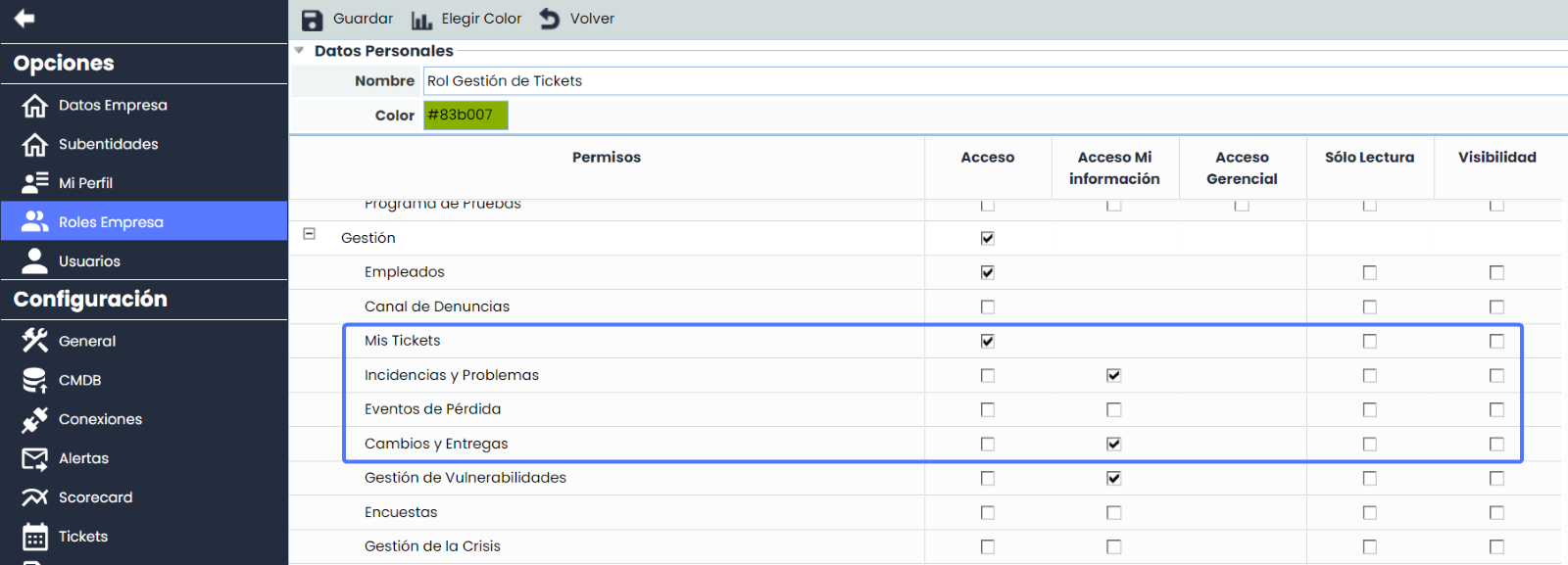
It can be configured according to the columns of the table:
-
Access: Full access to the option. They will be able to view and modify the tickets of the option as long as these tickets do not have a Workflow. In this case, they will only be able to modify it if they are responsible for a state of the WF.
-
Access My Information: They will only be able to view and modify tickets where they have some type of responsibility. Two options must be distinguished:
-
If the ticket does not have a WF, the user will see the tickets they own.
-
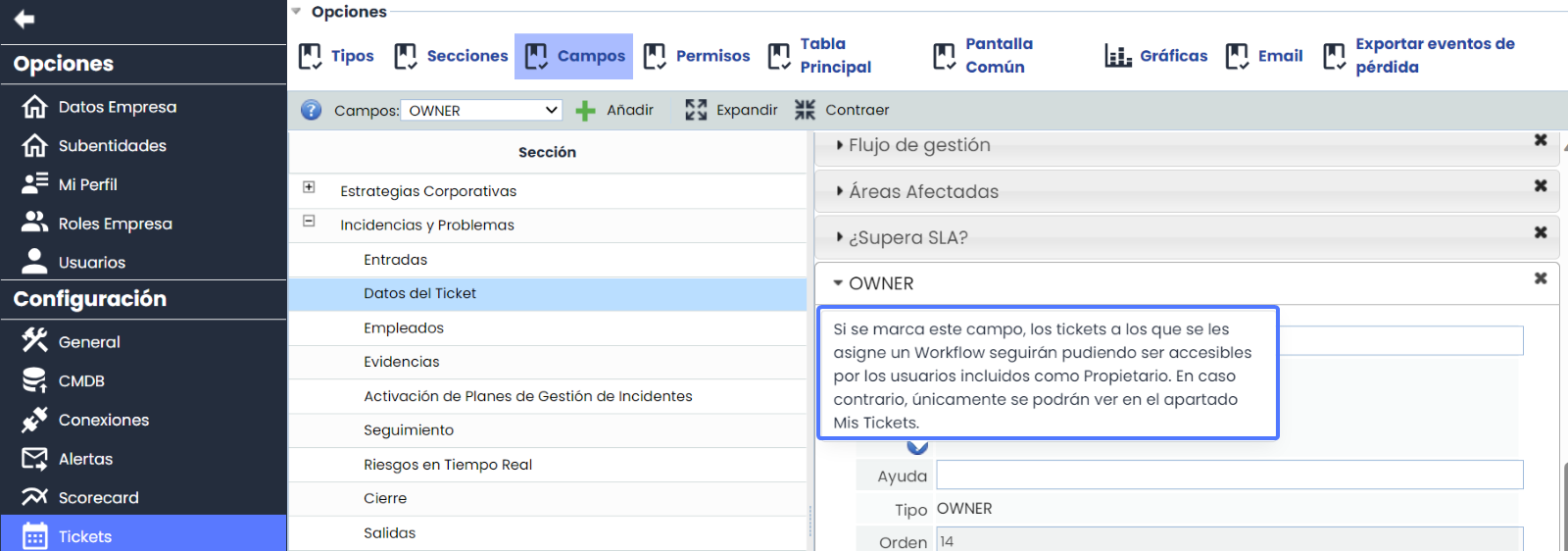
If the ticket has a WF, the visibility of the ticket owner can be configured when the option is added. This allows the owner to track the ticket at any stage of the WF.
How can I configure creation and deletion permissions without an approval Workflow?
These permissions only affect users who have access to My Information within any type of ticket. The goal is to associate any user with an action plan, an incident, a loss event, an audit observation, etc., and ensure they cannot delete it.
If we have an association without a WF or there is only one state, it can be configured as follows:
.png?cb=8ab1099bd8c7e9a796ae445a8f0bc72d)
In this example, all users configured with Access My Information will be able to create Incidents but will not be able to delete them. The view of the option for a user of this type will be:

When we create a ticket, the system will automatically assign the user who created it as the owner. From here, the management and tracking of the ticket type are the same as if they had full access. Since there is no approval WF, the state change will be manual.
This specific example is ideal for risk or audit teams that delegate the creation of any incident or action plan to area or process managers but want to control deletion permissions.
Is it possible to configure creation and deletion permissions with an approval Workflow?
If the audit or risk team has an automated system with multiple states where each state has responsible parties and a complete control of user actions is desired, these permissions can be configured.
If we have a WF, permissions can also be configured in the same way as the previous example, where users can create their tickets and associate a corresponding WF. Several options are available with this configuration:
-
If the user who creates the ticket is responsible for the first state, this user will continue to see the ticket.
-
If the user is not responsible, as the owner, visibility can be configured with the option identified in the first point of this document.
.png?cb=2a80e4f886ae4103391b0abfd684a535)
In this example, the options will be configured so that only audit, risk, security teams, etc., can have centralized management by the team and create the tickets themselves and associate them through the approval WF.
Configuration of the option so that it cannot be created or deleted:
In this way, the teams involved in the resolution will be notified when they create a ticket where they have some type of responsibility, and the management team can be assured that there will be no unwanted actions by the resolution responsible parties.
This functionality has been highly requested by audit teams where auditors can create any observation or finding from the audit options and associate it with the corresponding team.
In addition to creating permissions, we can detail field by field whether it can be modified or not, or if it is Read-Only. To do this, it must be detailed within the WF configuration. You will click on the WF state and on the right side, configure the fields through the sections.
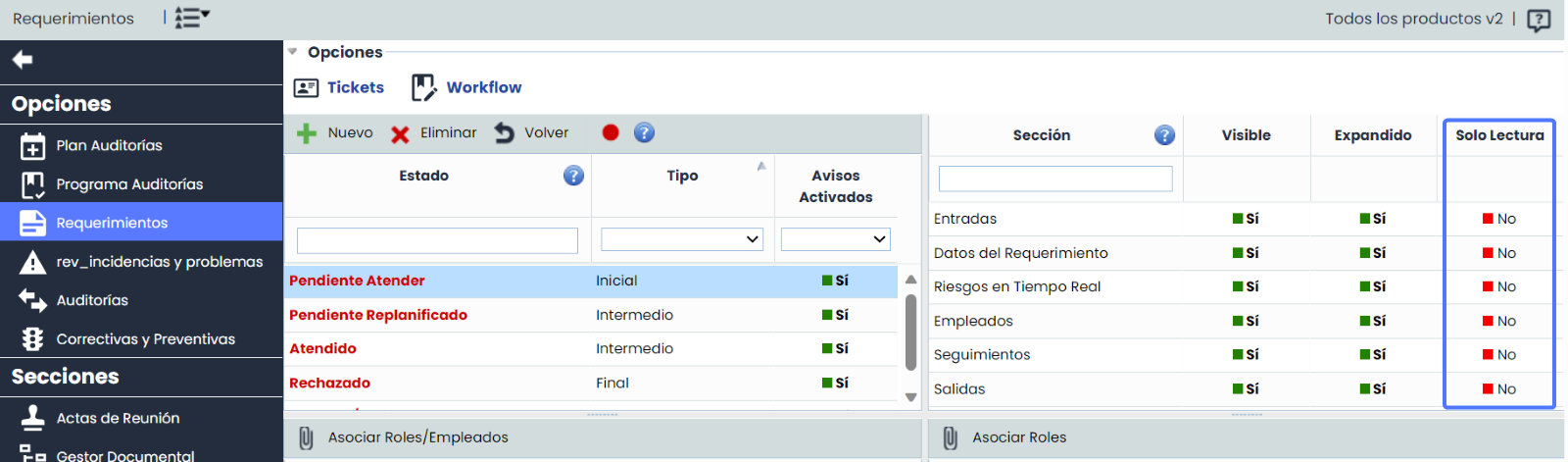
This combination of functionalities will provide the option with great security and detail of the defined permissions.