
General survey data

Allows defining the following information:
-
Name: Allows defining the identifying name of the survey.
-
Type: Indicates the model based on which the survey was conducted.
-
Department: Allows identifying the name of the Department for which the survey results were obtained.
-
Responsible: Provides the possibility to identify the person responsible for the survey.
-
Other responsible: Allows identifying a responsible person who is not registered in the tool.
-
Email: Provides the option to include the email address so that the responsible person is notified of any changes.
-
Date: Enables setting the date for conducting the survey.
Questions
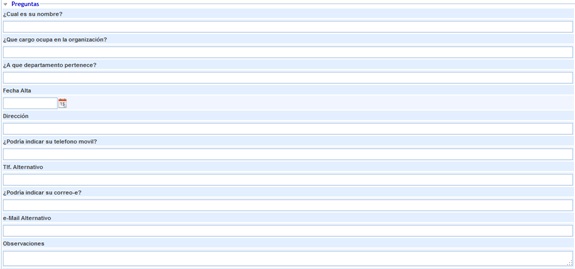
This section allows the user to answer those questions that have been defined in the 'Settings/Survey Models' section and configured in the 'Management/Survey Configuration' section, where it is established based on which model the employee survey is generated.
Roles

Allows the person responsible for generating the survey to view the roles initially assigned to them, with the ability to load additional roles into the survey. To do this, the desired role must be selected from the dropdown and the 'Add' button must be clicked. If a specific role needs to be disassociated, it must be selected in the table and the 'Remove' button must be clicked.
Survey tracking
.jpg?cb=9da4f49dcb501c3232be56395a3bc6fa)
Allows tracking the survey, enabling any comments or observations about it.
In published surveys completed anonymously (via link), it is possible to send the tracking to the person responsible for the publication to notify them. To do this, select the desired tracking and click "Send to Responsible".