
The dynamic Audit reports in Word allow generating fully customizable documents in .docx format based on the information recorded in the Audit Plans and Audit Works.
This functionality extends the current Word template system by adding two new specific report types for the Audit module and enabling the creation of fully configurable documents using user-uploaded templates.
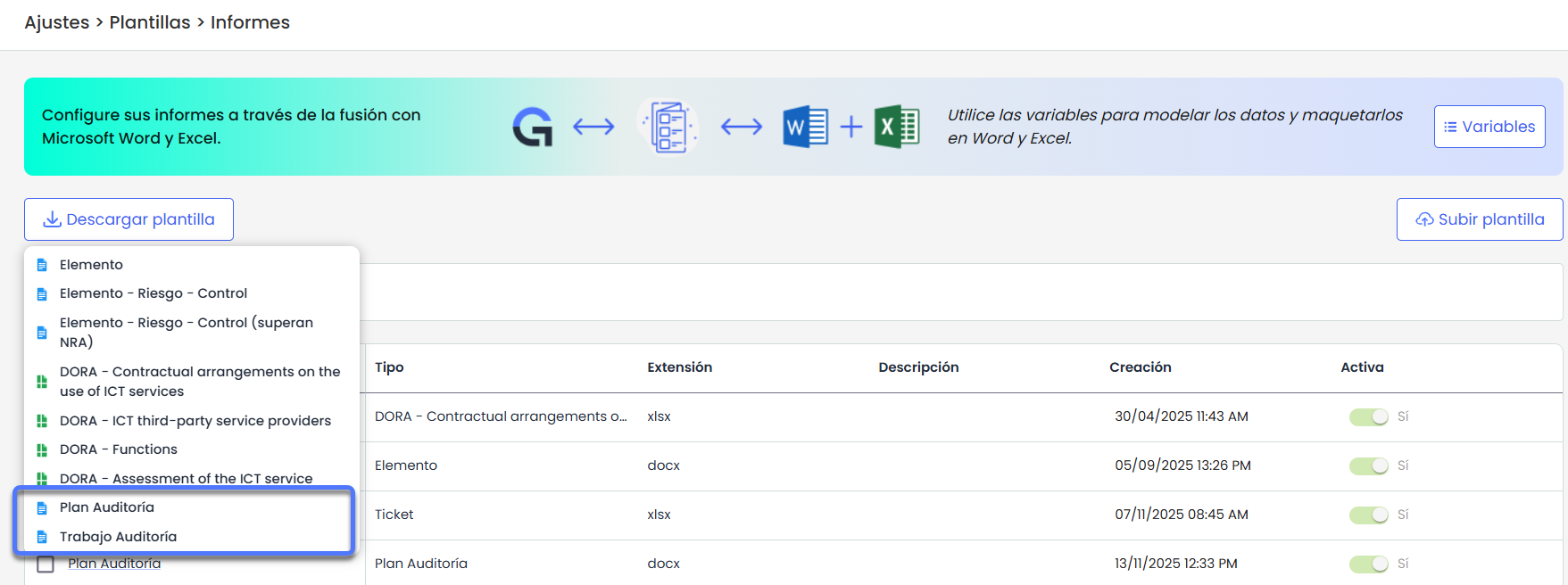
Download template
The solution includes two example templates that can be downloaded, reviewed, and used as a base:
-
Audit Plan Template
-
Audit Work Template
Both templates contain the basic structure of information, tables, and tags that can be used as a starting point to customize Audit reports.
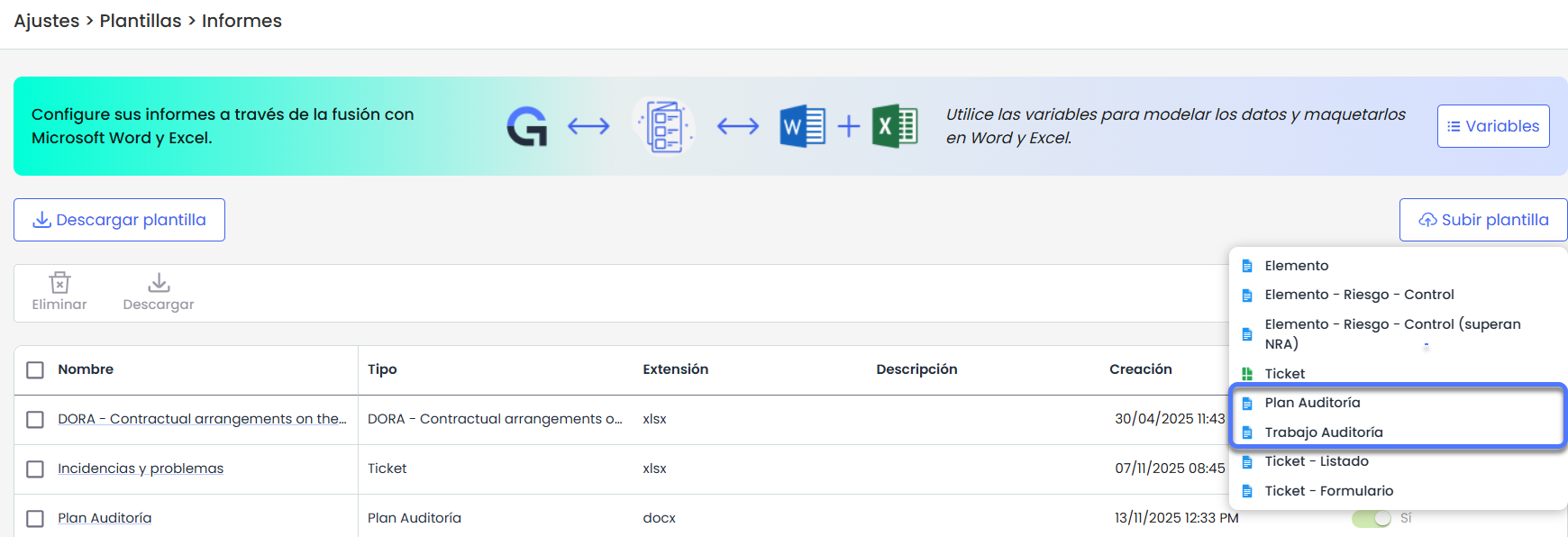
Upload Template
In the Upload Template option, users can upload Word templates for:
-
Audit Plan
-
Audit Work
Variables
The Audit Plan and Audit Work templates allow the use of a set of variables that are automatically replaced with the information recorded in the Audit module.
These variables can be inserted in any part of the Word document, whether in text, headers, footers, tables, or lists.
Below are the available variables organized by categories, following the structure used in standard Word templates.
Audit Plan
General plan data
|
Variable |
Description |
|---|---|
|
{planning.name} |
Name of the Audit Plan. |
|
{planning.description} |
Plan description. |
|
{planning.status} |
Plan status. |
|
{planning.date} |
Plan date (configurable format in template). |
Plan methodology and risk analysis
|
Variable |
Description |
|---|---|
|
{planning.planningMethodology} |
Planning methodology. |
|
{#planning.riskAnalysis}
{/} |
List of risk analyses associated with the plan. |
Audit Plan Responsibilities
It is structured with a loop of roles and, within each role, a loop of employees.
|
Variable |
Description |
|---|---|
|
{#planning.roles}{role.name} {/} |
List of roles in the Audit Plan. |
|
{#role.employees}
|
List of employees for that role. For example, if a bullet list is desired. |
Items associated with the Plan
|
Variable |
Description |
|---|---|
|
{#planning.items} |
Start of the list of items associated with the plan. |
|
{item.name} |
Name of the associated item. |
|
{item.category} |
Item category. |
|
{item.riskAnalysis} |
Risk analysis associated with the item. |
|
{item.associateWorks} |
Audit works associated with the item. |
|
{item.dim_alias.dimension.value} |
Value of the item's dimensions, using the alias configured in the methodology. |
|
{/} |
End of the list of items associated with the plan. |
Audit Works
General work data
|
Variable |
Description |
|---|---|
|
{#planning.auditWorks} |
Start of the list of works associated with the plan. |
|
{auditWork.name} |
Name of the audit work. |
|
{auditWork.type} |
Type of work. |
|
{auditWork.responsible} |
Responsible for the work. |
|
{auditWork.status} |
Work status. |
|
{auditWork.description} |
Work description. |
|
{auditWork.date} |
Work date. |
|
{#auditWork.items}
|
Items associated with the work with bullets. |
|
{auditWork.scheduledStartDate} |
Scheduled start date. |
|
{auditWork.scheduledEndDate} |
Scheduled end date. |
|
{auditWork.actualStartDate} |
Actual start date. |
|
{auditWork.actualEndDate} |
Actual end date. |
|
{auditWork.progress} |
Work progress (percentage). |
|
{auditWork.auditPlan} |
Audit Plan to which the work belongs. |
|
{/} |
End of the list of works associated with the plan. |
Configurable work fields
|
Variable |
Description |
|---|---|
|
{AuditWork.alias} |
Configurable work field, using the alias defined in Settings > Audit Methodologies > General |
Work Planning
(Specific section for planning an audit work)
|
Variable |
Description |
|---|---|
|
{AuditWork.name} |
Work name. |
|
{auditWork.type} |
Type of work. |
|
{auditWork.responsible} |
Responsible. |
|
{auditWork.description} |
Description. |
|
{auditWork.objectives} |
Objectives. |
|
{auditWork.requester} |
Requester. |
|
{auditWork.status} |
Status. |
|
{auditPlan} |
Associated audit plan. |
|
{auditWork.expectedStartDate} |
Expected start date |
|
{auditWork.expectedEndDate} |
Expected end date. |
Work Team
|
Variable |
Description |
|---|---|
|
{#auditWork.workTeams} |
Start of the work team list. |
|
{workTeam.role} |
Role within the work team. |
|
{workTeam.employee} |
Employee associated with the role. |
|
{workTeam.type} |
Types of auditor. |
|
{workTeam.plannedHours} |
Planned hours for that member. |
|
{/} |
End of the work team list. |
Associated Documentation
|
Variable |
Description |
|---|---|
|
{#auditWork.documentations} |
Start of the documentation list |
|
{documentation.name} |
File name. |
|
{documentation.extension} |
File extension. |
|
{documentation.date} |
Date. |
|
{documentation.description} |
Documentation description. |
|
{/} |
End of the documentation list |
Execution Methodologies
|
Variable |
Description |
|---|---|
|
{auditWork.executionMethodologies.items} |
Execution methodology for Items. |
|
{auditWork.executionMethodologies.risks} |
Execution methodology for Risks. |
|
{auditWork.executionMethodologies.controls} |
Execution methodology for Controls. |
Plan Scope
|
Variable |
Description |
|---|---|
|
{#auditWork.scope} |
Start of the Scope list. |
|
{item} |
Item included in the scope. |
|
{category} |
Item category. |
|
{categoryPath} |
Category path / hierarchy. |
|
{riskAnalysis} |
Risk analysis associated with the item. |
|
{dim_alias.dimension_name} |
Name of the item's dimensions (methodology alias). |
|
{dim_alias.dimension.value} |
Item dimensions (methodology alias). |
|
{dim_alias.dimension_alias} |
Alias of the item's dimensions (methodology alias). |
|
{/} |
End of the Scope list. |
|
{#auditWork.scope}
|
Example List of dimensions by item. |
Example:
|
Item |
Category |
Risk analysis |
Dimension U1 |
|---|---|---|---|
|
{#auditWork.scope}{item} |
{category} |
{riskAnalysis} |
Alias: {dim_U1.dimension_alias} Name: {dim_U1.dimension_name} Value: {dim_U1.dimension_value} |
Result:
|
Item |
Category |
Risk analysis |
dim_U1 |
|---|---|---|---|
|
Goods delivery service |
Services |
Operational risk analysis |
Alias:U1 Name: Item risk Value: Medium |
|
Technical support service |
Services |
Operational risk analysis, Security risk analysis |
Alias:U1 Name: Item risk Value: High |
Execution – Items
|
Variable |
Description |
|---|---|
|
{#auditWork.executionItems} |
Start of the list of execution items for the work. |
|
{executionItem.name} |
Item name. |
|
{executionItem.category} |
Item category. |
|
{executionItem.categoryPath} |
Category path / hierarchy. |
|
{executionItem.riskAnalysis} |
Risk analysis associated with the item. |
|
{#executionItem.dimensions} |
Start of the list of execution dimensions for items. |
|
{dimension_name} |
Dimension name. |
|
{dimension.value} |
Dimension value. |
|
{dimension_alias} |
Control dimension alias. |
|
{/}{/} |
End of the list of job execution items and the list of dimensions. |
Execution – Risks
|
Variable |
Description |
|---|---|
|
{#executionItem.risks} |
Start of the list of execution risks for the work. |
|
{risk.name} |
Risk. |
|
{risk.taxonomy} |
Risk grouping (taxonomy). |
|
{risk.riskAnalysis} |
Risk analysis associated. |
|
{#risk.dimensions} |
Start of the list of execution dimensions for risks. |
|
{dimension_name} |
Risk dimension name. |
|
{dimension.value} |
Risk dimension value. |
|
{dimension_alias} |
Control dimension alias. |
|
{/}{/} |
End of the list of job execution items and the list of dimensions. |
Execution – Controls
|
Variable |
Description |
|---|---|
|
{#executionItem.controls} |
Start of the list of job execution controls. |
|
{control.name} |
Control name. |
|
{control.riskAnalysis} |
Risk analysis associated with the control. |
|
{#control.risks} - {risk.name}{/} |
Start and end of the list of risks associated with the control. |
|
{#control.dimensions} |
Start of the list of control execution dimensions. |
|
{dimension_name} |
Control dimension name. |
|
{dimension_value} |
Control dimension value. |
|
{dimension_alias} |
Control dimension alias. |
Planning (project and tasks)
Project
|
Variable |
Description |
|---|---|
|
{auditWork.project.level} |
Level |
|
{auditWork.project.name} |
Project name. |
|
{auditWork.project.remainingDays} |
Remaining days. |
|
{auditWork.project.expectedStartDate} |
Expected start date. |
|
{auditWork.project.expectedEndDate} |
Expected end date. |
|
{auditWork.project.realStartDate} |
Actual start date. |
|
{auditWork.project.realEndDate} |
Actual end date. |
|
{auditWork.project.estimatedTime} |
Estimated time. |
|
{auditWork.project.dedicatedTime} |
Dedicated time. |
|
{auditWork.project.estimatedCost} |
Estimated cost. |
|
{auditWork.project.realCost} |
Actual cost. |
Tasks
|
Variable |
Description |
|---|---|
|
{#auditWork.project.tasks} |
Start of the list of project tasks. |
|
{task.level} |
Task level in the tree. |
|
{task.name} |
Task name. |
|
{task.description} |
Description. |
|
{task.type} |
Type. |
|
{task.responsibles} |
Responsibles. |
|
{task.remainingDays} |
Remaining days. |
|
{task.requestDate} |
Request date. |
|
{task.expectedStartDate} |
Expected start date. |
|
{task.expectedEndDate} |
Expected end date. |
|
{task.realStartDate} |
Actual start date. |
|
{task.realEndDate} |
Actual end date. |
|
{task.estimatedTime} |
Estimated time. |
|
{task.dedicatedTime} |
Dedicated time. |
|
{task.estimatedCost} |
Estimated cost. |
|
{task.realCost} |
Actual cost. |
|
{task.status} |
Status. |
|
{task.priority} |
Priority. |
|
{task.progress} |
Progress percentage. |
|
{/} |
End of the list of project tasks. |
Working papers
|
Variable |
Description |
|---|---|
|
{#auditWork.workingPapers} |
Start of the list of working papers. |
|
{workingPaper.code} |
Working paper code. |
|
{workingPaper.name} |
Working paper name. |
|
{workingPaper.type} |
Working paper type. |
|
{workingPaper.description} |
Description. |
|
{workingPaper.attachment} |
Associated attachment. |
|
{#workingPaper.relatedRecords}
|
Start of the list of related records. |
|
{/} |
End of the list of working papers. |
Formatting options
Dynamic Audit templates allow applying formatting options directly to the variables used in reports. These options work in any Word or Excel template configured in GlobalSuite® and are compatible with all available variables in the Audit module.
List formatting using |join
When a variable represents a set of values (arrays), it is possible to convert the list into a single line by concatenating the items with the desired separator.
Syntax:
{variable | join:' - '}
Examples:
{role.employees|join:' - ' }
{auditWork.items|join:' - '}
{control.risks|join:' - '}
Expected result:
A list like:
Elemento A
Elemento B
Elemento C
Will be displayed as:
Elemento A - Elemento B - Elemento C
Table example:
|
Role |
Employee |
|---|---|
|
{#planning.roles}{role.name} |
{role.employees|join:' - ' }{/} |
Result:
|
Role |
Employee |
|---|---|
|
Audit Team |
Cristina R.- Pedro S.- Elena P. |
|
Workflow Role |
Daniel T - Ana M. - Diego R. |
This option can be used with any multiple variable, including:
-
Items
-
Risks
-
Controls
-
Dimensions
-
Role employees
-
Documents
-
Tickets
-
Related records
-
Any configured alias
Date formatting using |formatDate
Variables representing dates can be displayed using the system's default format or a custom format defined by the user.
1. Default format
If no format is specified, GlobalSuite® will automatically use:
dd/MM/yyyy HH:mm:ss
Example:
{AuditWork.date}
→ 13/06/2025 11:41:48
2. Custom format
If you want to control the date representation, you can define a format directly in the template.
Syntax:
{variable | formatDate:"yyyy-MM-dd"}
Examples:
Simple date
planning.date | formatDate:"yyyy-MM-dd"
→ 2025-09-18
Day/month/year without time
AuditWork.scheduledStartDate | formatDate:"dd/MM/yyyy"
→ 18/09/2025
Long date with month name
AuditWork.date | formatDate:"dd MMMM yyyy"
→ 18 September 2025
Day of the week + date
Task.requestDate | formatDate:"EEEE, dd/MM/yyyy"
→ Thursday, 18/09/2025
Abbreviated year + abbreviated month + day
AuditWork.actualEndDate | formatDate:"yy MMM dd"
→ 25 Sep 18
Date and time with valid date-fns format
Task.requestDate | formatDate:"dd-MM-yyyy HH:mm"
→ 18-09-2025 14:30
Most used characters
-
yyyy → full year
-
yy → abbreviated year
-
MM → numeric month (01–12)
-
MMM → abbreviated month (Jan, Feb, Mar…)
-
MMMM → full month
-
dd → day of the month
-
EEEE → full day of the week
-
EEE → abbreviated day of the week
-
HH → hours 00–23
-
mm → minutes
-
ss → seconds
Note
Case-sensitive; must be respected exactly.