
This option allows configuring connections between GlobalSuite and external tools, thanks to connectors already implemented in the platform. The available connections are as follows:
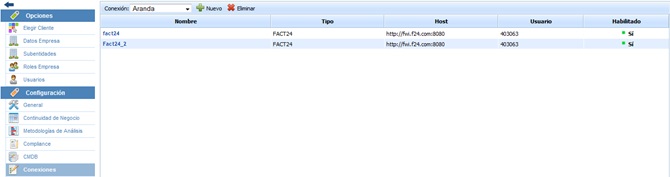
-
OSSIM: Open Source Security Information Management is a tool that allows system administrators to manage network security, servers, intrusion detection, and prevention. This connection allows integration with the options of CMDB, Incidents and Problems, Measurements, and SOA.
-
OCS: This tool allows users to manage the inventory of their IT assets, collecting information about the hardware and software of devices on the network. This connection allows integration with the CMDB option.
-
E-Mail: Enables synchronization of an email account with the Tickets option.
-
Redmine: This tool enables project management through a request tracking system. This connection allows integration with the options of Incidents and Problems, Tickets, Changes and Deliveries, Service Requests, Claims, Non-Conformities, and Corrective/Preventive Actions.
-
Active Directory: Allows the synchronization of GlobalSuite with an organization's Active Directory, so that access to GlobalSuite is performed through the Active Directory access credentials. This connection allows integration with the Users and Employees options. More information about this configuration can be found in this section of Synchronization > Active Directory / LDAP
-
Aranda: This tool enables the management and administration of a configuration management database. This connection, therefore, allows integration with the CMDB option.
-
FACT24: This tool, associated with business continuity, allows notifications to be sent via SMS and phone calls when incidents meeting certain criteria occur. This connection allows integration with the options of Employees, Decision Committees, Roles, Incident Management Plans, Recovery Plans, Crisis Management, and Critical HR.
-
LDAP: Allows the synchronization of GlobalSuite with an organization's LDAP, so that access to GlobalSuite is performed through this protocol. More information about this configuration can be found in this section of Synchronization > Active Directory / LDAP
-
SAML: Allows the authentication of GlobalSuite using the standard SAML2 protocol with different Identity Managers, so that access to GlobalSuite is performed through trusted users and single sign-on. You can find more details about this type of connection in the Synchronization section > SAML
If specific questions arise regarding the configuration of a connection type, please contact the GlobalSuite® support department.