
The General Details section groups the basic configuration and identification fields of the survey. Its behavior varies depending on the type of access (internal or external) and the configured survey model.
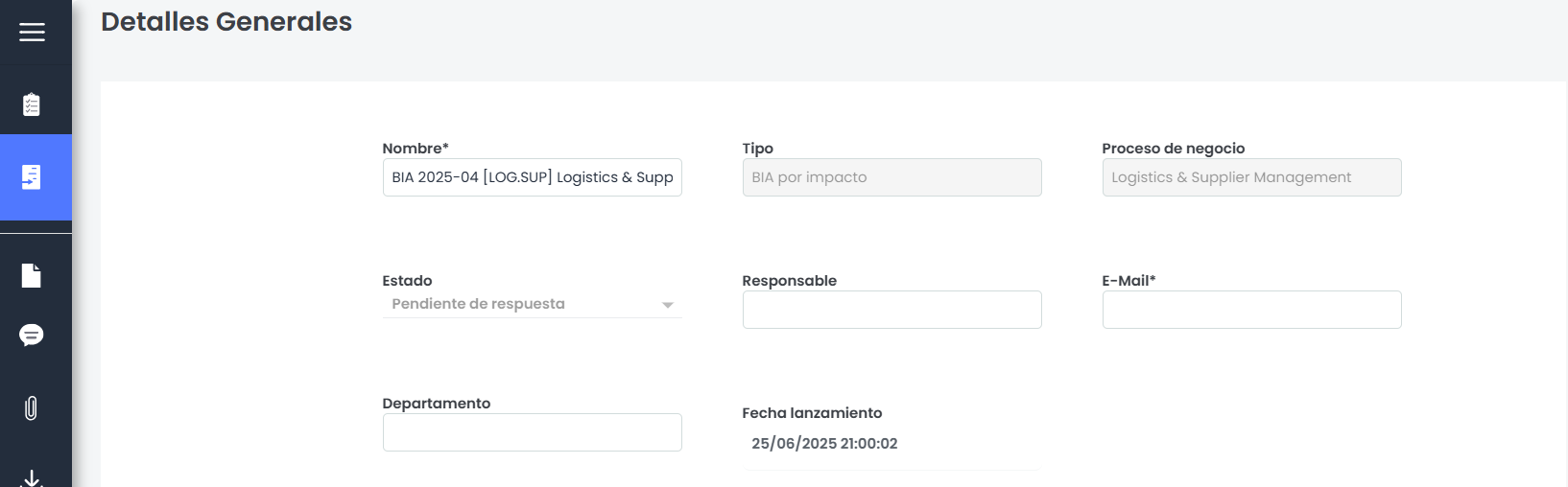
-
Name: Allows defining the identifying name of the survey. Editable in internal surveys and read-only in external access. It is a mandatory field.
-
Type: Indicates the type of Model based on which the survey was conducted. It is not editable.
-
Status: this field is only displayed if the survey model has configured statuses. Its behavior depends on the type of access and the type of defined status:
-
External access: for both automatic and manual statuses, the field is displayed in read-only mode.
-
Internal access:
-
If the status is automatic, it is displayed as read-only and reflects the current status of the survey (updatable from the header).
-
If the status is manual, the field is editable and allows selecting any available status.
-
-
-
Business process: Displays the business process evaluated in the survey. It is not editable.
-
Responsible:
-
External access: always visible and not editable.
-
Internal access:
-
If the survey has no statuses, or the current status does not define a responsible, the field appears empty and editable.
-
If the status defines a responsible, it is automatically filled and remains editable. It is not a mandatory field.
-
-
-
E-mail:
-
External access: always visible and not editable.
-
Internal access:
-
If there is no responsible, the field appears empty and editable.
-
If there is a responsible, it is automatically filled with their address and is not editable.
-
-
-
Department: text field, always visible and editable.
-
Launch date: date field, not editable. Displays the creation date of the survey.
-
End of publication date: only displayed if the survey was generated from a publication.
Additionally, in BIA by Impact type surveys, the following fields will also be displayed if they have been configured in the model. They are not editable:
-
Main objective: Informs the user about the main objective of the survey or the BIA.
-
Individual objectives: Informs the user about those more specific objectives for which it is necessary to conduct the survey or the BIA.
-
Additional requirements: Informs the user about those additional needs when completing the survey.
-
Types of business impact: Allows the user to view the criteria established when completing the BIA, which can help in completing the survey.
-
Criticality value: Informs users about the distribution of impacts in the form of a graph.
This section includes a “Save” button, located at the end of the form, which allows validating and saving the changes made on this screen.