
The subentities option allows users with the Enterprise Administrator and Entity Administrator profiles to generate entities pending in their company environment.
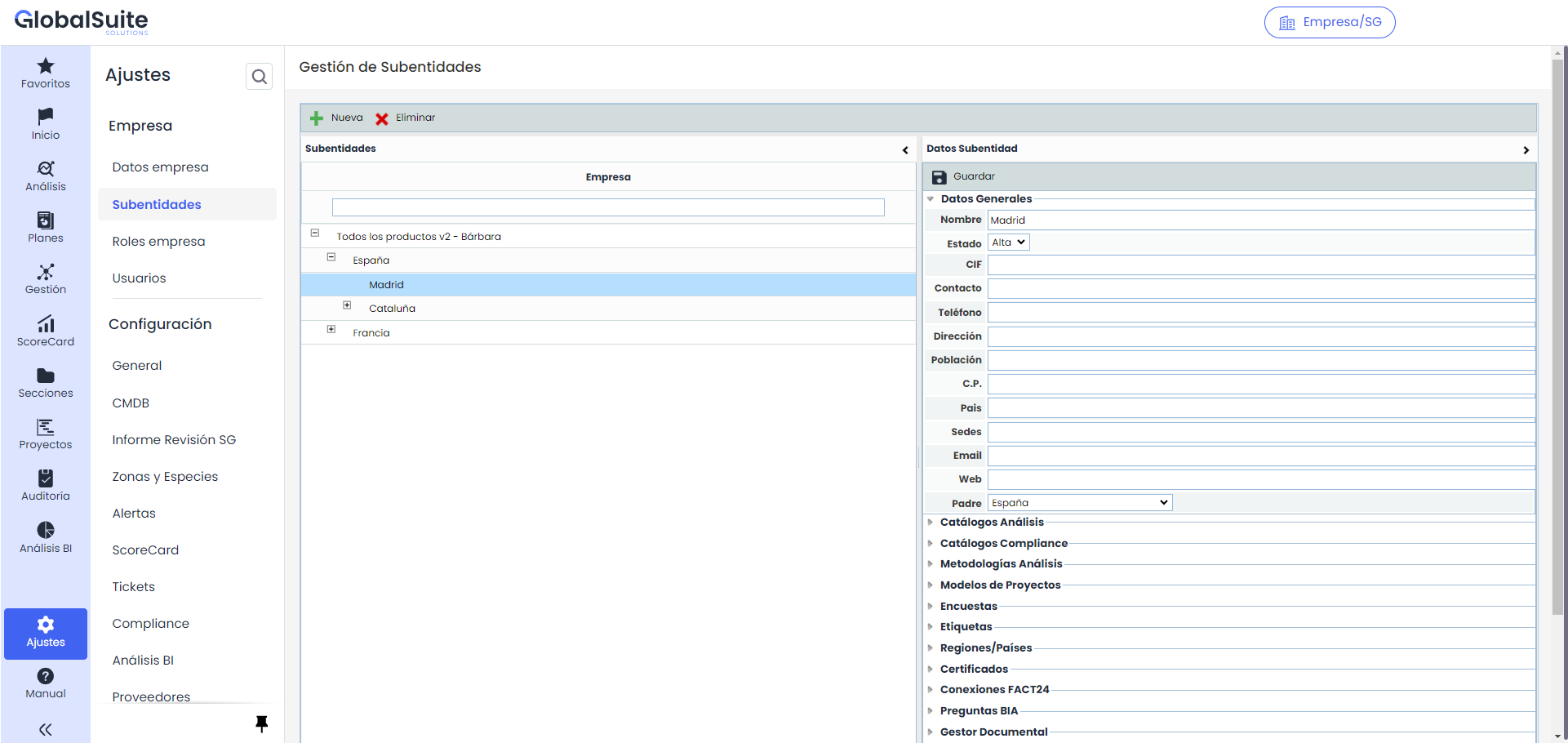
The options allowed by the table are as follows:
-
New: Allows creating a new entity. To do this, the desired row must be selected, and the 'New' button must be clicked. The tool has a limit for creating subentities set in the 'Company Data' option.
-
Delete: Enables the deletion of an entity created in the table.
Once the entity is created, by selecting it in the table, the tool allows defining the following sections:
-
General Data: Allows defining the entity's data such as Name, CIF, Contact, etc., and saving them by clicking the 'Save' button.
NOTE: The 'Parent' option allows the user to assign the required parent entity to the subentity if needed. For this, the subentity must have the same options (analysis catalogs, compliance catalogs, etc.) as the parent entity.
-
Analysis Catalogs: Allows defining which analysis catalogs will be available for work in the subentities.
-
Compliance Catalogs: Allows defining which compliance catalogs will be available for work in the subentities.
-
Analysis Methodologies: Offers the possibility to define which analysis methodologies can be used for work in the subentities.
-
Project Models: Allows selecting the project models that can be used in the subentities.
-
Surveys: Offers the possibility to select the survey models that can be used in the subentities.
-
Tags: Allows assigning tags to the subentities to consolidate information more specifically. To do this, the required tag must be selected, and the 'Add' button must be clicked. If you want to delete a tag, you must select it and click the 'Delete' button.
NOTE: Tags are set in the 'Settings/General' section.
-
Certificates: Allows defining the certificates associated with the subentity. To do this, the required certificates must be selected, and the 'Add' button must be clicked. Once the entry is generated, the tool allows defining the certificate number and any additional comments.
-
FACT24 Connections: Allows generating connections between GlobalSUITE and external tools.
-
BIA Questions: Allows customizing which questions from the BIA configuration will be visible in the lower entities, to personalize that impact assessment in each one.
NOTE: Questions not enabled for a subentity will not be available in BIAs, Consolidated BIAs, Reports, or BIA History.
-
Document Manager: Allows activating or deactivating selectively the Workflow approval manager for each subentity.
NOTE : If the use of Workflows for a subentity is deactivated, restrictions and approval flows will be removed: new documents and versions can be uploaded, statuses can be changed manually, and all files and folders will be visible (for users with access to the option).