
General Survey Configuration
-
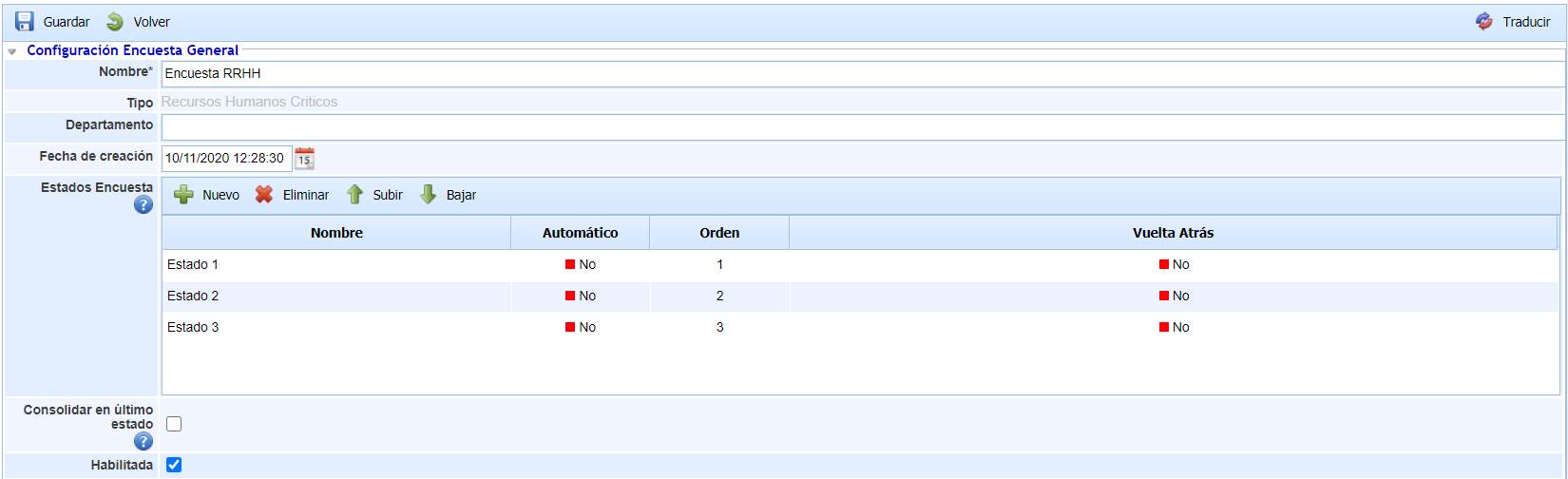
Name: Allows indicating the name of the survey model. This name will be displayed in the initial survey list.
-
Type: Displays the type of survey. It is an informational data.
-
Department: Allows indicating the department responsible for managing the survey.
-
Creation date: Identifies the creation date of the survey model.
-
Survey States: This table allows defining a set of states for the survey. These states can be assigned to employees when configuring the survey, so they will be responsible for the survey depending on the state it is in. For each state, it is possible to define:
-
The name of the state.
-
Whether the state is Automatic or not, so that if a state is automatic, the surveys will move to the next state once completed without any user intervention. If the state is not automatic, it will be necessary to manually change the state of a survey.
-
The order of the states through the "Move Up" and "Move Down" buttons.
-
Whether the state allows returning to the previous state. By selecting Yes, the person responsible for completing the survey can return it to the previous state.
-
Whether the surveys can return to the previous state or not for the state, through the "Rollback" field.
-
-
Enabled: Allows indicating that the survey is enabled for use in GlobalSUITE.
It is possible to translate the fields of the survey template into the other available languages through the "Translate" button at the top right. This button will allow us to select another language and define the name of the configurable fields in that language. Currently, the survey states.
Survey type
-
Critical HR Survey: Selecting this option allows conducting a survey to identify/modify the Critical Human Resources of each process.
-
Committee Survey: Selecting this option allows conducting a survey to identify the members of the Decision Committees.
-
Comment: This field allows additional information for the survey model.