
This option allows viewing the alerts sent by GlobalSuite®.
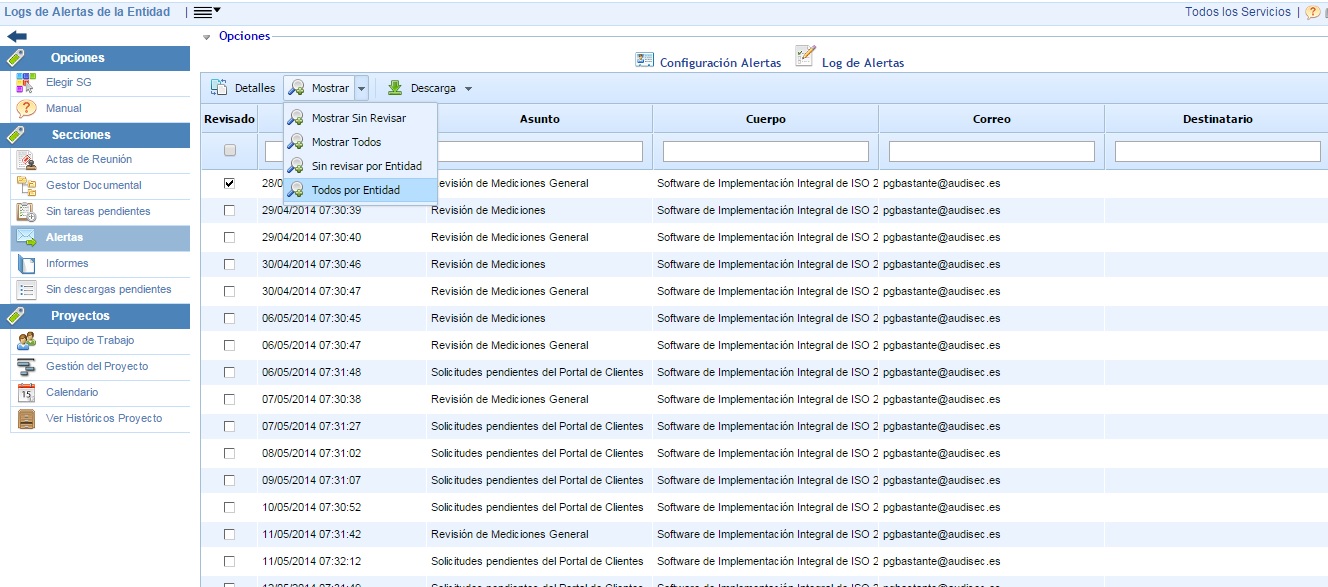
The available options are as follows:
-
Details: By selecting an alert and clicking on this button, all the details of the sent alert are displayed.
-
Show: Different filters are allowed to display the logs. The filters are:
-
Show Unreviewed: Displays the logs of the alerts sent to the user consulting the option that are unreviewed (without the Reviewed check).
-
Show All: Displays all the logs of the alerts sent to the user consulting the option, both reviewed and unreviewed.
-
Unreviewed by Entity: Displays the logs of the alerts sent to all users of the organization that have not been reviewed (without the Reviewed check).
-
All by Entity: Displays all the logs of the alerts sent to all users of the organization, both reviewed and unreviewed.
-
-
Download: Allows generating a report in .xls or .pdf format with the information displayed in the table.