
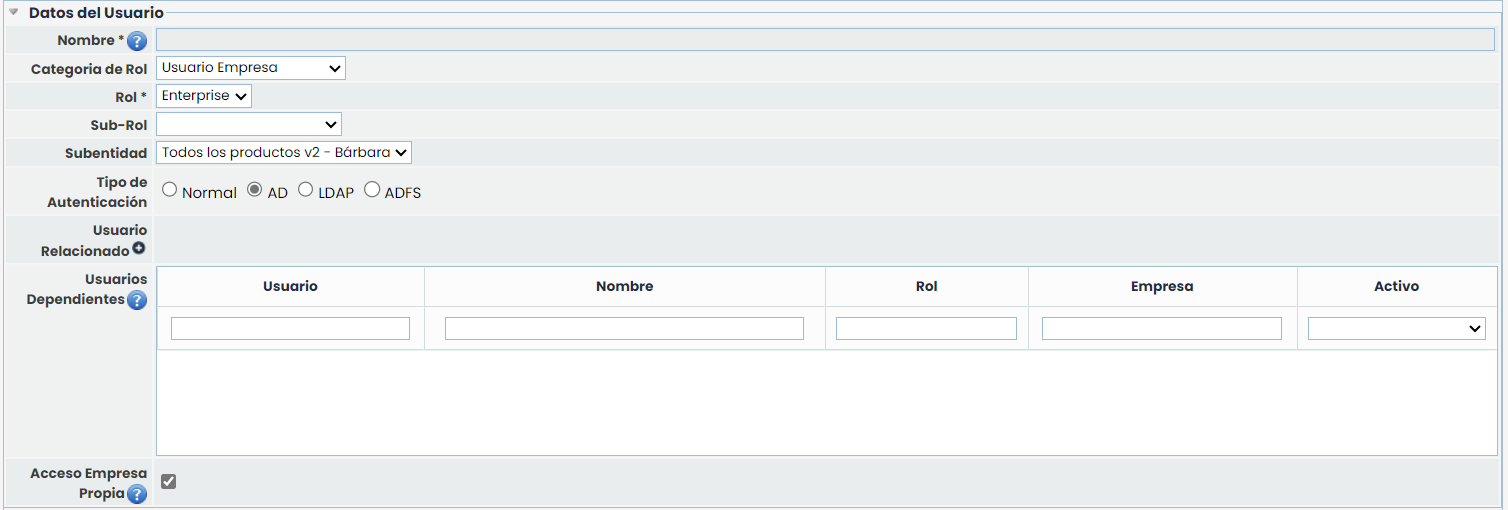
In the User Data, there are fields that allow customizing the authentication for accessing GlobalSUITE®. Below, each of the fields is detailed:
-
Authentication Type: Allows specifying how the user authentication will be performed to access GlobalSUITE®. There are 3 options available:
-
Normal: Authentication is performed against GlobalSUITE®.
-
AD: Authentication is performed against the Windows Active Directory. The connection between GlobalSUITE® and the organization's AD must have been configured beforehand.
-
LDAP: Authentication is performed against a standard LDAP. The connection between GlobalSUITE® and the organization's LDAP must have been configured beforehand.
-
-
Related User: Allows associating an already existing user from the organization itself or a higher level to avoid having different users for each of the entities or companies that the user needs access to. For this, you must have licenses with entities or a consulting license with associated Enterprise licenses. To associate the related user, you must click on the red exclamation icon, and a pop-up window will appear with the list of users to be associated.
-
Dependent Users: Allows viewing the users that the created user will have access to. This enables organizations with entities to provide a single user with access to multiple entities without needing to create a user for each entity or company with an Enterprise license. To assign dependent users, you must access the dependent user itself and mark the current user as "Related User".
-
Own Company Access: Allows marking whether the user is permitted access to their own company or, alternatively, will only have access to the entities with which they have been associated, as displayed in the previous "Dependent Users" section.