
The Business Impact Analysis, more commonly known as BIA, allows for the initial determination of which services are essential for the continuity of the organization's operations.
Upon accessing the Pre-BIA option, a list of registered impact analyses is displayed. By default, the tool shows individual Pre-BIAs, whose operation is developed in the next section. The initial options that can be performed are as follows:
-
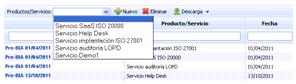
New: Allows creating a new Business Impact Analysis (BIA) record. To do this, select the service to be analyzed from the dropdown menu and click the ‘New’ button. Services are defined in ‘Home/Service Catalog’.
-
Delete: Allows deleting a registered Pre-BIA. To do this, select the desired row or rows and click the ‘Delete’ button.
-
Download: Allows downloading the list of Pre-BIAs in an editable format (.xlsx) or in .pdf format.
Individual Pre-BIAs
Impact Table
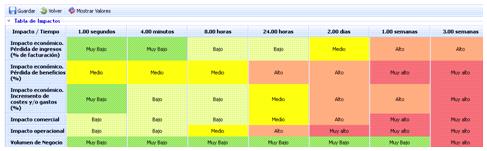
Allows evaluating how different impacts affect a specific service over a time scale. To do this, click the desired cell and select a specific value ranging from Very Low to Very High.
The impacts and the time scale must be previously configured in the ‘Home/Configuration’ section.
Graph
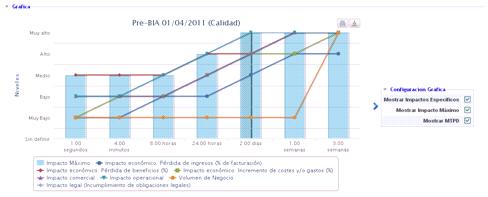
Allows graphically visualizing the values entered in the impact table. The visualization options are as follows:
-
Show specific impacts: Enables globally visualizing each of the impact assessments made in the previous section.
-
Show Maximum Impact: Allows visualizing the maximum impact level for each time scale.
-
Show MTPD: Allows visualizing the Maximum Tolerable Period of Disruption (MTPD). The calculation of the MTPD is developed in the next section.
If the user wants to see the specific graph of an impact, they can select its visualization in the box located below the graph.

MTPD Calculation
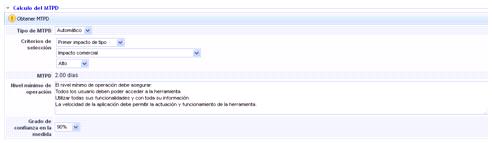
The options available in this section to calculate and define the MTPD are as follows:
-
MTPD Type: Allows establishing whether the MTPD calculation is manual or automatic.
-
Selection Criteria: Depending on the selected ‘MTPD Type’, it allows calculating the MTPD.
-
Manual: The user responsible for management sets the numerical and temporal value of the maximum interruption time.
-
Automatic: The platform automatically calculates the MTPD based on the following criteria:
-
First Impact: Establishes the MTPD when the first level of impact found matches the scale defined by the user (Very High-Very Low).
-
First Impact Average: Establishes the MTPD when the average of the impacts matches the scale defined by the user (Very High-Very Low).
-
First Impact of Type: Establishes the MTPD when the first level of a specific impact matches the scale defined by the user (Very High-Very Low).
-
-
Once all the criteria have been defined, click the ‘Get MTPD’ button, and the tool calculates the value automatically.
-
MTPD: Displays the evaluated Maximum Tolerable Period of Disruption.
-
Minimum Operating Level: Allows identifying the minimum processes and resources necessary to provide the service.
-
Confidence Level in the Measure: Enables indicating the user's confidence level regarding the obtained MTPD.
Resumption of Normal Operating Levels

-
Resumption Deadline: Allows establishing the maximum time within which the organization must return to normal.
-
Justification: Allows making any annotation that justifies the time defined in the previous point.
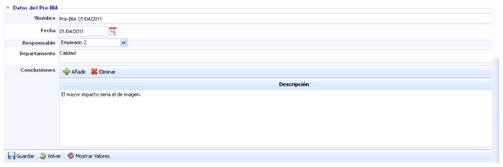
Pre-BIA Data
-
Name: Refers to a descriptive name of the Pre-BIA that will be displayed in the start table.
-
Date: Allows setting the date of the Pre-BIA execution.
-
Responsible: Allows identifying the person responsible for executing the Pre-BIA.
-
Department: Identifies the department(s) involved in the execution and evaluation of the Pre-BIA.
-
Conclusions: Allows identifying the conclusions related to the results obtained in the impact analysis by clicking the ‘Add’ button. If you want to delete a conclusion, select the desired row or rows and click the ‘Delete’ button.
Consolidated Pre-BIAs
The Consolidated Pre-BIAs option allows merging individual Pre-BIAs performed on the same service so that the user can have a global view of the impact analysis on a single service.
Upon accessing the option, the tool displays a list of the services defined in the scope, the number of individual Pre-BIAs performed on that service, and the consolidated MTPD.
NOTE: The consolidated MTPD value is only displayed once the individual Pre-BIAs have been merged.
To consolidate individual Pre-BIAs on the same service, click on the service name, where you will access the following screen:
The allowed options are as follows:
-
Save: Once the type of Consolidation (Manual or Automatic) is selected, it allows saving the selection made.
-
Back: Allows returning to the list of Consolidated Pre-BIAs.
-
Show Values: Displays the values by which the impact level is calculated. These values have been defined in the ‘Home/Configuration’ section.
-
By Department: Allows graphically visualizing the assessments made on the same service by different departments of the organization. When visualizing, you can choose between a pop-up window or displaying the graphs in an individual browser tab.
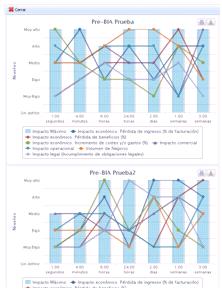
By Impact Type: Allows graphically visualizing the assessments made on one or more impacts by different departments of the organization. When visualizing, you can choose between a pop-up window or displaying the graphs in an individual browser tab.
To consolidate Pre-BIAs, the tool allows choosing between the following options:
-
Manual: Offers the user the possibility to manually set the impact values based on the individual Pre-BIAs performed by the different departments. To do this, you can rely on the ‘By Department’ and ‘By Impact Type’ buttons, where the values defined in the individual Pre-BIAs are graphically displayed.
-
Automatic: Allows automatically consolidating the individual Pre-BIAs, with the option to choose between two types of calculation:
-
Same for all impact types
Performs an automatic consolidation of the desired individual Pre-BIAs. To do this, click on the dropdown menu, select the required individual Pre-BIA, and click the ‘Add’ button. If you want to remove a Pre-BIA from the list, click the ‘Delete’ button.
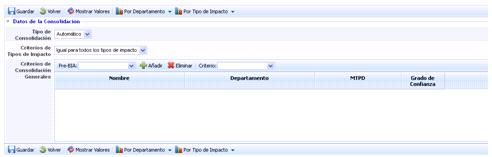
Once the individual Pre-BIAs are selected, the desired consolidation criterion must be defined, which can be:
-
Average: Performs an average of the defined values.
-
Weighted Average: Allows performing a weighted average of the values by establishing the importance weights on the Individual Pre-BIAs.

-
Maximum: Consolidates the values defined in the individual Pre-BIAs by selecting the maximum value of the values to be consolidated.
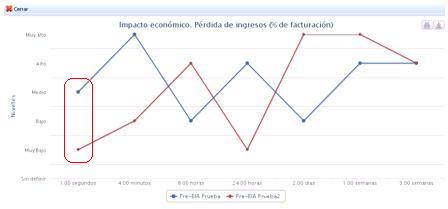
According to the economic impact graph, the consolidation on the maximum value in 1.00 seconds would show the Medium level.
-
Minimum: Consolidates the values defined in the individual Pre-BIAs by selecting the minimum value of the values to be consolidated.
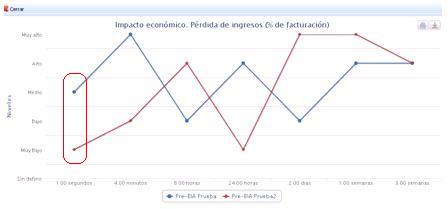
According to the economic impact graph, the consolidation on the minimum value in 1.00 seconds would show the Very Low level.
Once the consolidation values are defined, the consolidated Pre-BIA must be managed and defined as developed in the individual Pre-BIAs section, obtaining the MTPD, defining the minimum operating levels, etc.
-
Different for each impact type
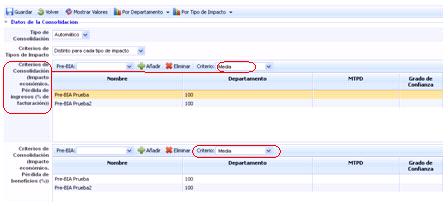
Allows defining specific consolidation criteria for each evaluated impact. These criteria have been developed in the previous section.
Once the consolidation criteria are defined, the consolidated Pre-BIA must be managed and defined as developed in the individual Pre-BIAs section, obtaining the MTPD, defining the minimum operating levels, etc.