
New features and general improvements
New AI Compliance Assistant
This improvement introduces an intelligent assistant for regulatory analysis and management, aiming to facilitate compliance assessment, identify gaps, propose improvement actions, and automate the creation of controls in GlobalSuite®.
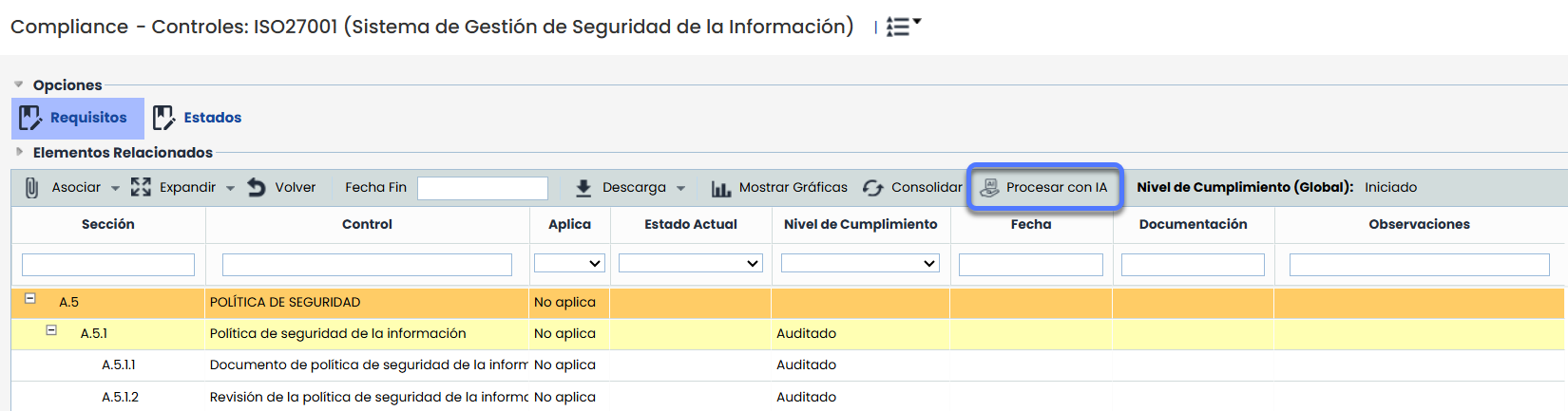
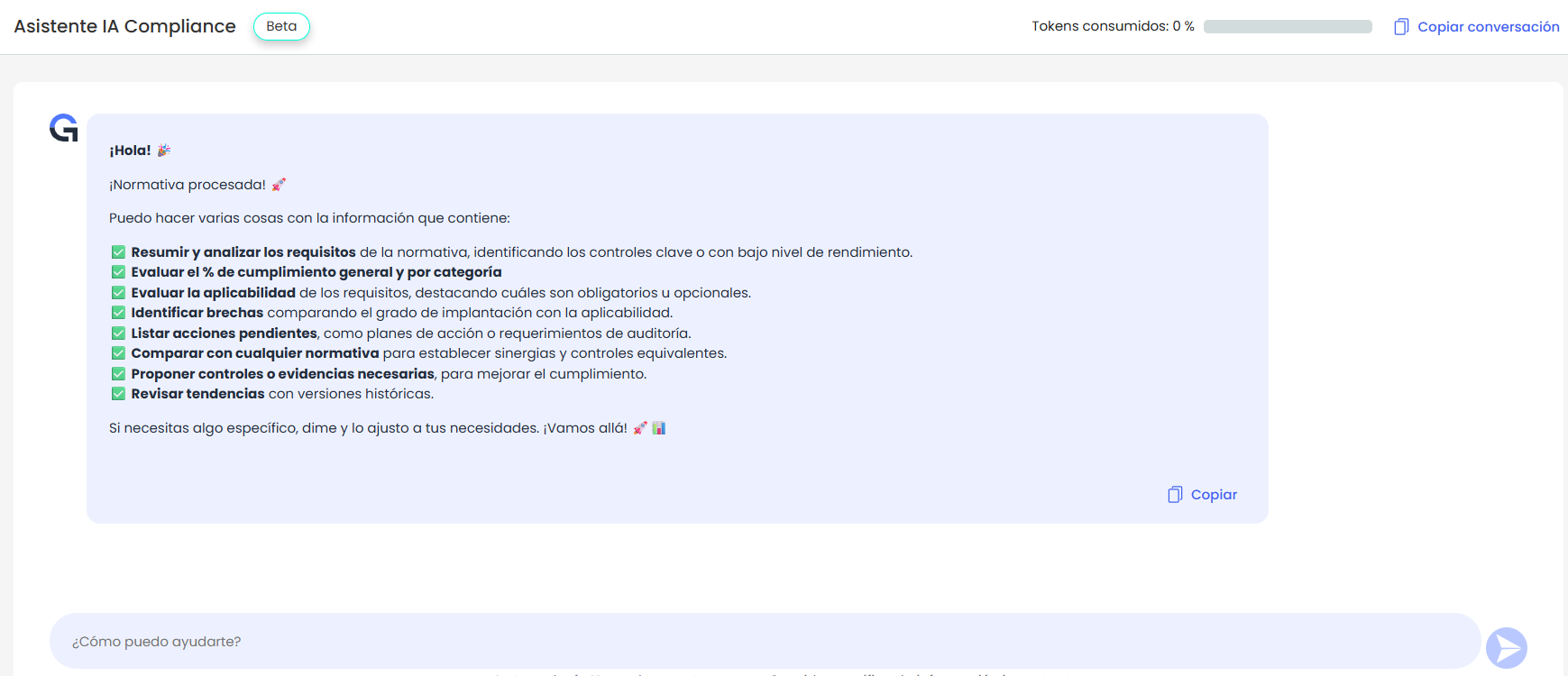
Key Features
-
Summarize and analyze the requirements of a regulation, highlighting key controls or those with low performance levels.
-
Evaluate the compliance percentage both overall and by category.
-
Determine the applicability of the requirements, differentiating between mandatory and optional.
-
Identify gaps by comparing the implementation level with the applicability.
-
List pending actions, including action plans and audit requirements.
-
Compare with any other regulation to establish synergies and equivalent controls.
-
Propose controls or evidence necessary to improve the compliance level.
-
Review trends and compliance evolution with historical versions.
-
Automation of proposals and controls:
-
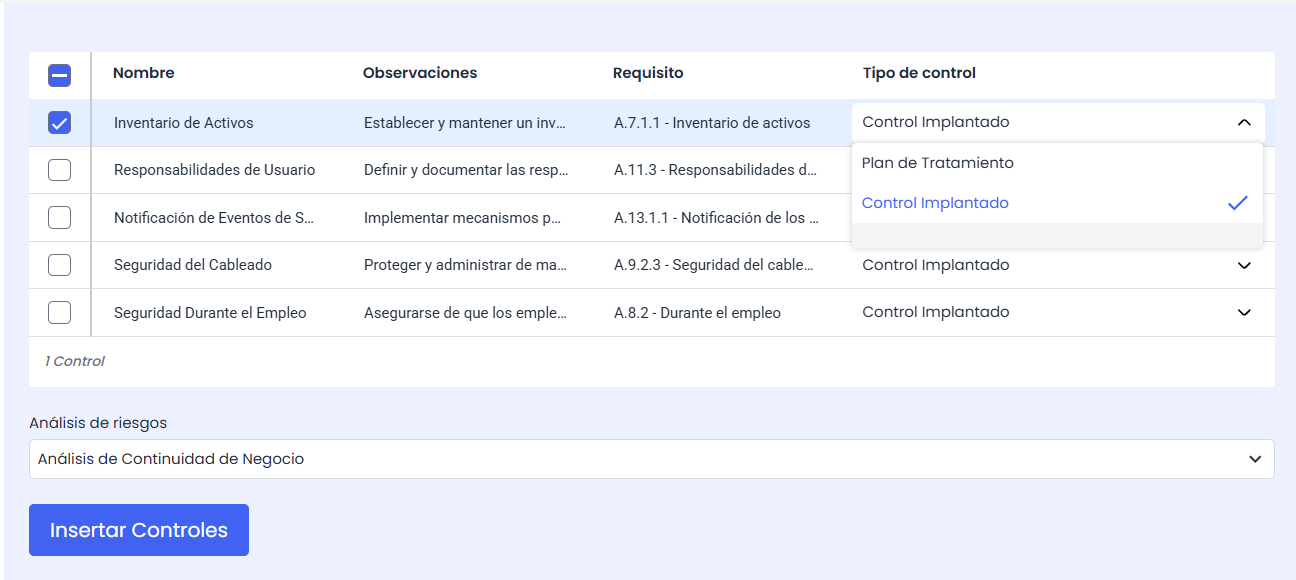
Display action proposals in table format, with the possibility of selecting them to include in a risk analysis, either as a treatment plan or as an implemented control.
-
Associate the created controls directly to the requirements of the regulation.
-
GlobalSuite® Continuity Improvements
-
Automatic calculation of MTPD, RTO in BIAs, Pre-BIAs, and RTO and RPO Calculation, with the possibility of applying configurable and globally applicable criteria.
-
Automatic calculation of MTPD and RTO in BIA surveys, with integration of configuration criteria and automatic value copying from the source BIA.
Automatic calculation of MTPD and RTO in BIAs
The possibility of automating the calculation of MTPD, RTO in BIAs is incorporated, applying the criteria defined globally from Settings, avoiding the need to manually input these values in each one.
Main features:
-
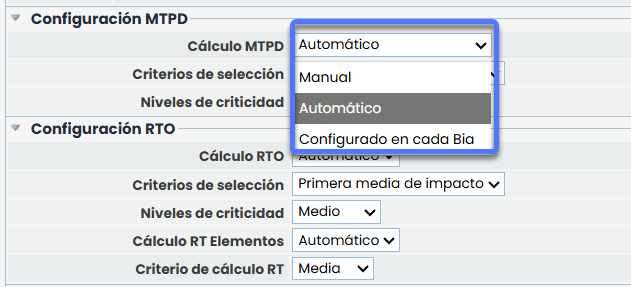
Global configuration of the type and calculation criteria in Settings > Business Continuity > BIAs , with the option to define whether the MTPD and RTO are manual or automatic or configured in each BIA (for the MTPD). This allows defining the calculation of MTPD and RTO for all BIAs without needing to access each one individually.
-
Possibility to choose criteria such as first impact, first average impact, first impact by type, or percentage of MTPD (for the RTO).
-
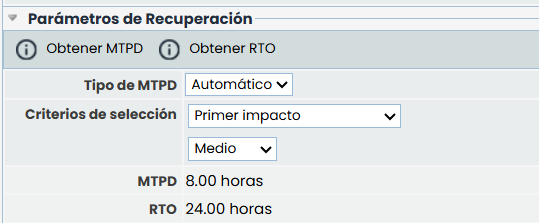
Differentiated visualization in the forms of BIAs , Pre-BIAs , and in the section RTO and RPO Calculation , according to the established calculation criteria (manual, automatic, or configured in each BIA).
Example of MTPD type configured in each BIA, and RTO as automatic:
Improvement in the RTO and RPO Calculation view
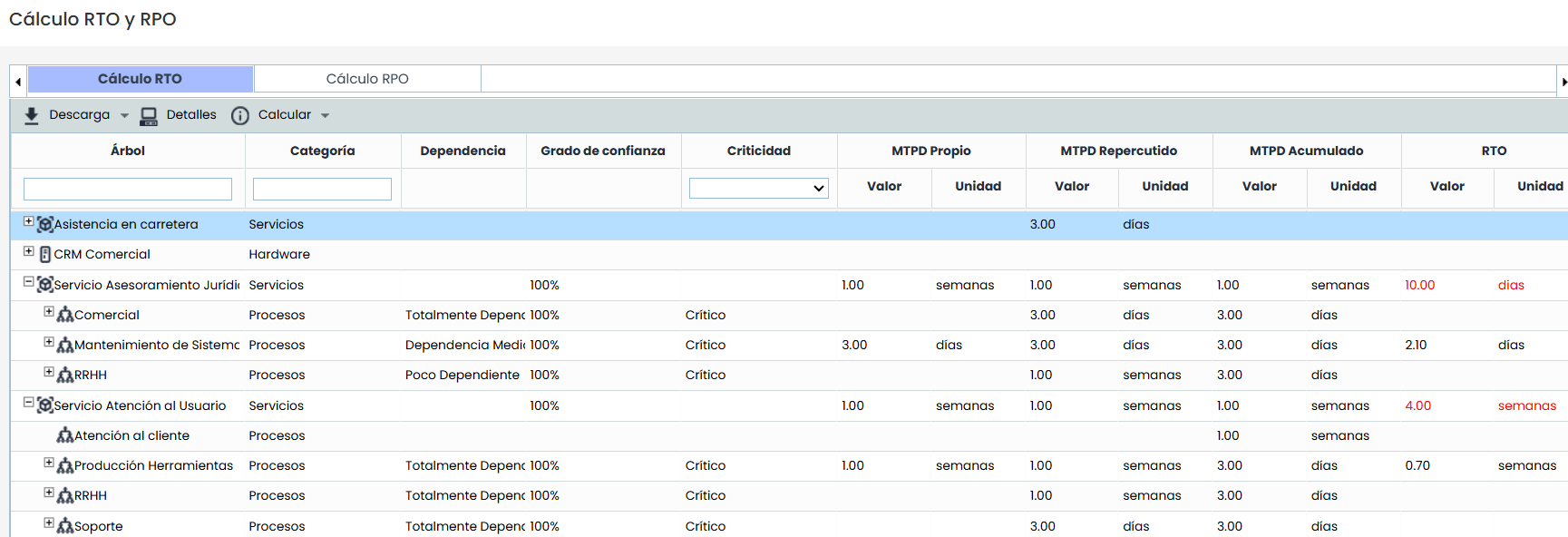
The existing view in Analysis > RTO and RPO Calculation is expanded, incorporating new capabilities that allow global calculation of consolidated MTPD and RTO for services and processes. This global calculation is based, as in the BIAs, on the configuration defined in Settings > Continuity > BIAs.
Main improvements:
-
Mass calculation of consolidated MTPD and RTO for services and processes according to the criteria defined in Settings > Continuity > BIAs.
-
Automation of calculations: possibility to calculate MTPD and RTO manually or automatically, with criteria such as first impact, first average impact, first impact by type, or percentage of MTPD (for the RTO).
-
Global execution from the action bar, with new options in the Calculate button:
-
Consolidated MTPD
-
Consolidated RTO
-
Accumulated and Repercussed MTPD
-
Accumulated and Repercussed RTO
-
-
Automatic validations to detect inconsistencies: in case of inconsistencies, the values are displayed in red.
-
New Details button to directly access the inventory form of the selected item and edit it.
Automatic calculation of MTPD and RTO in BIA surveys
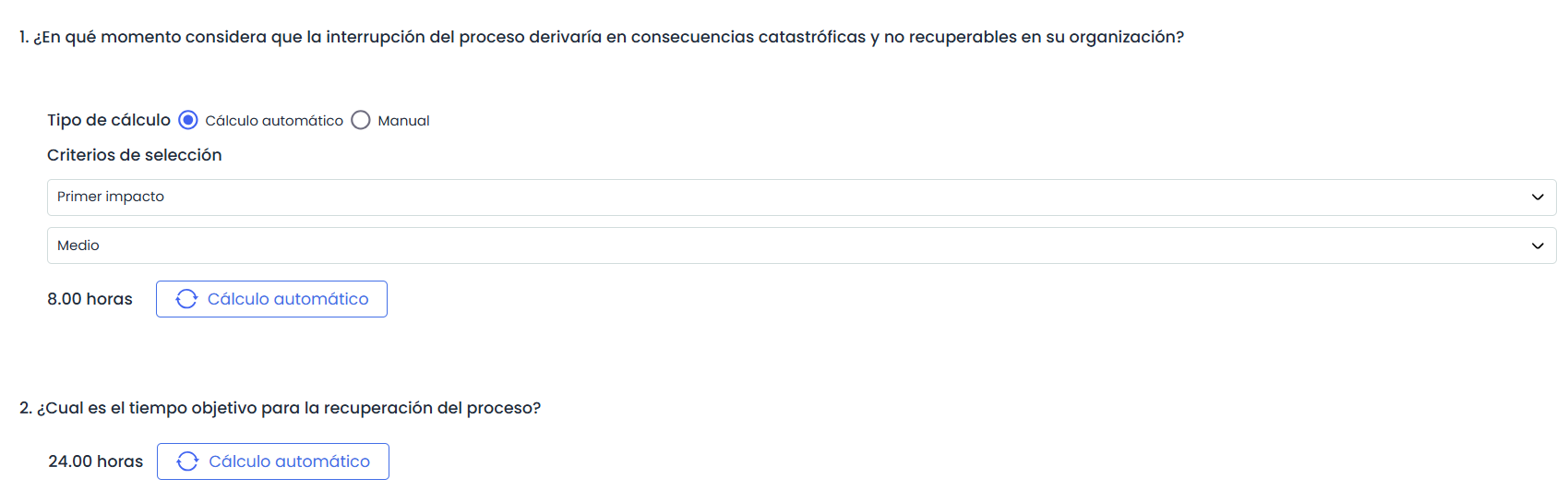
The possibility of automatically calculating MTPD and RTO in BIA surveys by Impact is added, expanding the functionality that until now only allowed manual input of values.
Main features:
-
Dynamic adjustment of survey forms based on the configured criteria:
-
If the calculation is manual, value + unit input is maintained.
-
If the calculation is automatic, the option to Obtain MTPD or Obtain RTO is displayed according to the criteria defined in the configuration.
-
If the calculation is Configured in each BIA for the MTPD, it will be possible to select the type (manual or automatic) and calculation criteria in the survey.
-
Example of MTPD type configured in each BIA, and RTO as automatic:
New GlobalSuite® GRC improvements
Permanent visualization of Global Risk by Element (GRI)
The column Global Risk by Element (GRI) is incorporated by default in the list of elements within Risk Analyses.
This column automatically displays the consolidated risk of each element, updating whenever associated risks are modified, surveys are consolidated, or the Calculate RA functionality is used.
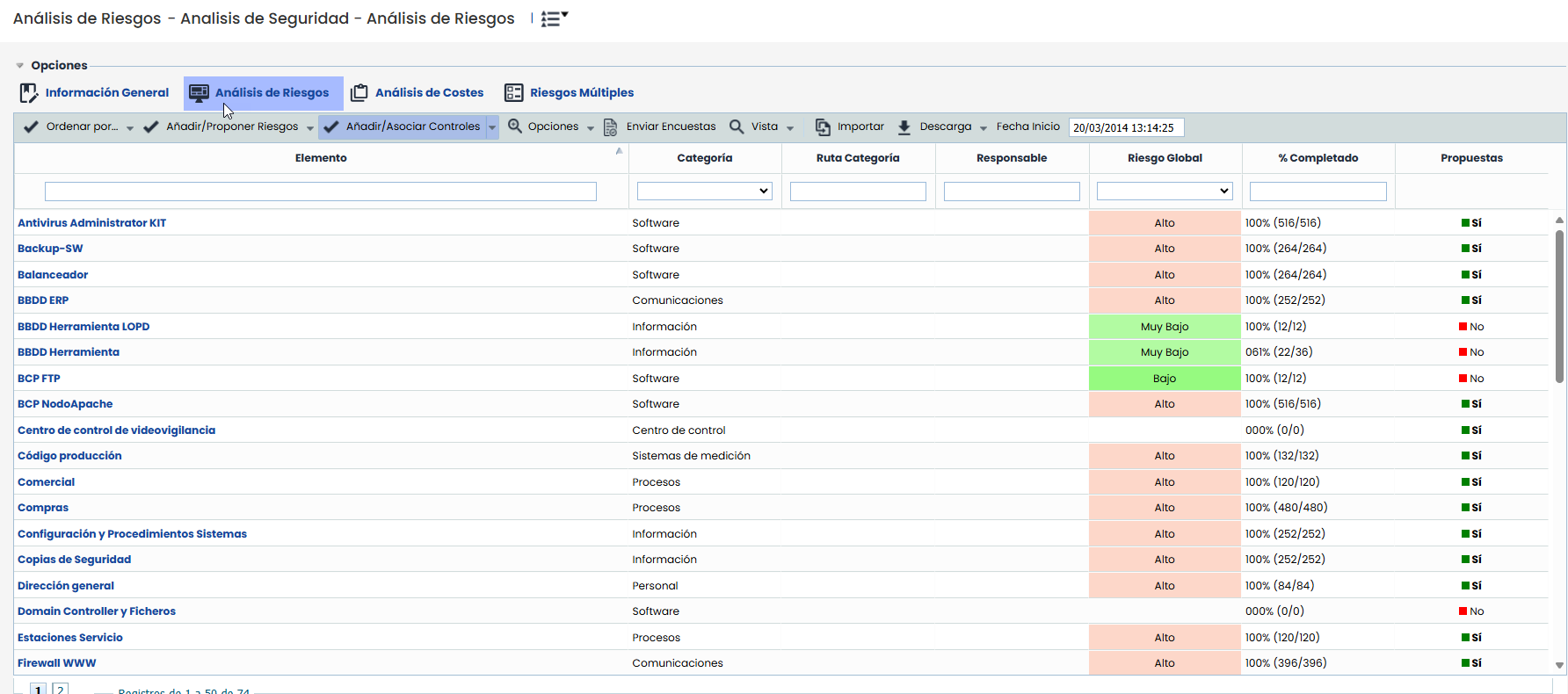
Additionally, it can be sorted and filtered like any other column in the table, facilitating the permanent consultation of the GRI without the need for manual calculations.