
New features and improvements in GlobalSuite®
Comprehensive reports of Items, Risks, and Controls
Report generation for Items, Risks, and Controls is expanded to allow mass export of information corresponding to multiple items or complete risk analyses.
Until now, these reports could only be generated for a single item. With this improvement, users can configure new templates in Settings > Templates > Reports and use them to export all visible information from the Inventory and Risk Analysis listings, maintaining the same fields and variables already available.
New template types
From Settings > Templates > Reports, the Upload template option incorporates three new types, available in Word and Excel format:
-
Item Listing.
-
Item - Risks - Controls Listing
-
Item - Risks - Controls Listing (exceed ARL)
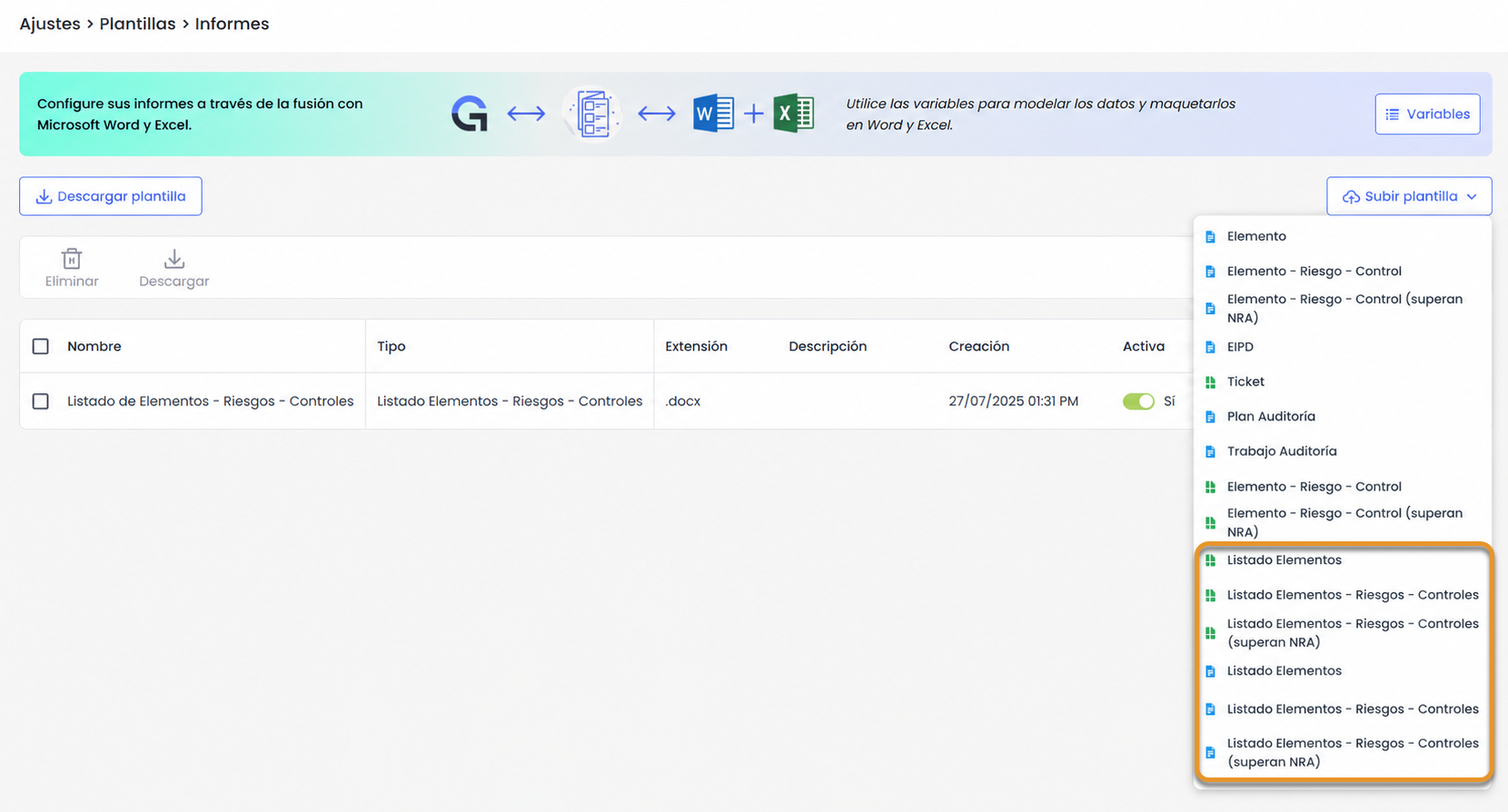
Each template allows configuring in which sections of the application its download will be available:
-
Inventory - Listing
-
Risk Analysis - Item Listing
Additionally, the Download template option includes predefined templates in Word and Excel to facilitate their configuration without needing to create the document from scratch.
Key features
-
Mass export of information with the full scope of an analysis, without repeating the download item by item.
-
Export of information in Word and Excel format.
-
New predefined templates for:
-
Item, Risk, and Control Listing.
-
Item, Risk, and Control Listing that exceed the ARL.
-
For more information about this feature, you can consult:
Tickets - New automatic date type “Calculated Date”
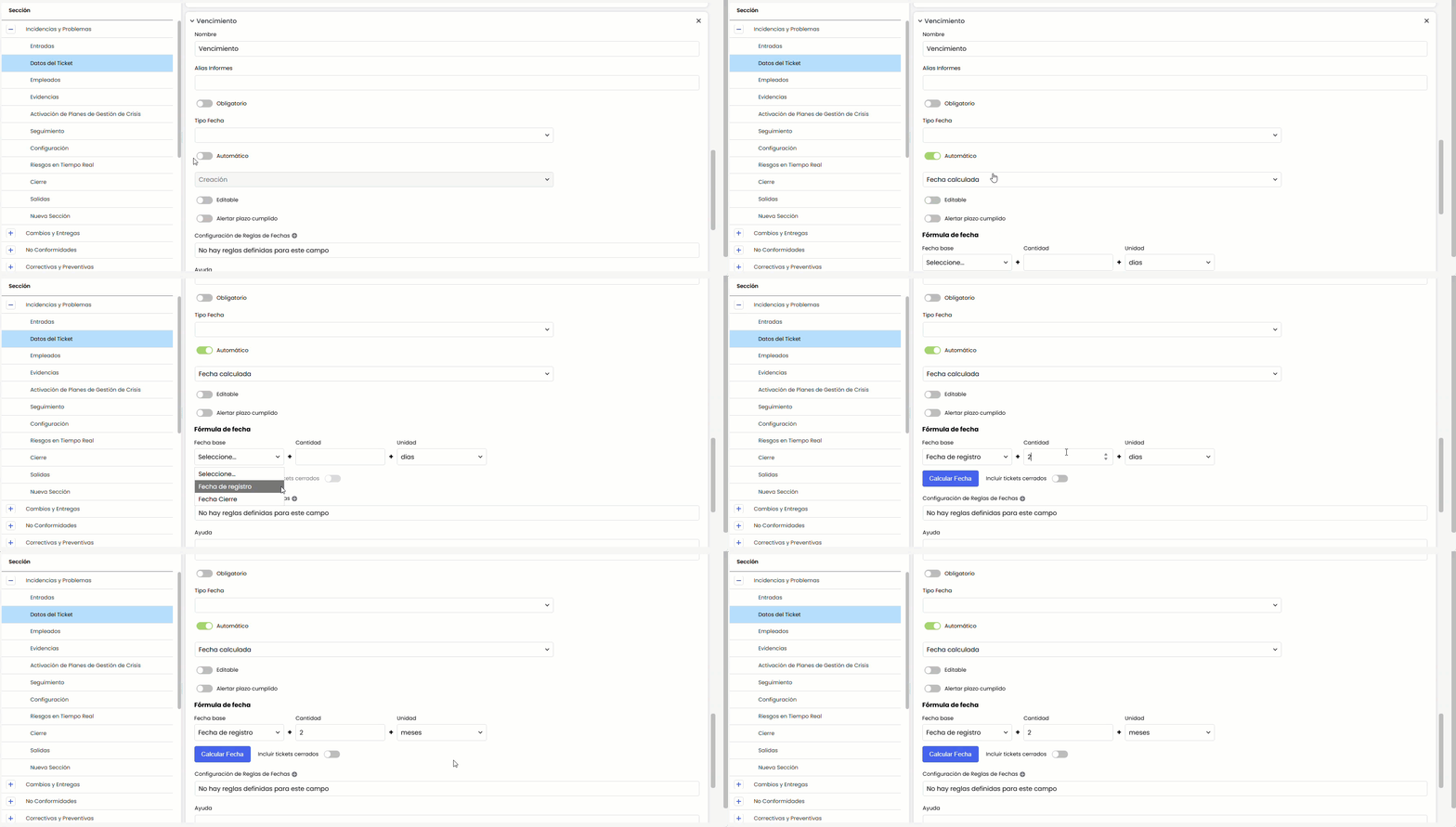
The automatic date type Calculated Date is incorporated, which generates a date by adding a number of days or months to another date within the same ticket —due dates, reviews, or deadlines— without manually entering it. It is configured from Administration > Tickets > Fields, marking a date field as Automatic and choosing Calculated Date. It applies to all ticket types.
Key features
-
Simple formula: base date + quantity (positive integer) + unit (days or months). The base date is chosen from the date fields of the same ticket type; the field itself and other calculated dates are excluded to avoid cycles.
-
If days is selected, natural days are added; if months is selected, the day of the month is preserved (or the last valid day if it does not exist). Example, starting from 02/15/2026: +30 days → 03/17/2026 and +1 month → 03/15/2026.
-
Non-editable field, which is automatically recalculated upon completing or modifying the base date (empty if the base has no value).
-
Mass recalculation of existing tickets with the Calculate Date button: in the background, with prior confirmation and the option to include closed tickets.
-
It is used like any other date in reports, filters, searches, exports, and copies, and is automatically calculated for imported tickets.
-
It can be combined with deadline alerts (Alert deadline met): a calculated due date can automatically notify when the date is reached.
Benefits
-
Less manual work and errors: due dates, reviews, and deadlines are calculated automatically and kept up to date.
-
Consistency and integration: deterministic calculation, applicable in bulk and imports, and usable like any other ticket date.
Document Manager - Link external files from SharePoint, OneDrive, and Google Drive
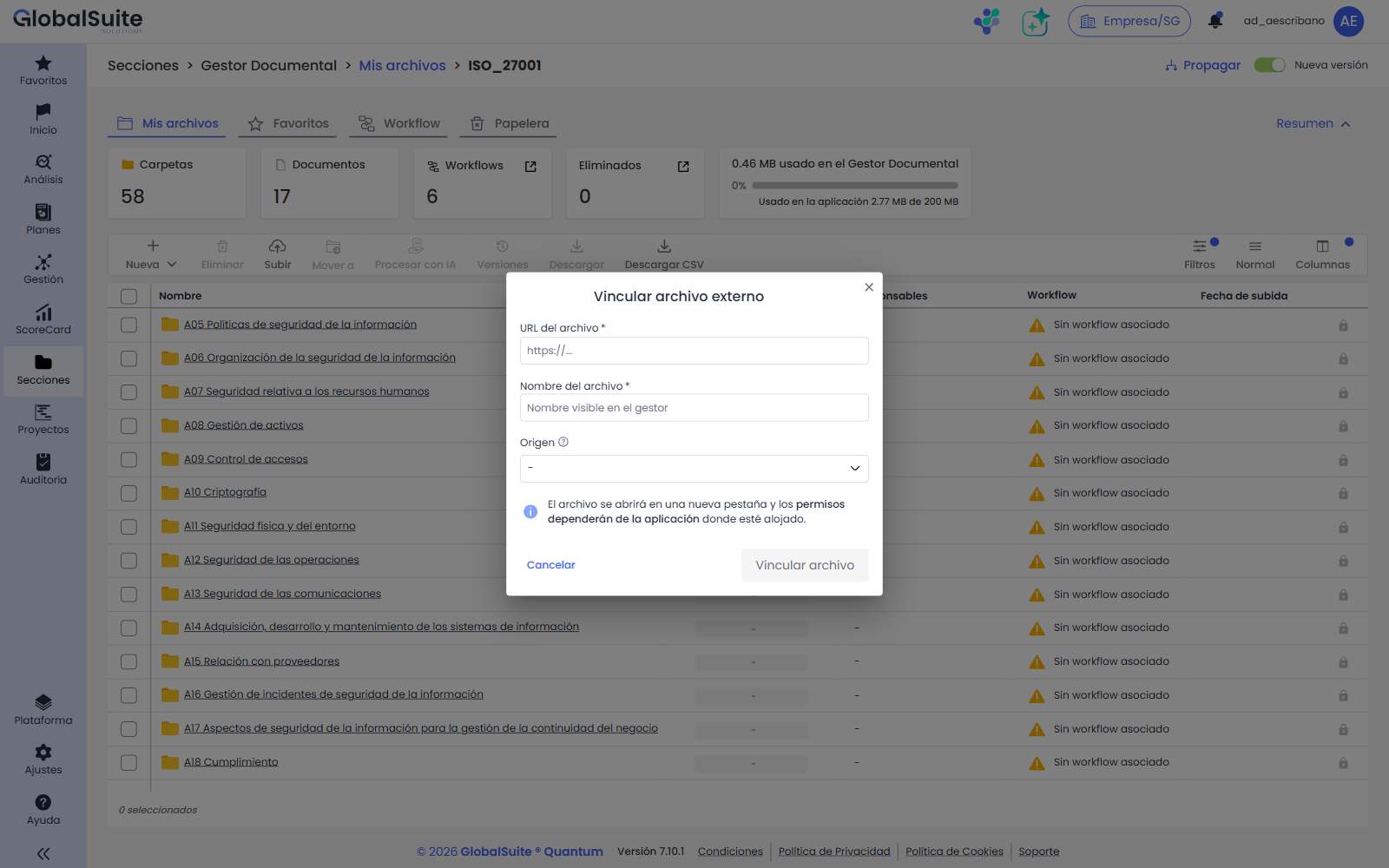
The Document Manager now allows linking external files via their URL from corporate repositories and content managers such as Microsoft SharePoint, Microsoft OneDrive, Google Drive, or other sources, without duplicating documentation within GlobalSuite®.
Until now, to use a document in GlobalSuite® that already existed in the client's corporate repository, a copy had to be uploaded, resulting in double maintenance, outdated versions, and inconsistencies. With this feature, the file is linked and behaves like a native document in the manager, maintaining a single source of truth.
Key features
-
New option Link external file in the New menu of the Document Manager, for users with document creation permissions.
-
Configurable sources per company: Microsoft SharePoint, Microsoft OneDrive, Google Drive, and Others (free URL). They are activated in Settings > General Configuration > Document Manager Configuration.
-
The linked file integrates into the folder structure and respects GlobalSuite® permissions, participates in document workflows (approval/rejection), and can be associated with evidence, plans, and other parts of the product, just like a native document.
-
Displays the source icon, supports tags, favorites, and trash, and its preview and opening are performed in a new browser tab.
-
It is logged and included in the company backup.
Benefits
-
No duplications: a single valid document in the corporate repository, linked from GlobalSuite®.
-
Governance within GlobalSuite®: permissions, workflows, and associations are managed within the tool, without relying on external permissions.
-
Less manual work and reduced risk of outdated versions.
For more information, you can consult:
Interface customization with corporate colors
GlobalSuite® now allows adapting the interface to the corporate image of each company not only with the logo but also with its brand colors, automatically adjusting text colors to maintain contrast and readability.
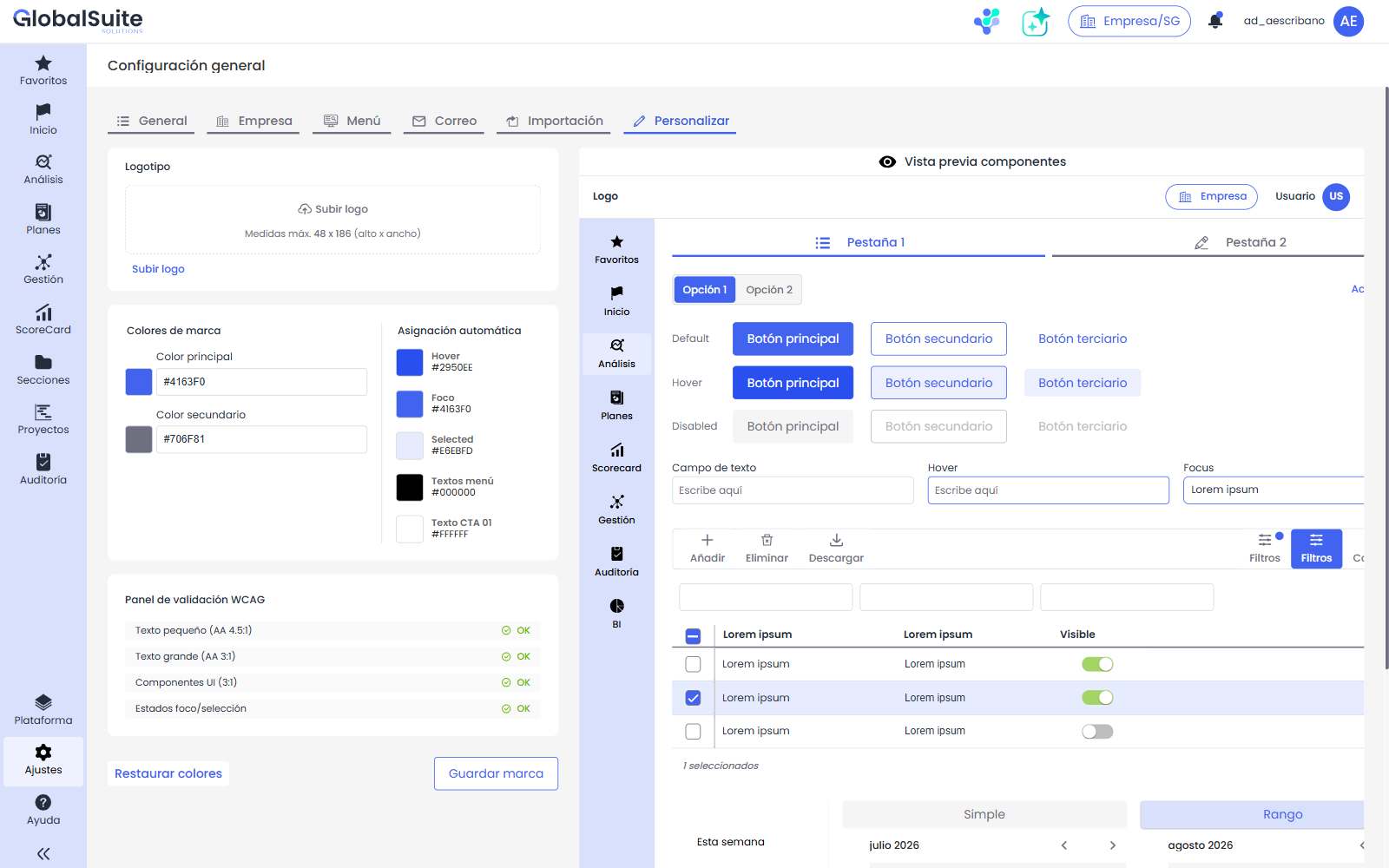
The configuration of logo and colors is unified in the new Customize tab ( Settings > General Configuration > Customize), and the resulting theme is applied transversally across the company's entire interface.
Key features
-
Definition of primary color and secondary color (visual selector or hexadecimal value), with logo configurable in the same place.
-
Automatic assignment of derived interface colors (hover, focus, selected, menu texts, and CTA) based on the base colors.
-
WCAG 2.2 AA accessibility validation in real-time and Correct action to automatically adjust combinations that do not meet contrast requirements.
-
Real-time preview of components before saving, with options to Save brand and Restore default colors.
-
The theme is applied to the entire interface (menus, modules, and components), loads according to the active company, and is included in the company backup.
Benefits
-
Coherent brand image across the platform, without custom developments.
-
Guaranteed readability thanks to automatic contrast calculation (WCAG 2.2 AA).
-
Client autonomy: each company configures its visual identity directly within the product.
For more information, you can consult: