
New features and improvements
New AI Assistant - IRC Surveys Analysis
A new assistant has been included in the GlobalSuite® Surveys module that performs an Intelligent Analysis of the information incorporated in the survey, transitioning from a manual review of responses to a more guided and assisted analysis, allowing the identification of items, risks, or controls that require greater attention and reducing the time spent reviewing large volumes of assessments and documents.
This version incorporates a new Artificial Intelligence assistant for the Surveys module of Items, Risks, and Controls.
This assistant facilitates the review and conclusion extraction from the survey to assist decision-makers responsible for verifying and consolidating information, as well as the user in identifying inconsistencies, gaps, or missing points when completing the survey.
Key features
-
Generation of insights on criticality, risk coverage, and control maturity.
-
Identification of high risks without associated controls or with insufficient coverage.
-
Detection of controls that are weak, ineffective, or highly dependent on manual processes.
-
Assisted review of evidence to verify if the provided document meets the requirements.
-
Highlighting possible deficiencies in evidence, such as missing date, responsible party, traceability, or context.
-
Generation of recommendations to improve controls, documentation, or future reviews.
Executive summary of the main findings to facilitate follow-up.
Other improvements
This version also includes the capability that once the survey is finalized, it is locked to prevent adding, deleting, or modifying information without following the established workflow.
The survey will remain accessible to recipients until it is closed or expires in the case of surveys published via a link.
Document Manager - New option to attach documents: drag and drop files
The document upload experience in the Document Manager is improved by incorporating a more agile and intuitive way to upload files.
The possibility of uploading documents by dragging them directly onto the file list in the “My Files” tab is incorporated, streamlining document management and avoiding exclusive use of the “Upload” button.
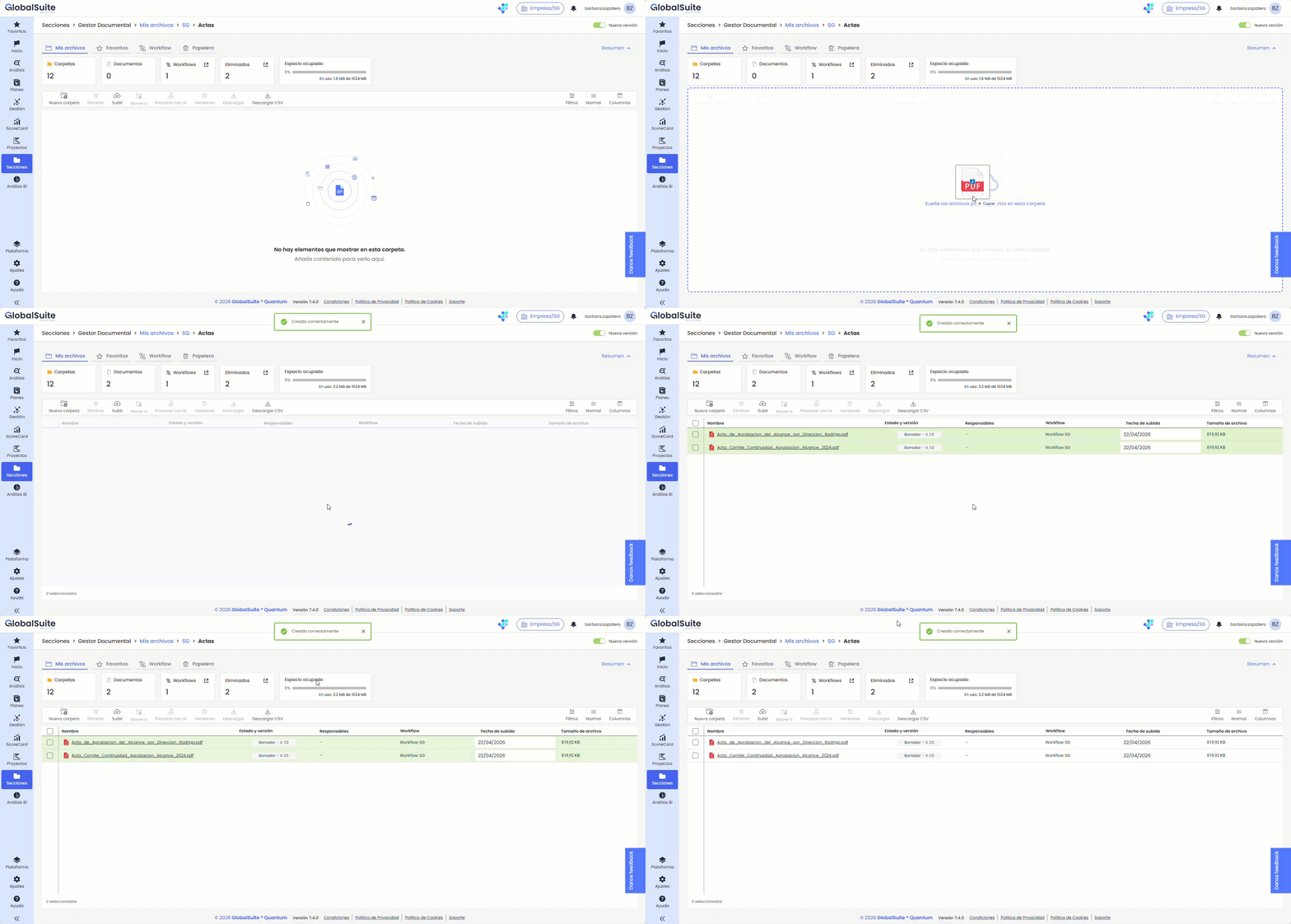
During the process, the system displays a active upload zone that is visually highlighted and indicates to the user when they can drop the files. Additionally, contextual information is provided, such as the name and icon of the file for individual uploads or the total number of files for multiple uploads.
When documents are dropped, the usual validation and workflow association flow (if activated) is automatically executed, maintaining the same behavior as uploading via the “Upload” button.
This functionality is only available in the “My Files” tab and is disabled when filters or active searches are present, ensuring consistency in document management.
Compliance - Detail view of requirements in a side panel
Information consultation in the Compliance module is improved, allowing access to the detail of requirements without losing the evaluation context.
From now on, when selecting a requirement, its information is displayed in a right sidebar panel instead of opening in full screen. This panel maintains a width equivalent to the standard inventory detail and includes a veil over the background content to focus the interaction.
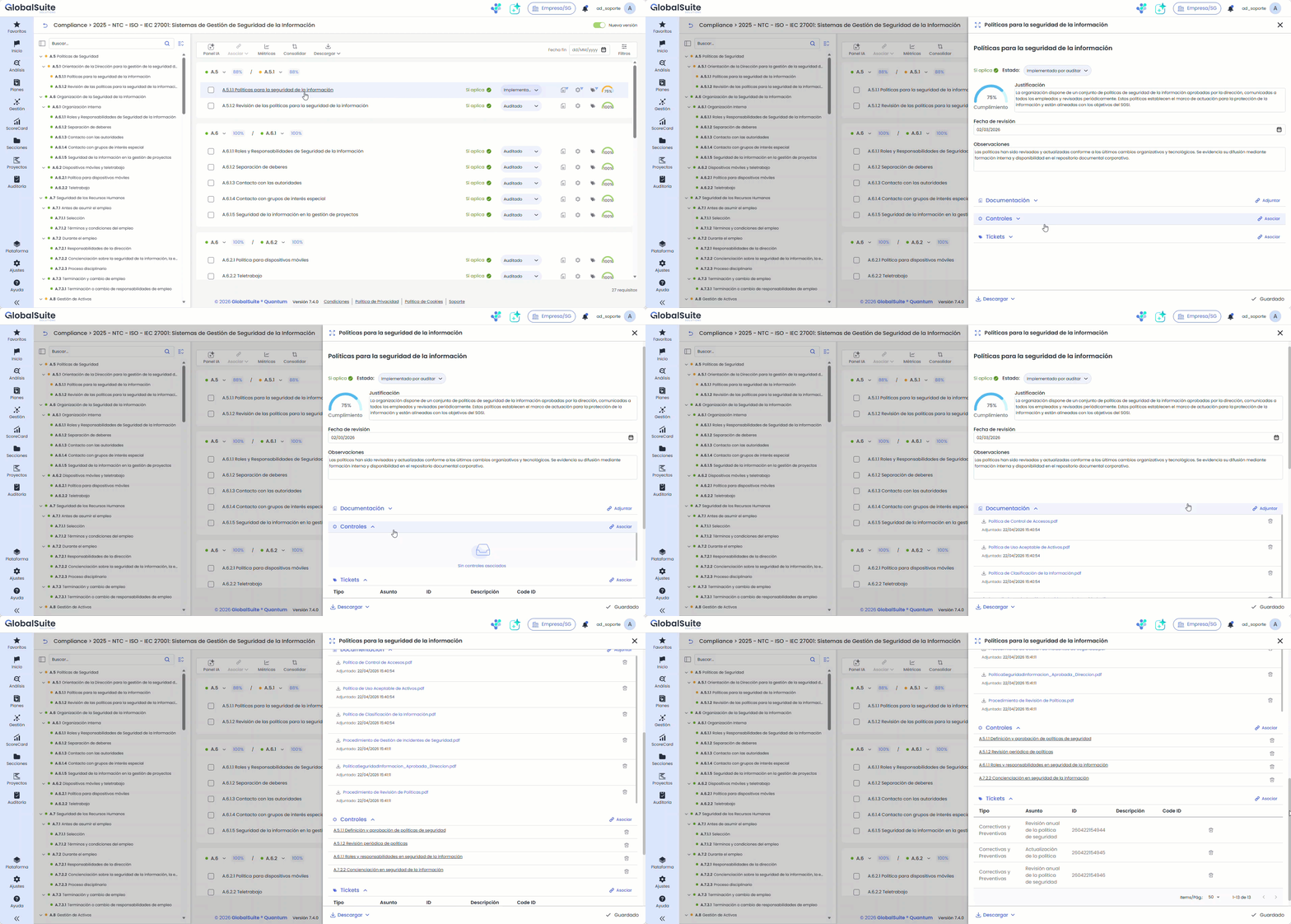
The panel allows expansion to full screen when a broader view is required, hiding other items like the index if visible. Additionally, it can contract back to its initial size or close, restoring the previous screen state.