
New features and improvements in GlobalSuite
Artificial Intelligence in GRC
MCP GlobalSuite: connect GlobalSuite® with your AI assistant
The MCP GlobalSuite connector is introduced, enabling the use of GlobalSuite® with leading artificial intelligence assistants —Claude, ChatGPT, Gemini, Microsoft Copilot, and Cursor— through the open standard Model Context Protocol (MCP). If your organization uses another assistant, we can consider including it in the future.
Until now, answering cross-cutting questions —which critical risks lack controls, which requirements of a regulation have the lowest compliance, which items in the inventory are unassessed— required navigating through multiple views, applying filters, and exporting. With MCP, you can simply ask in natural language: the assistant queries GlobalSuite® using your user credentials and permissions and responds with real data from your management system, in the form of text, tables, graphs, or files.
Key features
-
Natural language queries for Inventory, Risk Analysis, Controls, Compliance, Document Manager, and platform updates.
-
Write actions in Inventory, Risk Analysis, and Controls: creation and modification of items, creation and assessment of risks, controls, actions, and evidence, deletion of risks, and association of controls to risks, always respecting your permissions. Each assistant decides when to ask for confirmation before applying a change.
-
Log in with your GlobalSuite® user via OAuth, using your usual method —username and password, Active Directory or LDAP, or Single Sign-On— and two-factor authentication.
-
Same permissions as on the web: the assistant accesses only the information from your company and management system that your user can view.
-
Sessions that auto-renew: access lasts 60 minutes and renews automatically; after 7 days of inactivity, a new login is required.
-
Ready-to-use results: tables, graphs, Word reports, and Excel sheets, including the completion of import templates and reports.
-
Available for GlobalSuite® Cloud customers.
Benefits
-
Answers in seconds to questions that previously required navigating through multiple screens and exporting data.
-
With the AI you already use: without switching tools or copying information between applications.
-
Security and control: your credentials, your permissions, only the changes you request, and a log of every call to MCP.
-
Less manual work: reports, graphs, and templates generated from real GlobalSuite® data.
AI Agent for Risk Analysis and Assessment
Risk Assessment and Risk Analysis now include the AI Agent, a conversational assistant that responds in natural language about the analysis you have open: which risks are the most critical, which exceed the acceptable level, which controls are still only planned, or which actions should be prioritized. Additionally, it prepares reports in HTML, Word, PowerPoint, and Excel with your organization's corporate branding and applies changes to the analysis when you approve them. It uses the same capabilities as MCP GlobalSuite but is integrated into the platform without needing to connect any external assistant.
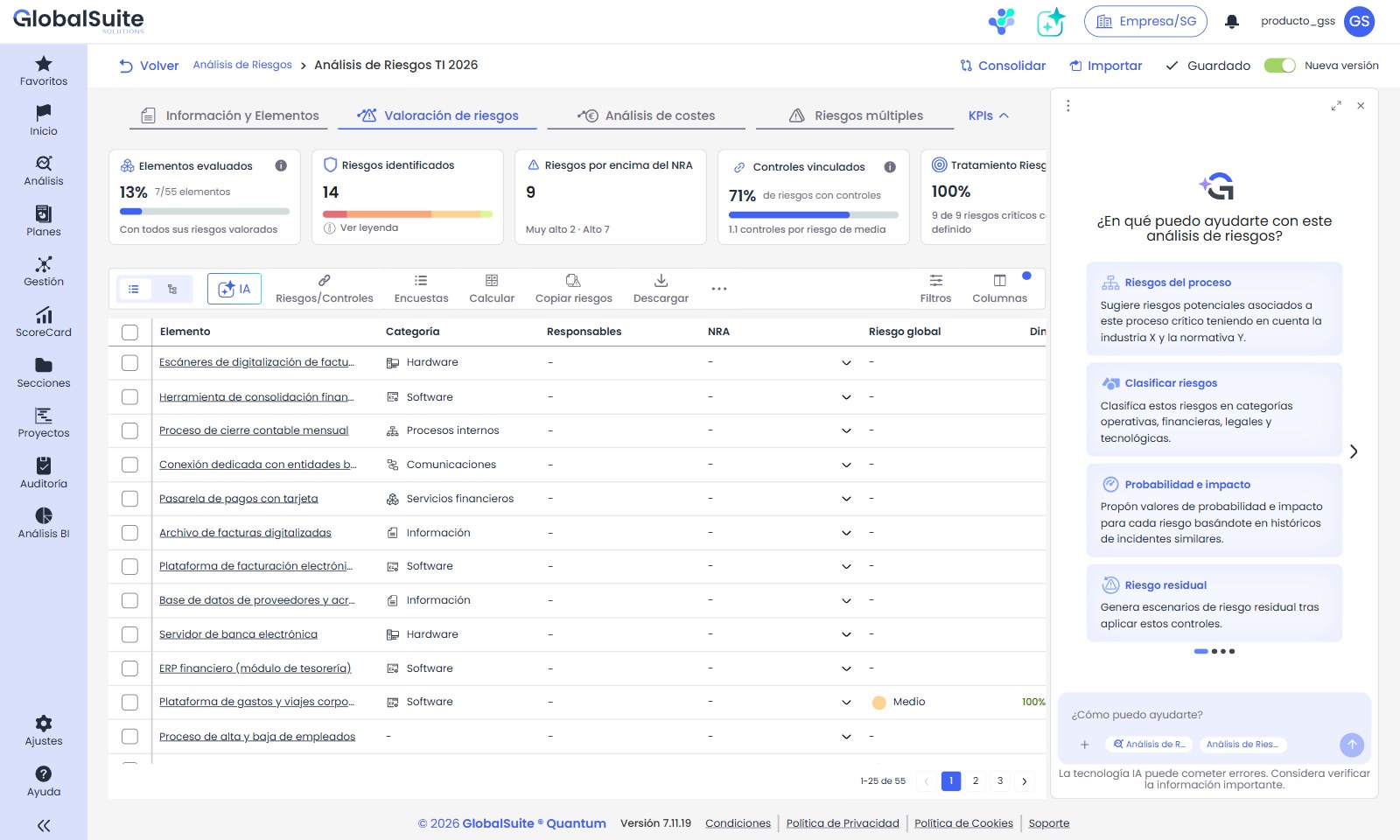
The AI Agent opens in a side panel over the analysis, with suggested queries to get started.
Key features
-
AI Agent action in the Risk Assessment header, across all its tabs, and AI button in the analysis listings and the Risk Assessment tab.
-
Side panel that opens without leaving the analysis and retains the tab and filters. It can be expanded to the full width of the workspace or closed, and the conversation is preserved. With "New conversation," you start from scratch.
-
Automatic context: the agent always works on the open analysis, identified with fixed tags in the writing field.
-
Eight suggested queries in each view —with proposals for changes in Risk Analysis and for queries and reports in Risk Assessment— and free queries about items, risks, controls, and treatment plans, with responses in tables and conclusions that can be copied.
-
Downloadable reports in HTML, Word, PowerPoint, and Excel with analysis data, using the logo and colors configured in Settings ▸ Configuration ▸ General ▸ Customize.
-
Documents attached to the query, from the device or the Document Manager, such as an audit report, to relate them to the risks and controls of the analysis.
-
Changes in the analysis when requested —create items, risks, controls, treatment plans, and actions, assess them, and associate them— that are only applied when you approve them, one by one or all at once.
-
Alerts when data is missing, for example, when controls lack effectiveness assessment, instead of assuming it.
-
Available for all GlobalSuite® Cloud customers with the Risks module, with a monthly quota of 1.5 million tokens per company, like the rest of GlobalSuite® AI agents.
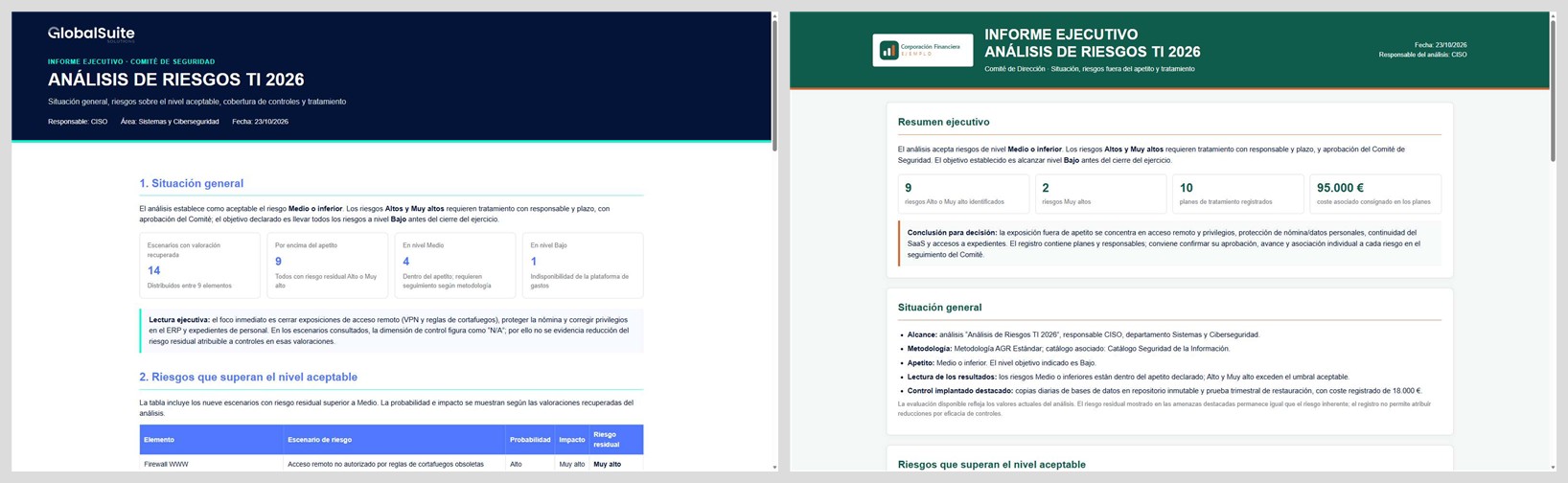
The agent generates the executive report of the analysis with the GlobalSuite® branding or, if configured, with your organization's branding.
Benefits
-
Immediate analysis reading: from the snapshot of results to conclusions, without filters or exports.
-
Reports in minutes: executive summaries, presentations, and listings ready for the committee, with your organization's branding.
-
Without leaving GlobalSuite®: the analysis and conversation, on the same screen.
-
From diagnosis to action: recommendations based on the real risks and plans of the analysis, and changes applied with your approval.
Risk Analysis: new experience for identifying, assessing, and treating risks
Risk Analysis is updated with a clearer and more agile experience to configure each analysis, assess the risks of its items, and manage controls, plans, indicators, and tickets without switching screens, with indicators, filters, and direct editing with auto-save. Additionally, three new features are introduced: Multiple Assessment, to assess several risks at once; Copy Controls, to reuse controls between risks; and Compare Risks, to contrast origin and destination before copying.
Key features
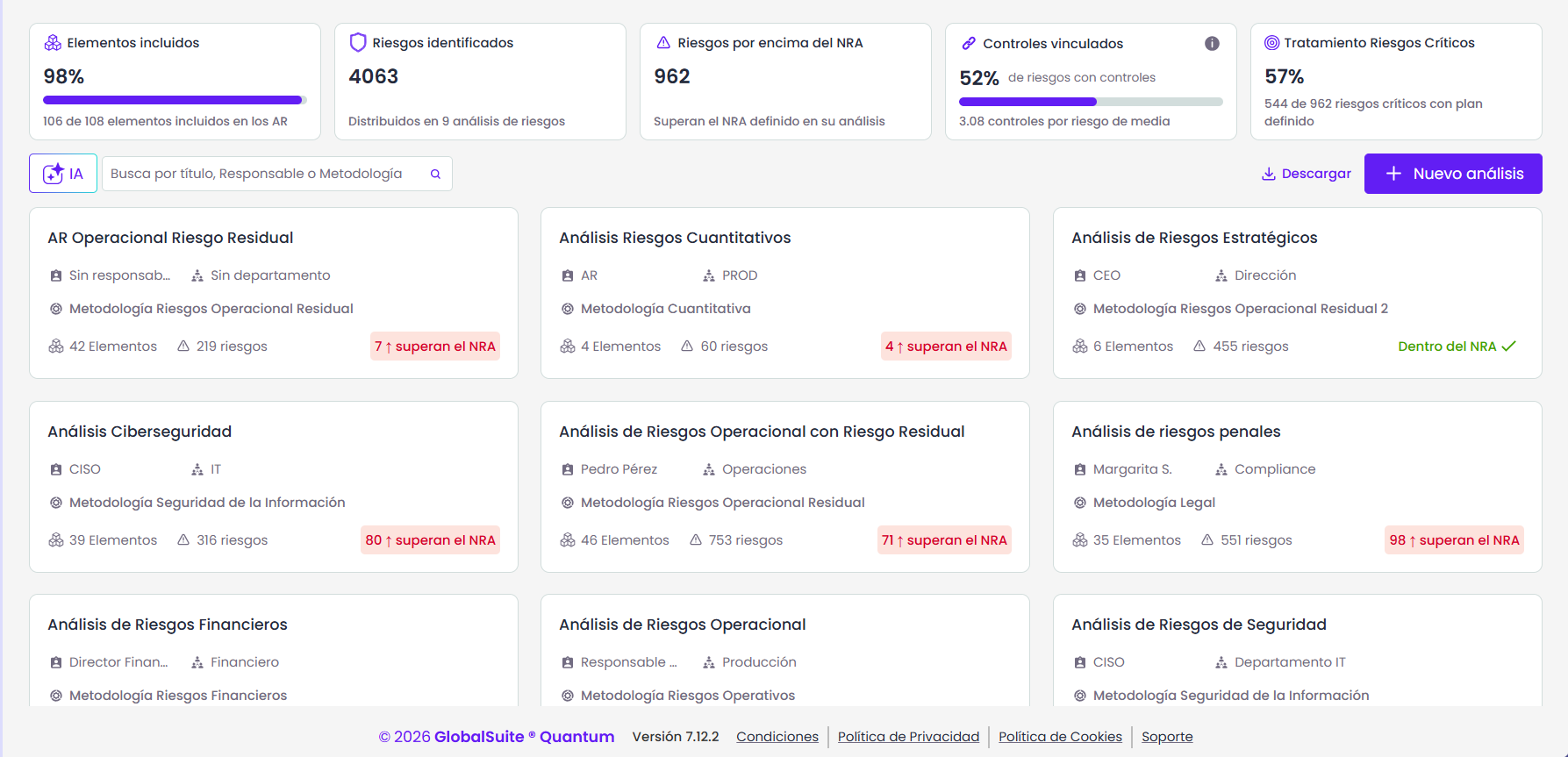
Risk Analysis Panel
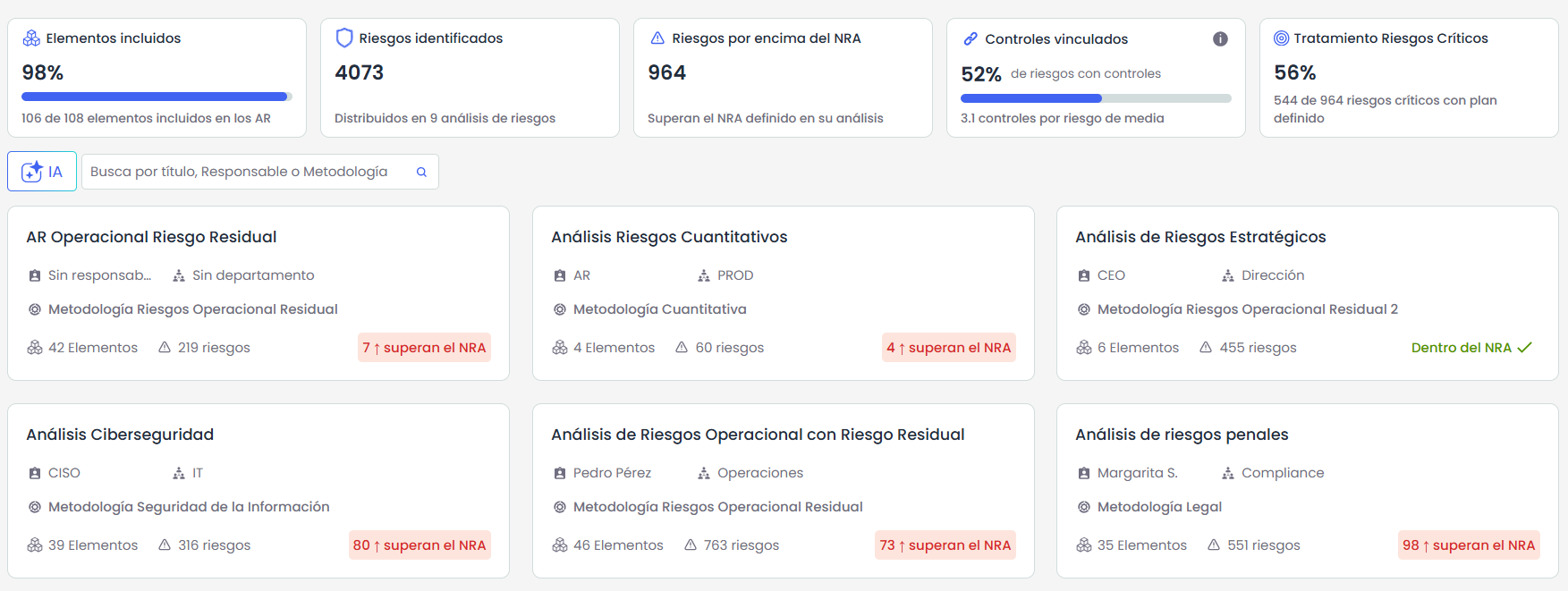
The panel provides a global view with indicators of items, risks, risks above the ARL, linked controls, and critical risk treatment. The status of each analysis regarding the ARL helps to identify at a glance where to act.
It also allows searching by name, responsible party, or methodology, duplicating analyses, and downloading a CSV report with applied filters.
Information and items
-
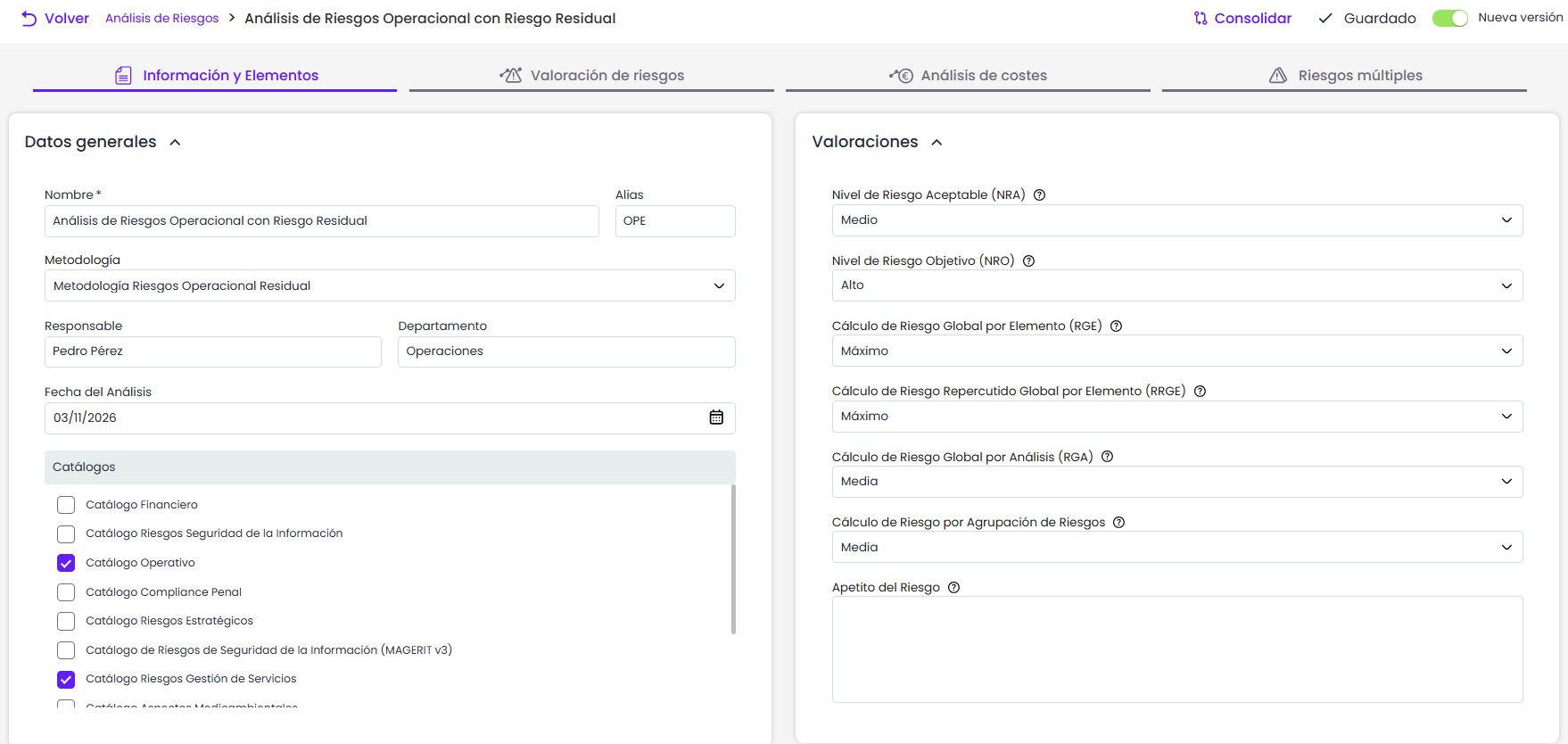
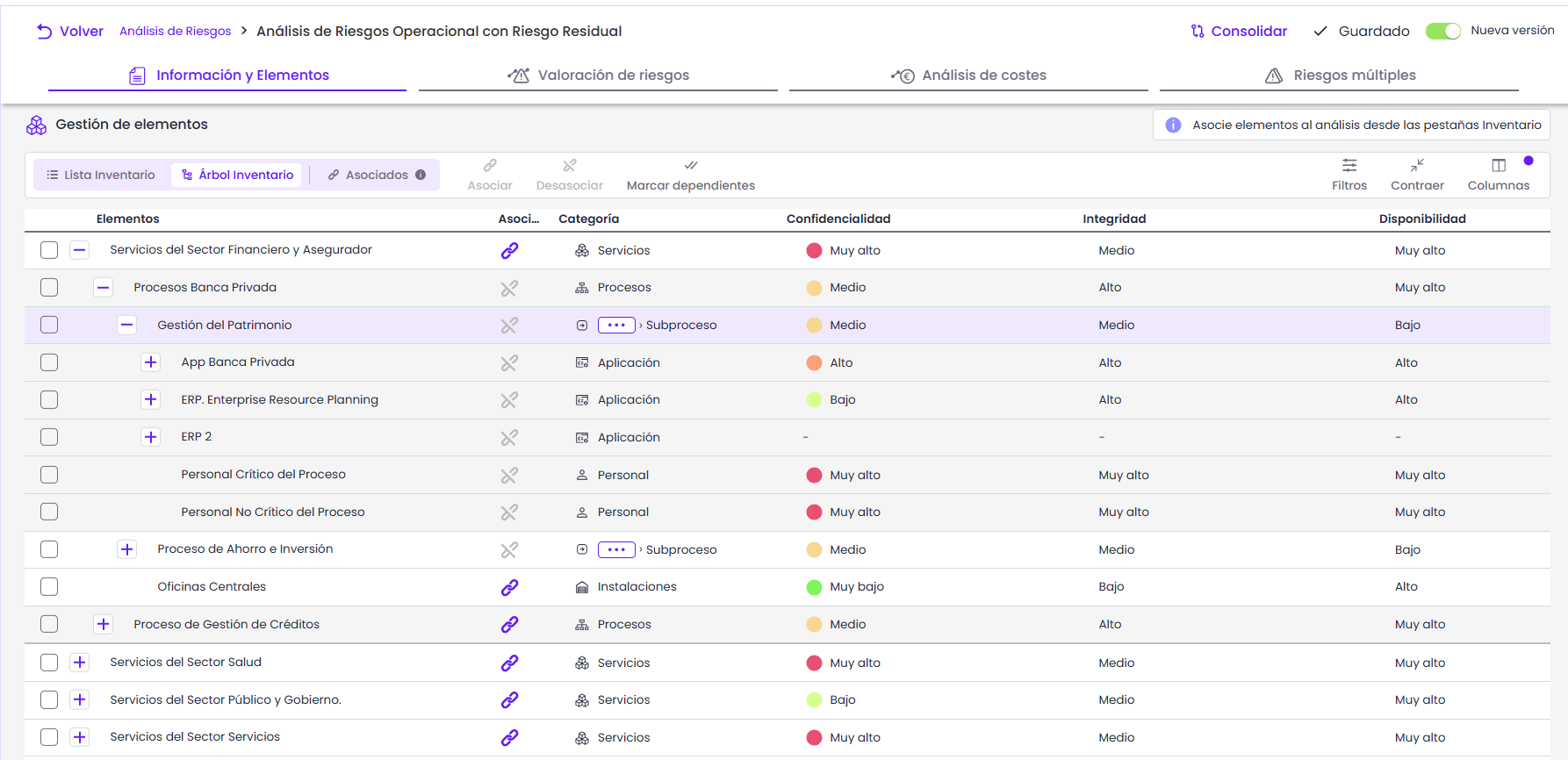
General data, methodology, catalogs, and assessment parameters —ARL, TRL, risk appetite…— are gathered on a single screen, with auto-save and help for each parameter.
-
The scope can be managed in a list, tree, or by showing only associated items, to directly add or remove items from the inventory.
Risk Assessment
-
List and tree views allow consulting the risk level, assessed dimensions, and controls of the items. Progress indicators and filters help identify priorities without reviewing each item individually.
-
The Risks / Controls action streamlines the association of risks and controls from catalogs, allowing it to be applied to selected items or the entire analysis in the background.
-
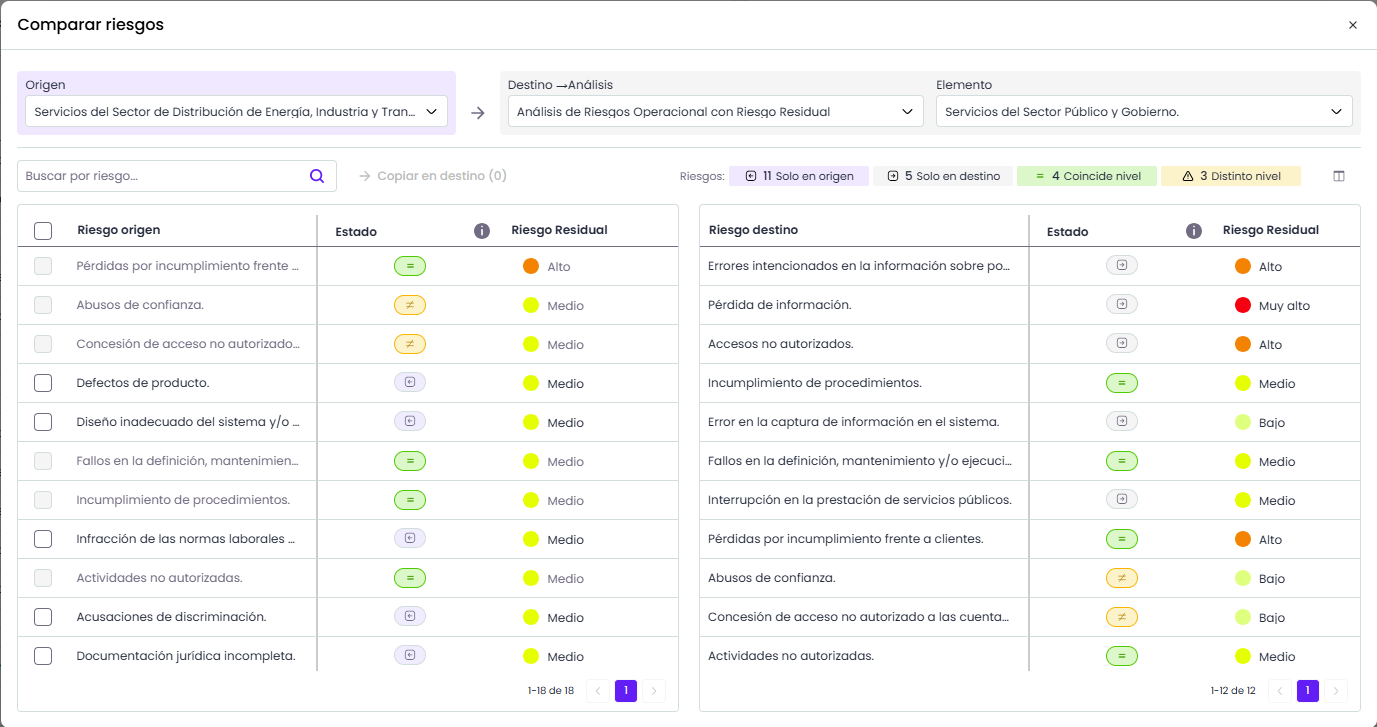
Copy Risks facilitates the reuse of risks between items or analyses. As a new feature, Compare Risks allows reviewing matches, differences, and missing risks in the destination before copying.
-
The options for General assessment, Transferred risks, surveys, calculations, and reports are gathered in the same tab, making it easier to access assessment and analysis tools.
Risks of an item
-
-
The table allows values to be edited directly in the cells, with automatic saving to streamline the assessment. Filters, configurable columns, and CSV downloads facilitate the review and analysis of information.
-
From the same table, risks can be created and deleted, responsible parties can be assigned in bulk, risks can be retrieved from the catalog, and access to the history, tree, and BIA data of the item is available.
-
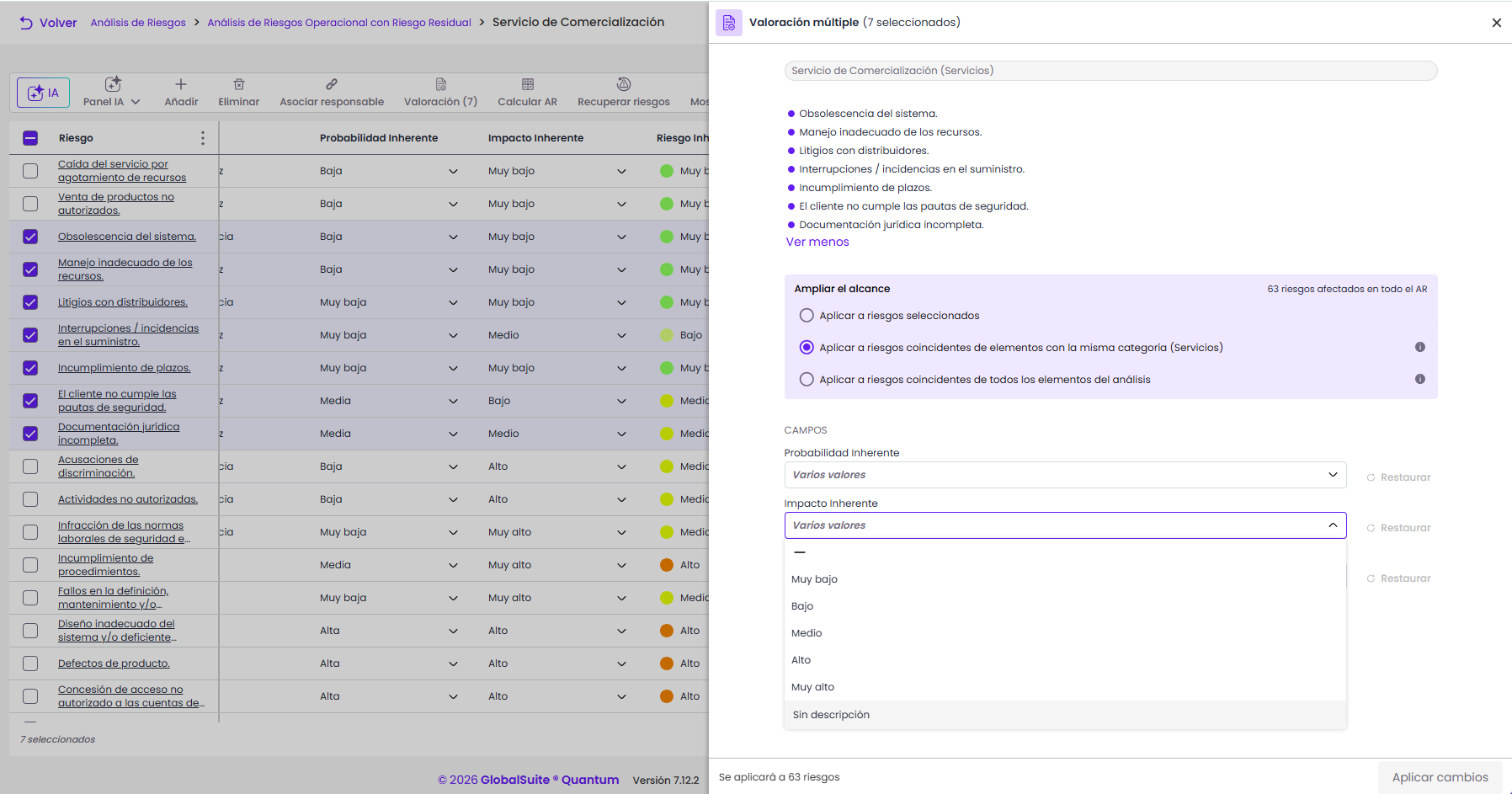
Multiple assessment (new functionality) allows the same assessment to be applied to several risks in a single operation. Its scope can be extended to matching risks of items in the same category or the entire analysis, with the possibility of assigning groupings.
-
Risk detail
-
The side panel gathers the fields and dimensions of the risk, with automatic saving and navigation between risks to facilitate their review. Automatic dimensions include an explanation of their formula, helping to understand how each result is obtained.
-
The tabs for Controls, Treatment plan, Indicators, and Tickets centralize the management of linked records, allowing them to be created, associated, or disassociated directly from the risk.
-
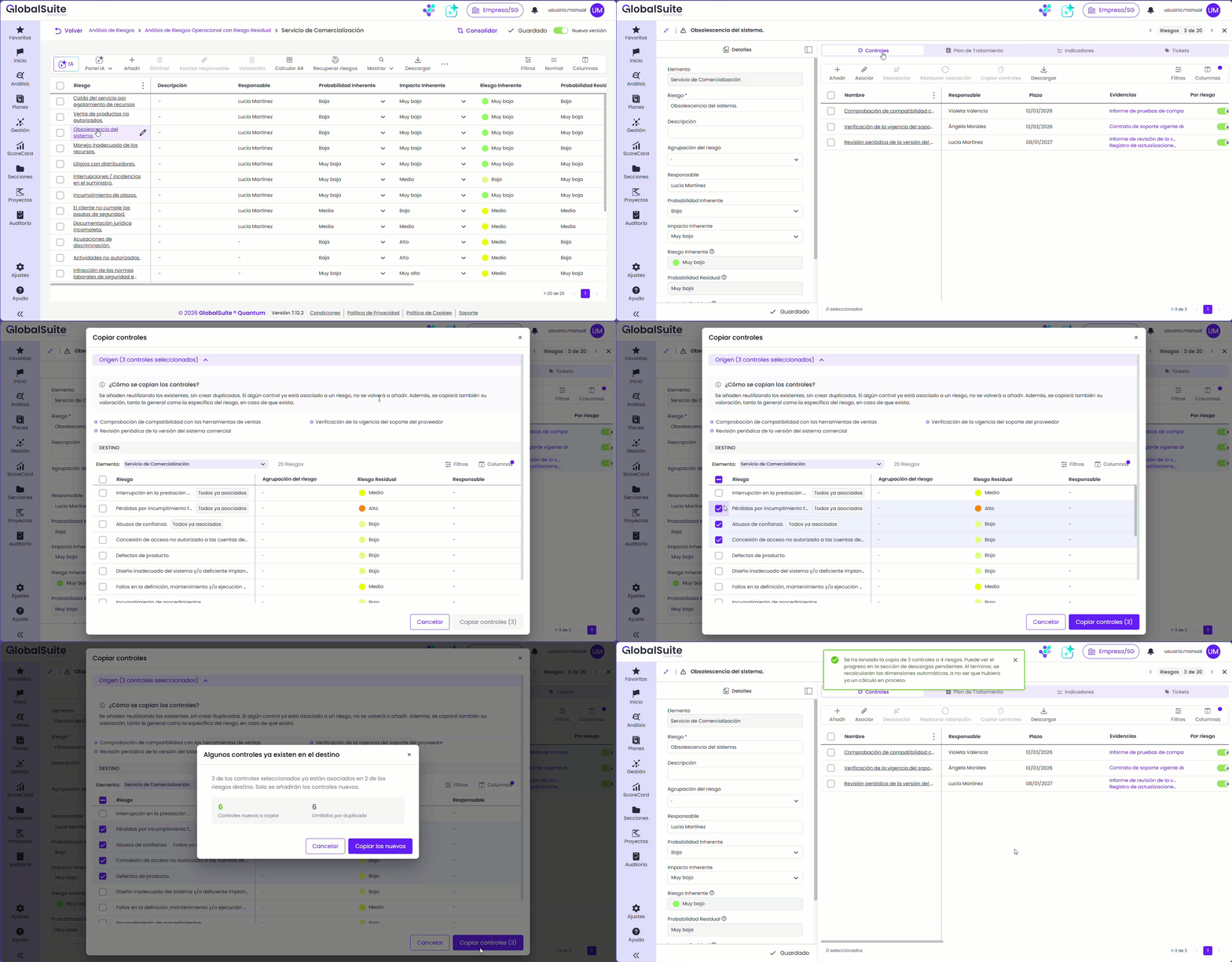
Copy controls (new functionality) allows selected controls to be reused in other risks of the same item or another item in the analysis. The copy retains its assessment and responsible parties and includes duplicate warnings.
Benefits
-
Less repetitive work: assessments, risks, and controls applied to many items in a single operation.
-
Everything in one place: controls, plans, indicators, and tickets managed from the risk, without switching modules.
-
Clear priorities: status against the ARL at each level, from the general panel to the item.
-
Traceability: bulk operations in the background, with tracking in Job progress and logging in action logs.
For more information, you can consult Análisis Riesgos
Risk Assessment: new experience for analyzing and prioritizing risks
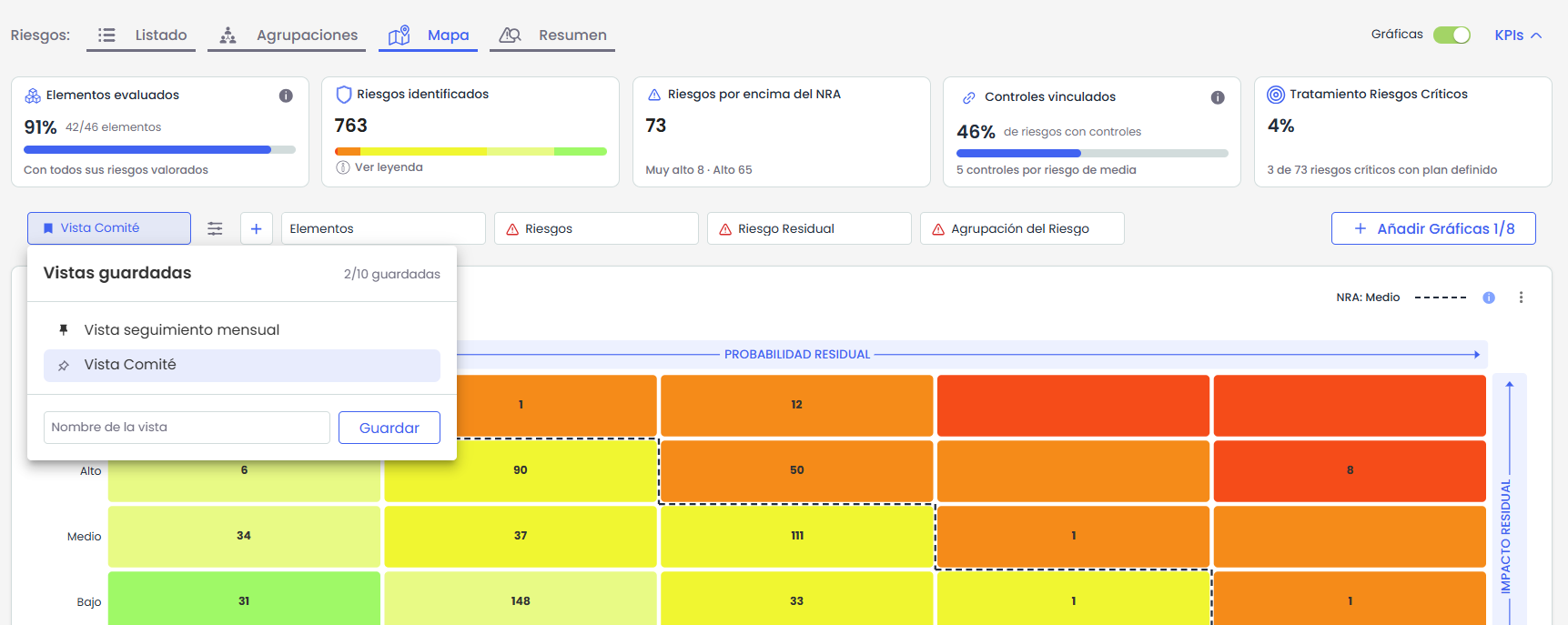
Risk Assessment is renewed with a visual and interactive experience for analyzing and prioritizing risks. The new experience incorporates tracking indicators, interactive graphs, and a new Groupings tab, allowing users to move from a global view to detailed risk insights.
Additionally, the new functionalities Saved views and Add graphs allow users to customize the query and visualization of information according to their needs.
Key features
Home screen and indicators: the status of analyses at a glance
-
Global view of analyses. The home screen gathers aggregated indicators and shows the status of each analysis regarding the ARL, to identify where to focus attention.
-
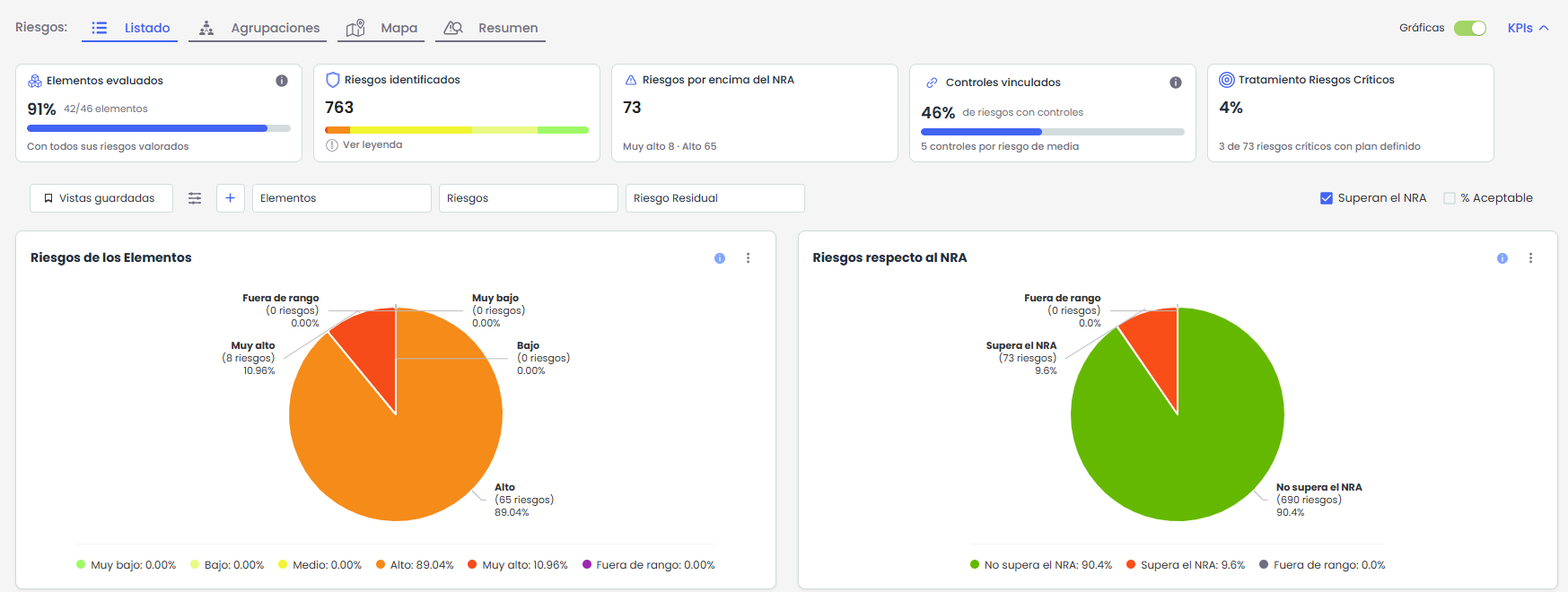
Tracking within each analysis. An indicator strip shows the evaluated items, the distribution of risks by level, the coverage of controls, and the treatment of critical risks.
Risk list: filter, query, and share
-
Graphs connected to the table. The graphs of risks by item and regarding the ARL allow filtering the List by selecting their data.
-
Filters to focus the analysis. Quick filters "Exceed the ARL" and "% Acceptable" are added, along with filters by item, responsible party, grouping, and custom fields.
New Groupings tab: identify where the risk is concentrated
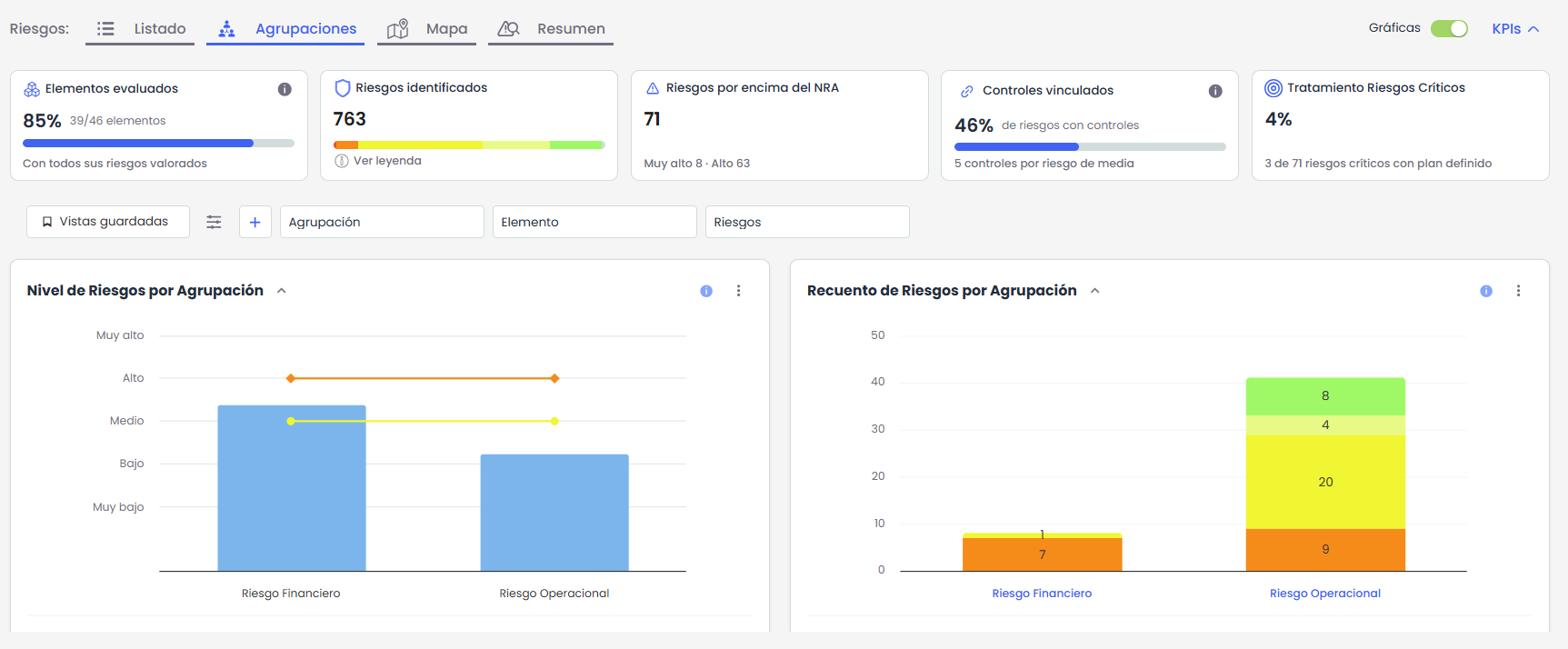
The new Groupings tab allows users to check the risk level of each grouping and explore the risks that explain their results.
-
Comparison against the ARL and TRL. Visualization of the risk level of each grouping, accompanied by the count of risks by level, a heat map, and a scatter plot.
-
Detail of associated risks. A tree of groupings and risks facilitates the query of risks contributing to each result.
Risk map: more options to visualize and explore information
-
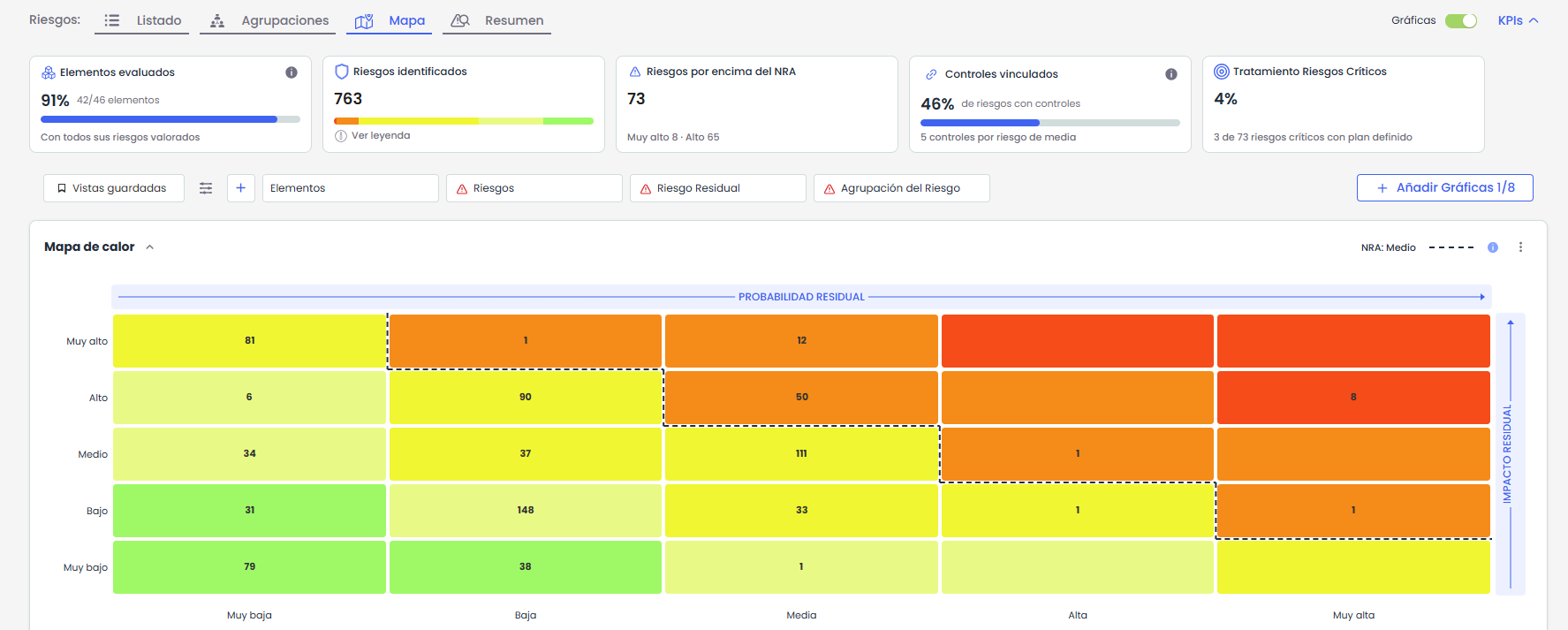
New functionality Add graphs. Allows configuring a dashboard of up to 8 graphs, combining heat maps, bars, bubbles, scatter plots, pie charts, or ranges to analyze risks from different perspectives.
-
Two table views. The classic view organizes information by item. The IRC view —items, risks, and controls— shows their relationships and allows checking the coverage of each risk without switching screens.
Saved views: retrieve the usual configuration
The new functionality Saved views allows users to preserve the filters, columns, and sorting of the List, Groupings, and Map tabs.
Each user can set a default view, which loads automatically upon access. Views are personal and apply only to the user who creates them.
Main benefits
-
Greater clarity for prioritization. Indicators and graphs that facilitate the identification of analyses, items, and groupings requiring attention.
-
A query tailored to each user. Configurable dashboards with custom graphs and personal views to work with relevant information from each analysis.
For more information, you can consult Risk Assessment.
Automations
Automations: surveys automatically directed to the contacts of each provider
The actions Send item survey and Send IRC survey incorporate new dynamic recipients, allowing automatic determination of who should receive each survey based on the item triggering the automation.
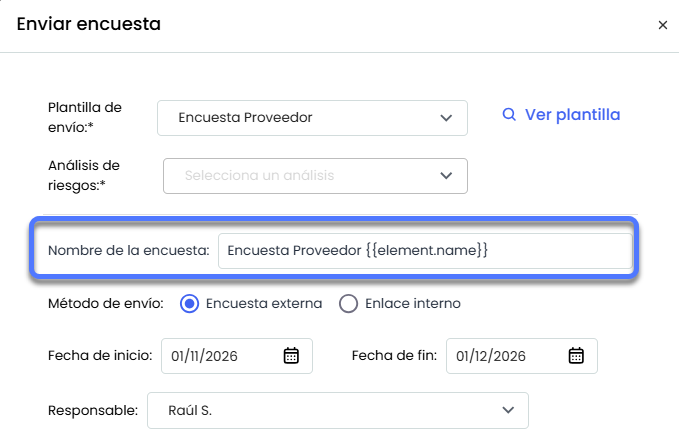
Additionally, it is now possible to use variables in the survey name, making it easier to identify generated surveys. This way, a single rule can manage evaluation campaigns or periodic reviews over large provider inventories, sending each survey to the corresponding contact and identifying it with the provider or item that originated it.
Key features
-
Dynamic recipients in the actions Send item survey and Send IRC survey, with two options available:
-
Provider contact, to send the survey to the contacts defined for receiving surveys of the provider associated with the item. These contacts are configured in the provider's form.
-
Item responsible, to direct it to the employee responsible for the item that triggered the rule.
-
-
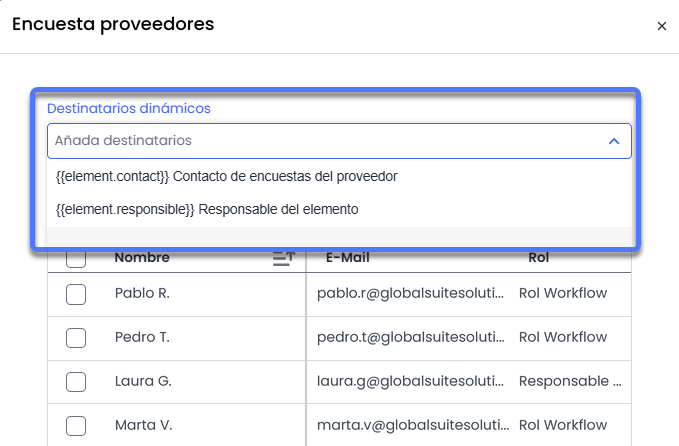
Possibility to combine dynamic and fixed recipients within the same action, including selected employees and manually added email addresses.
-
New column Survey contact in the Contacts/Interlocutors section of the provider's record, from which it is possible to define which contacts will receive surveys generated through Automations.
-
Incorporation of variable in the survey name, including the name of the item that triggered the rule, to facilitate its identification in the survey list.
User benefits
-
A single rule for the entire inventory: allows automating the sending of surveys to multiple providers or items without creating a specific rule for each recipient.
-
Recipients always linked to the item: each execution automatically obtains the corresponding contact or responsible person based on the item that triggered the automation.
-
Surveys easier to identify: the name can include the provider or source item, facilitating its location and tracking.
For more information, you can consult:
Update of Terms of Use of GlobalSuite®
In this version, we have updated the version of Terms of Use of GlobalSuite®:
-
The terms of use for our users have been updated. These terms must be reviewed and accepted upon first access after the update.