
This option allows you to associate the selected controls to multiple risks of an item at once. It reuses existing controls and does not create duplicates, so it is not necessary to associate them risk by risk.
To start the copy, it is necessary to select the controls to copy from the Controls tab of the Risk Detail. Doing so activates Copy Controls, and clicking it opens the Copy Controls window.
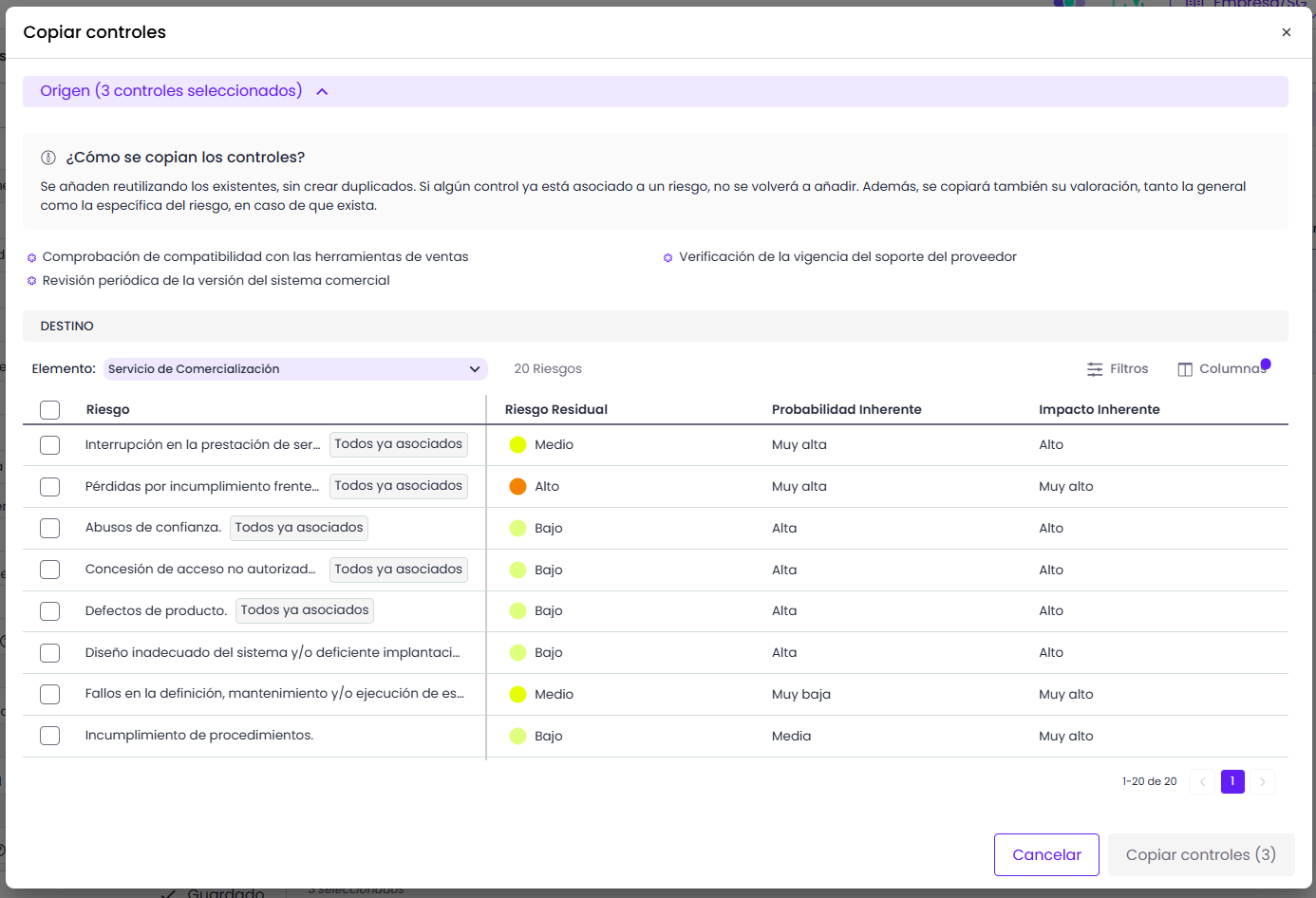
Source Panel
The Source block displays the operating instructions for this option and the selected controls to copy.
Destination Panel
In Choose in Item, select the destination item. The list shows the items of the analysis in alphabetical order and allows searching by any part of their name.
Once the item is selected, all its risks are displayed so you can mark one or several as the destination. The table includes the main field, grouping, main dimension, and the person responsible for each risk, and allows using Filters, configuring Columns, and sorting the information from the headers.
When loading the risks, a label may appear indicating how many of the selected controls are already associated with each risk. If all controls are associated, the label «All already associated» is displayed.
The source risk appears disabled and cannot be selected as the destination.
Copy Controls
When clicking Copy controls (N), if any of the selected controls are already associated with a destination risk, a window opens showing:
-
New controls to copy: number of controls that will be associated with the selected risks.
-
Skipped due to duplication: number of associations that will not be created because they already exist.
To continue with the copy, click Copy the new ones.
The window closes and returns to the Controls tab of the source risk, without selected controls. The copy is executed in the background, and its status can be checked in Job Progress.
The copy creates associations between each selected control and the destination risks that do not yet have them. Existing associations are skipped and not modified. The person responsible for the control in the source risk is also copied.
The control assessment is copied based on the type of evaluation configured in the controls methodology:
-
Global: only the control is copied. The assessment remains as established in Control Management.
-
By risk: the manual dimensions specific to the control are copied. If in the source By risk = Yes, in the destination it is also set to Yes.
-
By item, with destination in the same item: the destination risk takes the assessment that the control has in that item.
-
By item, with destination in another item: only the control is copied, without its assessment. The indicator is set to No.
If at least one new association is created, Calculate RA is initiated as an independent process to recalculate the automatic dimensions. In Job Progress, two processes appear: the copy of controls and the calculation.
If at the end of the copy there is already a calculation process in progress or queued in the company, Calculate RA is not initiated. In this case, the automatic dimensions remain pending until Calculate RA is executed once the ongoing calculation is completed.