
This option displays, for an item, the value of each risk considering the one inherited from its dependent items. This way, the real exposure of the item is known beyond its own assessment.
Accessed from Analysis > Risk Analysis. Within the analysis, in the Risk Assessment tab, select a single item and click Cascading Risks.
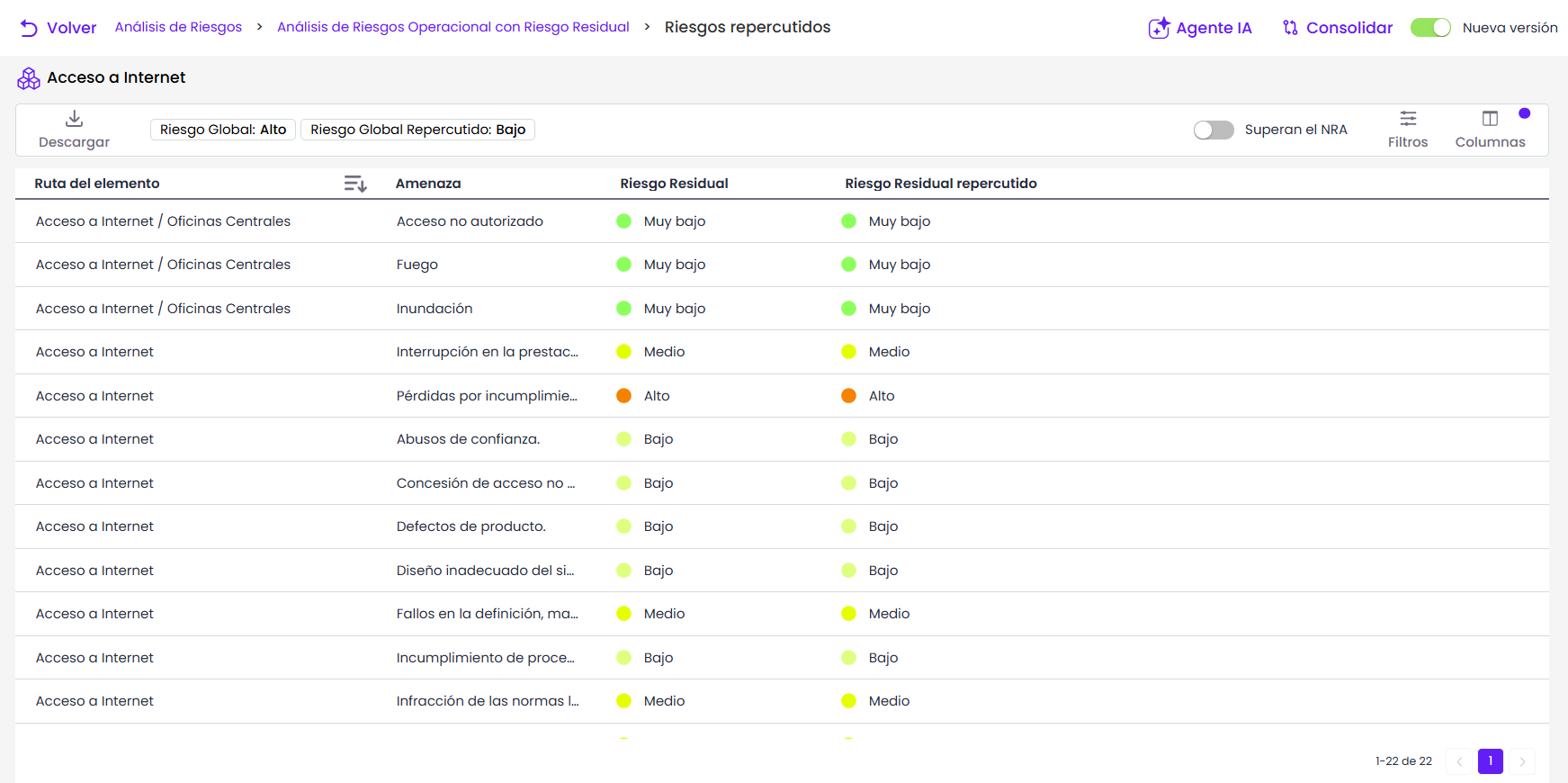
Item indicators
Two read-only indicators are displayed in the top bar:
-
Global Risk: Global Risk of the item, calculated upon entering Risk Assessment.
-
Cascading Global Risk: Result of the last calculation triggered from Calculate in Risk Assessment. Displays "Not calculated" if it has never been calculated.
Cascading Risks Table
The table gathers the risks of the item itself and those of its dependent items, according to the dependency tree in Analysis > Inventory . It is read-only.
-
Item Path: Path in the dependency tree of the item to which the risk belongs, from parent to child. Includes only items that are part of the analysis.
-
Main Configurable Field of the Methodology: Risk name.
-
Main Dimension: Risk value in its item, in the main dimension of the risk methodology. The column is named after that dimension.
-
Cascading Main Dimension: Value after applying the dependency cascade. The column is named after the main dimension followed by "cascading".
The other dimensions of the methodology are hidden and can be displayed from Columns. If a value is not calculated, the cell appears empty.
If the item has no dependencies, the view still displays its risks, and the cascading value matches the direct value.
How the cascading value is calculated
-
The risk of each dependent item is weighted by the percentage of its dependency degree, configured in Dependency Degrees of Item Methodology.
-
If the dependency passes through intermediate items, the percentage is the product of each segment. For example, 60% × 60% = 36%.
-
If an item is reached through multiple paths, the one with the highest percentage is used, and the item appears only once under that path.
-
The risks of the selected item itself are not reduced.
This calculation is independent of the Global Cascading Risk by Item (GRRI): they do not share logic or results.
Available actions
-
Exceed the ARL: Displays only the risks that exceed the Acceptable Risk Level in the main dimension. If the methodology works with ARL by item and the item does not have it defined, the ARL of the analysis is used. If that does not exist either, it is considered 0, and all risks exceed it.
-
Filters: Allow filtering by any column. In Item Path, paths are displayed without the main item, for example "…/Mobile Telephony".
-
Columns: Allows showing, hiding, and reordering columns.
-
Download: Downloads the table in CSV format, with applied filters and visible columns.