
The General Assessment allows assessing the same risk across multiple items in the analysis at once, avoiding repetitive assessment item by item.
Access it from Analysis > Risk Analysis. Within the analysis, in the Risk Assessment tab, click the … menu and select General Assessment.
To use the general assessment, the analysis must meet at least one of these conditions:
-
The risk methodology has a configurable field with Catalog Equivalence, configured in Settings > Methodologies > Risks ( Risk Methodology).
-
The analysis has catalogs associated in Information and Items
If none of these conditions are met, the option does not open and an error message is displayed.
Tabs
The general assessment is organized into tabs. Each tab determines the criteria used to identify the risks to which the assessment will be applied.
-
Main field of the methodology, for example Risk or Threat: applies the assessment to risks that have the same value in that field within the items of the indicated categories.
-
Second field of the methodology, for example Vulnerability: works the same way, using that field as the matching criterion. It is only displayed if the field has Catalog Equivalence configured.
-
Risk grouping: applies the assessment to risks belonging to each grouping. It is only displayed if the analysis has associated catalogs.
The names of the tabs corresponding to the fields depend on the configured methodology and may vary between analyses.
Assessment Table
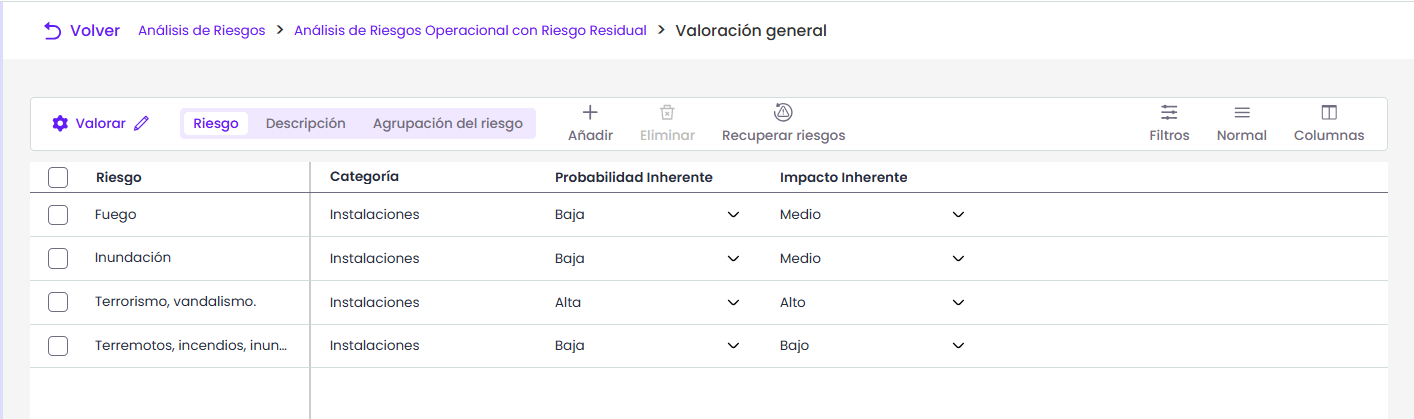
The table contains the records that will be used to apply the assessment and the manual dimensions of the risk methodology.
The columns depend on the selected tab:
-
In the tabs corresponding to fields of the methodology, the field that names the tab, Category, and the manual dimensions are displayed.
-
In Risk grouping, Risk grouping and the manual dimensions are displayed.
The values of the dimensions are entered or selected directly in their cells.
In the tabs corresponding to fields of the methodology, clicking the Category of a record opens a window that allows selecting the categories of items to which it will be applied. A single record can include multiple categories.
The table has the following options:
-
Filters: allows filtering records by the available columns.
-
Columns: allows showing, hiding, and reordering columns. The column corresponding to the tab field remains fixed.
If the table is empty, it is necessary to add or retrieve records before performing the assessment.
Actions
-
Retrieve risks: allows incorporating existing risks into the table From the Catalog or From the Analysis. It is only available in the first tab.
-
From the Catalog: opens the Add from Catalog window with the catalogs associated with the analysis. Risks are grouped by category, and subcategories are displayed as branches. The table includes the columns Risk and Catalog.
-
From the Analysis: opens the Add from Analysis window with the risks incorporated into the analysis outside of the catalogs. The table includes the columns Risk and Category.
-
-
Add: allows creating a new record by entering its name. It is available in all tabs except Risk grouping.
-
Delete: allows removing selected records from the table. It is available in all tabs except Risk grouping.
-
Assess: opens the Assessment Configuration panel to apply the record values to the corresponding risks.
Apply the Assessment
The assessment is applied to the selected records or, if none are selected, to all records in the table.
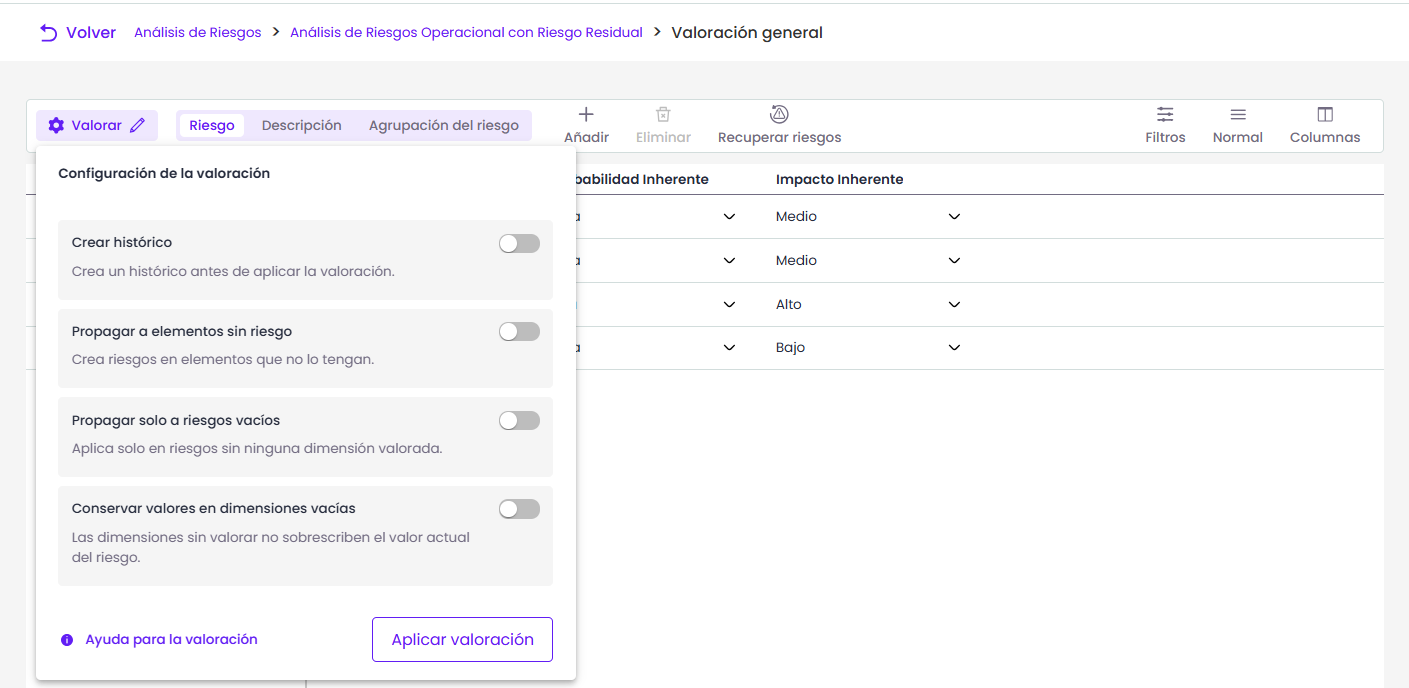
Clicking Assess opens the Assessment Configuration panel, where you can define how the changes will be applied:
-
Create history: saves a history of the analysis before applying the assessment.
-
Propagate to items without risk: creates the risk in the items of the indicated categories that do not yet have it.
-
Propagate only to empty risks: applies the assessment only to risks that do not have any manual dimension assessed.
-
Preserve values in empty dimensions: prevents dimensions without values from overwriting existing values in the risks.
The options can be combined.
If none are activated, the assessment is applied to all matching risks and overwrites their current values.
The matching depends on the tab:
-
Main field: applies to risks that have the same value in that field and belong to items of the indicated categories.
-
Second field: applies to risks that have the same value in that field and belong to items of the indicated categories.
-
Risk grouping: applies to risks that belong to that grouping.
The assessment does not modify risks of items whose category does not match the one configured in the record.