
Answers to the most common questions about MCP GlobalSuite: which assistants you can use, how sessions and permissions work, what limits it has, and how to disconnect it.
Assistants, availability, and licenses
Which AI assistants can I connect?
MCP GlobalSuite is compatible with assistants that support remote MCP servers with OAuth authentication:
|
Assistant |
Plans or products |
|
Claude |
Plans with custom connectors (Pro, Max, Team, and Enterprise), on web, desktop, and mobile. |
|
ChatGPT |
Plus, Pro, Business, Enterprise, and Edu, with developer mode enabled. |
|
Gemini |
Gemini Enterprise. |
|
Microsoft Copilot |
Microsoft 365 Copilot and Copilot Studio. |
|
Cursor |
Cursor Editor. |
If your organization uses another AI assistant, discuss it with your GlobalSuite® account manager: we can consider including it in the future.
The steps for each are in the Installation and Configuration Guide .
Does it have a cost? Do I need an additional license?
MCP GlobalSuite is included for GlobalSuite® Cloud customers, without an additional license. The use of the AI assistant is governed by the plan you have contracted with its provider.
Is it available for OnPremise installations?
No. MCP GlobalSuite is only available on GlobalSuite® Cloud.
What is the difference between MCP and the GlobalSuite® AI Agent?
MCP connects GlobalSuite® with the AI assistant of your choice (Claude, ChatGPT, Gemini, Microsoft Copilot, or Cursor) and you use it from that assistant. The Risk Analysis and Assessment AI Agent is integrated into GlobalSuite® and uses the same capabilities, both for queries and making changes, without leaving the platform or connecting any external service. In the AI Agent, each change appears on a card and is only applied when you approve it, one by one or all at once. It is available for all GlobalSuite® Cloud customers with the Risk module, with a quota of 1.5 million tokens per month per company.
Access, sessions, and permissions
What information can the assistant see?
Exactly the same as your user on the web: MCP works with your permissions, in your company and your management system. It does not provide access to anything you cannot already see in GlobalSuite®.
What can the assistant modify?
In Inventory, Risk Analysis, and Controls, it can create and update information —for example, add items, assess risks, or associate controls— always with your permissions. Compliance and the Document Manager are, for now, read-only.
Confirmation before each change is requested by your assistant, not GlobalSuite®, and each does it in its own way. ChatGPT displays a card "Allow ChatGPT to use GlobalSuite?" before some actions, such as modifying an item, removing it from an analysis, or deleting it, but not in all cases. Claude depends on the permission mode you choose: it can ask for permission for each tool or act without asking. Therefore, we recommend first requesting a proposal and applying it after reviewing it. You can find examples in Use Cases and Prompt Examples.
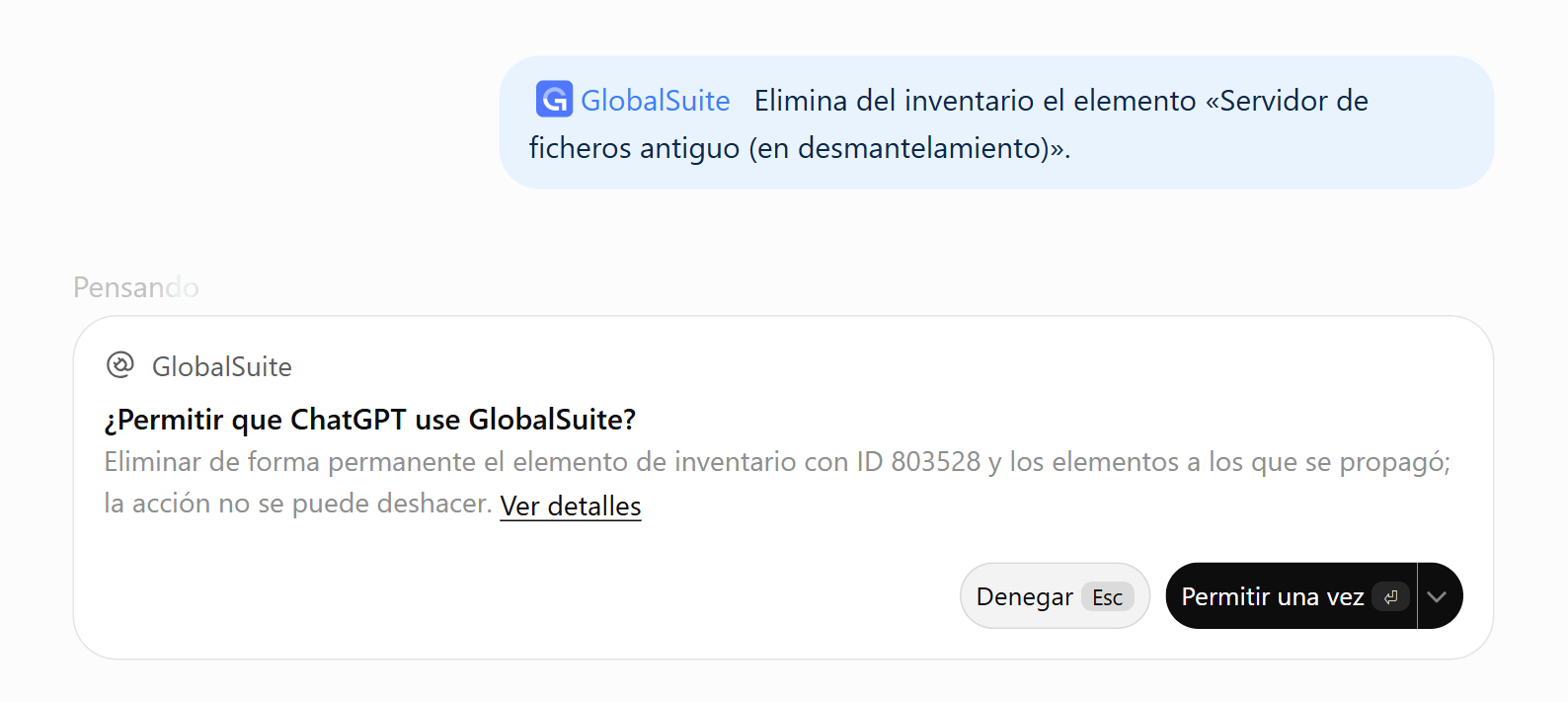
ChatGPT confirmation card before deletion · demo environment
View Claude's permission notice
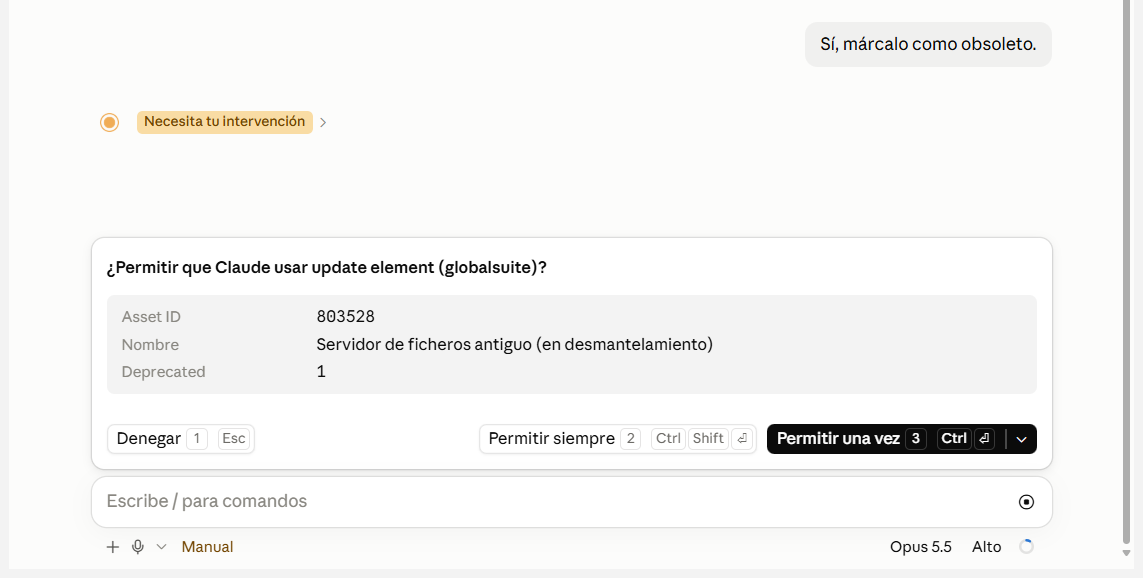
Claude's permission notice before modification · demo environment
Does it work with users who access multiple companies or sub-entities?
MCP connects with the company and management system to which your user belongs. Soon, you will be able to switch between companies or management systems from the assistant.
Can I use it if my organization logs in with SSO?
Yes. MCP's login screen supports the same methods as the web: username and password, Active Directory or LDAP, and Single Sign-On, with two-factor authentication if enabled.
Do I need to have GlobalSuite® open in the browser to use it from the chat?
No. You only log in once when connecting MCP. After that, the assistant uses that access even if GlobalSuite® is not open.
What happens when the access token expires?
Nothing you need to do: access lasts 60 minutes, and the assistant renews it automatically while in use. If the connector is unused for more than 7 days, the next time it will ask you to log in again.
If I change my password, do I need to reconnect?
Not immediately: MCP continues to work until the connector token expires. After that, your assistant will ask you to reconnect and log in with the new password.
If my user is deactivated, does it stop working?
Yes. Each time access is renewed, GlobalSuite® checks that the user, company license, and management system are still active. If the user has been deactivated, the assistant will no longer be able to access the platform, at the latest during the next access renewal (60 minutes).
How do I disconnect MCP or prevent it from being used from the chat?
You can disconnect it at any time from your assistant's connector settings or disable it only in a conversation. In corporate accounts, Claude and ChatGPT administrators can limit which connectors are allowed in the organization. The steps are in the guide, in the "Disconnect MCP" section.
MCP cannot be blocked for an entire company: to cut off a user's access, deactivate or remove them in GlobalSuite®.
Limits and data volume
Are there usage limits?
MCP GlobalSuite does not limit the volume of data you can query based on your license. It applies a security limit of 180 requests per minute: if you exceed it, the assistant will notify you, and you can try again after a few seconds. Additionally, each assistant has its own usage limits based on your plan.
Is the research mode essential for querying large volumes of data?
It is not essential, but it is recommended. GlobalSuite® delivers results in pages, and in a normal chat, the assistant may respond with the first page without reviewing the rest. Your assistant's research mode (e.g., Research in Claude or Deep Research in ChatGPT) performs many more queries before responding and goes through all the information. If you don't use it, ask the assistant to review all pages or narrow down the question.
Data, privacy, and security
Where is my data processed?
The information queried by the assistant leaves GlobalSuite® for the AI provider you use and is processed in their service, according to the terms and configuration of your account with that provider. GlobalSuite® only delivers the information your user can see and that the assistant requests to respond to you.
Are my data used to train AI models?
GlobalSuite® does not use your data to train models. The use by the AI provider depends on their policy and your plan: generally, enterprise plans do not use your conversations for training, but it is advisable to review your account's privacy settings.
Is there a record of what the assistant queries?
Yes. GlobalSuite® logs every call to MCP: the tool used, the user, the company and management system, the assistant from which it was made, the parameters, the result, and the duration. This log is used to review MCP usage and analyze incidents.
The log is retained for 2 years and does not store the content of your questions or the assistant's responses.
Can MCP see information from other companies or other users?
No. Each access is tied to a specific user and their company and management system, and GlobalSuite® validates permissions for each query.
Other questions
Why does the assistant say it can't find an analysis or document?
Usually because the name does not match or because your user does not have access. Write the name exactly as it appears in GlobalSuite®. Note that documents in the Document Manager are searched by file name, not by content.
Will the connector be in Claude and ChatGPT directories?
It is planned. For now, it is added as a custom connector with the address of your environment, as explained in the installation guide.
Note: if your question is not listed here, check the legal notice and terms of use or contact GlobalSuite® Support.